
On this page
Python Strings: Convert, Clean, Find and Format
Strings are the data type you touch most often in Python: user input, file contents, web pages and CSV rows all arrive as text. They are easy to underestimate, because a Python string is immutable — no method changes it in place; every operation returns a new string. This page organises all 115 DelftStack string guides by the job you are doing, along four task lines: convert text to other types and back, clean away characters that do not belong, find and check what a string contains, and format or replace text for output.
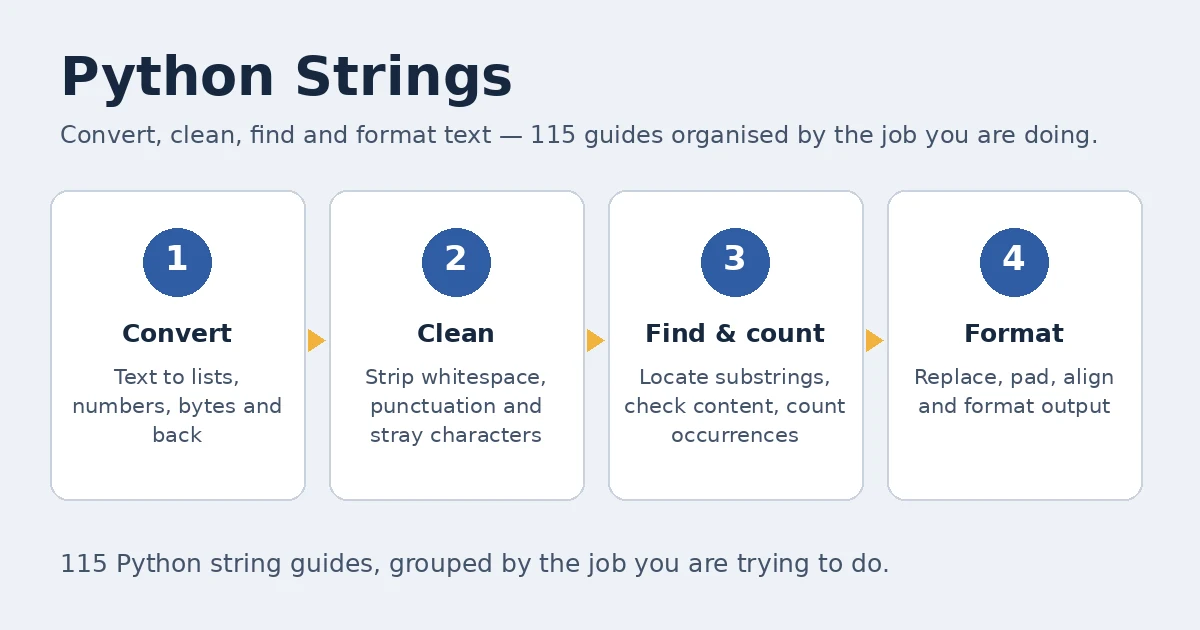
The String Learning Path
Start with five minutes of basics: how strings are built, indexed and sliced, and why immutability means you always keep the return value. Next, learn to search and clean — find(), the in operator, strip() and replace() handle most daily text work. Then move to conversion, where strings trade places with lists, numbers, dictionaries and bytes. Finish with formatting and replacement, where f-strings are the default and the older styles appear only where they still earn their place. Each step below is one group on this page, in the order to learn them.
Five-Minute Basics: Build, Join and Repeat
A string is a sequence of characters in single or double quotes; triple quotes span lines, and indexing plus slicing read any part of it. Two facts do most of the work: len() measures a string, and building a longer one always produces a new value.
- How to Repeat String N Times in Python — Multiplies with
*for a fixed number of copies, then repeats and slices to hit an exact target length, validating empty sources and negative lengths. - How to Copy String in Python — Six duplication routes — empty-string concatenation, full slicing,
str(),%,format()and f-strings — after explaining why immutability makes both variables share one value. - How to Create a Multi Line String in Python — Triple quotes for true multi-line text, backslash and parenthesised concatenation for one logical line, and
textwrap.fill()for fixed-width output. - How to Append One String to Another in Python —
+versusstr.join();join()wins for many pieces because each+builds a fresh intermediate string.
Convert: Strings to Lists, Numbers and Back
Conversion is where string work earns its keep: data arrives as text and is used as something else. Lists are the busiest doorway, numbers the next; containers flatten with str() or join(), and bytes cross over only through explicit encodings. One neighbour lives elsewhere: turning a datetime into a string belongs to the Datetime guides — see Convert Datetime to String and the Datetime section of the Python pillar.
- How to Convert a String to List in Python — Flagship guide:
list()for characters,split()for words and fields,ast.literal_eval()for literal text — nevereval()on untrusted input. - How to Convert Tuple to String in Python —
str()keeps the tuple’s structure,join()gives a clean separated result, and astr()-per-item generator handles mixed types. - How to Convert Dictionary to String in Python — Four routes: a hand-built loop,
str(),json.dumps()for interchange, andpprint.pformat()for readable nesting. - tostring() Equivalent in Python — Python has no
toString(): usestr()for one value,join()for many, f-strings for messages,__str__()for your own classes. - How to Convert List of Strings to Integer in Python — The same conversion four ways: comprehension,
map(int, ...), an explicit loop, and NumPy for large datasets. - How to Convert Bytearray to String in Python — Shows why
bytes()leaves ab'...'repr behind, and whybytearray.decode()returns the actual text. - How to Convert a String to Binary in Python — Separates code-point binary via
ord()from encoded-byte binary viabytearray()with08bpadding. - How to Convert String to Boolean in Python — Starts with the trap —
bool("False")isTrue— then builds an explicit token parser that raises on unknown spellings.
Clean and Delete: Remove What Does Not Belong
Cleaning is this cluster’s home turf: scraped pages, exports and user input arrive with characters that were never invited. Choose by the shape of the dirt: replace() for one known substring, translate() with a table for a whole set of characters at once, and regex when dirt is a pattern, not a literal.
- Ways to Remove xa0 From a String in Python — Two attacks on the invisible non-breaking space:
unicodedata.normalize("NFKD", ...)decomposition and a directreplace("\xa0", " "). - How to Remove Commas From String in Python —
replace(",", "")for every comma, thecountargument for just the first,re.sub()for pattern work. - How to Strip Punctuation From a String in Python — The full toolkit: a
string.punctuationfilter, the regex[^\w\s]substitution, and a faststr.translate()table frommaketrans(). - How to Remove Quotes From String in Python —
replace()clears quotes everywhere;strip('"')trims only the surrounding pair, leaving interior quotes untouched. - How to Remove Special Characters From the String in Python — Defines “special” first, then applies an
isalnum()filter, atranslate()set, or an ASCII-only regex. - How to Remove \n From the String in Python —
replace()for newlines,split()plusjoin()to rejoin lines with single spaces, regex for mixed whitespace. - How to Remove the Last Character From String in Python — Slicing does it:
s[:-1]drops the last character and negative indexing generalises to the last three.
Find, Check and Count
Finding is the cluster’s biggest unmet demand: readers know the character they want and need its position, its count, or a yes-or-no answer. Keep the division of labour straight — in answers whether, find() answers where first, index() answers where and complains loudly when there is no match, and count() answers how many.
- How to Find Character in a String in Python —
find()for the first match,rfind()for the last,index()when absence should raise, and anenumerate()loop for every index. - How to Count Character Occurrences in a Python String —
str.count()for one character and its non-overlapping substring rule;collections.Counterwhen every character needs counting. - How to Check if a String Contains Word in Python —
infor the plain test, noting"is" in "This"is true; a\bword-boundary regex when a whole word matters. - How to Check Variable Is String or Not in Python —
isinstance(value, str)as the default, the strictertype()comparison that misses subclasses, and try-except variants. - if Statement With Strings in Python — Conditions from
==,inmembership and case-normalised comparison;istests identity, not text. - How to Find All Substring Occurrences in Python String —
count()with bounds for a quick total, and astartswith()comprehension returning every index.
Case, Comparison and Padding
Case is where comparisons quietly go wrong: Python compares by Unicode code point, so case and special letters all count. Normalise before comparing — lower() or upper() for ordinary text, casefold() when Unicode pairs must match — and pad with ljust(), rjust(), center() or zfill() for presentation.
- How to Compare Strings Without Case Sensitivity in Python — Normalises both sides with
lower()orupper(), then makes the Unicode case forcasefold(), which equatesstraßeandSTRASSE. - How to Pad String With Spaces in Python — The full bench:
ljust(),rjust(),center()with fill characters, plus%,format()and f-string equivalents for aligned output. - How to Compare Strings in Python — The operator reference:
==and!=for equality,<and>for lexicographic order decided by the first differing code point. - How to Compare Two Strings Character by Character in Python — Pairs characters with
zip()and counts matching positions, handlingNoneinputs and unequal lengths explicitly.
Format and Replace
For new code, formatting means f-strings: values sit inside the template where you can read them, and format specs control width and precision. str.format() remains right when the template lives separately or is reused, and % formatting survives in older code you will still meet. Replacement obeys immutability like everything else — you never edit a string, you build the corrected one.
- How to Replace Character in a String in Python — List-and-assign by index, slicing around a known position, or
replace()for every match — each returning a new string. - Difference Between %s and %d in Python String Formatting —
%saccepts any value viastr()conversion;%ddemands an integer and truncates floats — the legacy distinction behind most surprises. - The sprintf() Function in Python — Python has no
sprintf(); the job maps onto the%operator,format(), f-strings, or a hand-rolled wrapper. - How to Replace Character in String at Index in Python — The
Meatloafexample both ways — slice and rebuild, or mutate a list copy — extended to several indices.
String Method Map
Python ships 47 built-in string methods, and this map finds the right one fast. Read it by verb: the is* family checks, case methods transform, split and join pull apart and rebuild, search methods locate. Where a guide goes deeper on a method, the third column links to it; an empty cell means the one-line description suffices.
| Method | What it does | Deep dive |
|---|---|---|
capitalize() |
Capitalise the first character, lowercase the rest | Deep dive |
casefold() |
Aggressive lowercase built for caseless matching | Deep dive |
center() |
Centre the string in a field of a given width | Deep dive |
count() |
Count non-overlapping occurrences of a substring | Deep dive |
encode() |
Encode the string to bytes in a chosen encoding | Deep dive |
endswith() |
Test whether the string ends with a suffix | |
expandtabs() |
Replace tab characters with spaces | |
find() |
Lowest index of a substring, or -1 when absent | Deep dive |
format() |
Format values into {} placeholders | Deep dive |
format_map() |
Like format(), with values taken from a mapping | |
index() |
Lowest index of a substring; raises ValueError when absent | Deep dive |
isalnum() |
True when every character is a letter or digit | Deep dive |
isalpha() |
True when every character is alphabetic | |
isascii() |
True when every character is ASCII | |
isdecimal() |
True when every character is a decimal digit | |
isdigit() |
True when every character is a digit | Deep dive |
isidentifier() |
True when the string is a valid Python identifier | |
islower() |
True when all cased characters are lowercase | |
isnumeric() |
True when every character is numeric | |
isprintable() |
True when every character is printable | |
isspace() |
True when every character is whitespace | |
istitle() |
True when the string is titlecased | |
isupper() |
True when all cased characters are uppercase | |
join() |
Join an iterable of strings using this string as separator | Deep dive |
ljust() |
Left-justify in a field of a given width | Deep dive |
lower() |
Return a lowercase copy | Deep dive |
lstrip() |
Strip leading characters (whitespace by default) | |
maketrans() |
Build a translation table for translate() | Deep dive |
partition() |
Split at the first separator into a three-part tuple | |
removeprefix() |
Remove a prefix when it is present | |
removesuffix() |
Remove a suffix when it is present | |
replace() |
Replace occurrences of one substring with another | Deep dive |
rfind() |
Highest index of a substring, or -1 when absent | Deep dive |
rindex() |
Highest index of a substring; raises ValueError when absent | |
rjust() |
Right-justify in a field of a given width | Deep dive |
rpartition() |
Split at the last separator into a three-part tuple | |
rsplit() |
Split on a separator, counting from the right | |
rstrip() |
Strip trailing characters (whitespace by default) | |
split() |
Split on a separator into a list | Deep dive |
splitlines() |
Split on line boundaries into a list | |
startswith() |
Test whether the string starts with a prefix | Deep dive |
strip() |
Strip leading and trailing characters | Deep dive |
swapcase() |
Return a copy with every character’s case swapped | |
title() |
Return a titlecased copy, each word capitalised | |
translate() |
Map characters through a translation table | Deep dive |
upper() |
Return an uppercase copy | Deep dive |
zfill() |
Pad with leading zeros to a given width | Deep dive |
Frequently Asked Questions
How do I convert a string to a list in Python?
Decide what one item should be, then pick the matching tool. list(text) gives one item per character; text.split() gives words, and text.split(",") gives delimiter-separated fields, preserving empty fields. For text that already looks like a Python list, parse it with ast.literal_eval() and check the result really is a list. Never use eval() on input you do not control. The full walkthrough is How to Convert a String to List in Python.
How do I check whether a string contains a substring or a word?
For a plain substring test, use the in operator: "word" in text returns a Boolean and is case-sensitive. When you also need the position, find() returns the first index or -1, while index() raises ValueError instead. Note that in matches inside larger words — "is" in "This" is true — so for a whole word, tokenise or use a regex with \b boundaries, as shown in How to Check if a String Contains Word in Python.
How do I remove punctuation or special characters from a string?
First define what must go: punctuation only, or everything that is not a letter or digit. For punctuation, filter against string.punctuation, substitute with the regex [^\w\s], or delete a whole set at once with a str.translate() table built by maketrans() — the fastest option. For broader cleaning, an isalnum() filter keeps Unicode letters and digits. How to Strip Punctuation From a String in Python works through each variant.
Why does Python say “not all arguments converted during string formatting”?
This TypeError comes from % formatting: the template holds fewer placeholders than the tuple of values you supplied, so Python reaches the end of the template with arguments left over — for example, "Value: " % (1, 2). Give every value exactly one placeholder, wrap a single value in a one-item tuple, and escape a literal percent sign as %%`. The dedicated error guide dissects the message case by case.
Is there a toString() in Python?
No. Python has no toString() method; looking for one is a habit carried over from Java. The equivalent is the built-in str(value), which returns a readable string for numbers, collections and most objects. Use join() to combine many strings, f-strings to build messages, and define __str__() on your own classes to control how they print. Note that str() produces display text, not JSON or CSV. See tostring() Equivalent in Python.
How do I replace one character at a specific index?
You cannot assign into a string — text[2] = "m" raises TypeError, because strings are immutable. Build the replacement instead: slice around the position, text[:2] + "m" + text[3:], or convert to a list, assign at the index, and rejoin with "".join(...). Both return a new string and leave the original untouched; validate the index against len(text) when it comes from user input. How to Replace Character in String at Index in Python shows both.
All Python String Guides
Basics
- How to Copy String in Python
- How to Repeat String N Times in Python
- How to Create a Multi Line String in Python
- How to Loop Over a String in Python
- How to Append One String to Another in Python
- How to Concatenate String and Int Values in Python
- How to Add Character to String in Python
- String Builder Equivalent in Python
- How to Insert String Into a String in Python
- How to Fix String Indices Must Be Integers Error in Python
Convert
- How to Convert a String to List in Python
- How to Convert Tuple to String in Python
- How to Convert List of Strings to Integer in Python
- How to Convert Bytearray to String in Python
- How to Convert Dictionary to String in Python
- tostring() Equivalent in Python
- How to Convert String to Float or Int in Python
- How to Convert Float to String in Python
- How to Convert String to Unicode in Python
- How to Convert a String to Binary in Python
- How to Convert String to Boolean in Python
- How to Convert Integer to String in Python
- How to Format a Floating Number to String in Python
- How to Convert List to Comma-Separated String in Python
- How to Convert a List to String in Python
- How to Concatenate List of String in Python
- How to Split a String Into a Character Array in Python
- How to Parse String to List in Python
- How to Split String Based on Multiple Delimiters in Python
- How to Split a String by WhiteSpace in Python
- How to Split String in Half in Python
- How to Convert String to ASCII Value in Python
- How to Convert Unicode Characters to ASCII String in Python
- How to Convert String to Double in Python
- How to Convert String to Decimal in Python
- How to Convert Bytes to String in Python 2 and Python 3
- How to Convert String to Bytes in Python
- How to Convert Datetime to String in Python
- How to Convert String to Datetime in Python
- How to Convert a String to Variable Name in Python
- How to Stringify JSON in Python
- How to Convert a String to a Float Value in Python
- How to Convert String to Integer in Python
Clean and Delete
- Ways to Remove xa0 From a String in Python
- How to Remove Commas From String in Python
- How to Strip Punctuation From a String in Python
- How to Remove Quotes From String in Python
- How to Remove Special Characters From the String in Python
- How to Remove \n From the String in Python
- How to Remove the Last Character From String in Python
- How to Remove Certain Characters From String in Python
- How to Remove Numbers From String in Python
- How to Remove Newline From String in Python
- How to Remove the First Character From the String in Python
- How to Remove Parentheses From String in Python
- How to Remove Substring From String in Python
- How to Remove Whitespace From a String in Python
Find, Check and Count
- How to Check if a String Contains Word in Python
- How to Check Variable Is String or Not in Python
- How to Check a String Contains a Number in Python
- How to Check if a String Is Integer in Python
- How to Find Character in a String in Python
- How to Count Character Occurrences in a Python String
- if Statement With Strings in Python
- How to Find All Substring Occurrences in Python String
- How to Check if a String Is a Number in Python
- How to Check Whether a String Contains Substring in Python
- How to Check if a Word Exists in a String in Python
- How to Find All Indexes of a Character in Python String
- How to Extract Substring From a String in Python
- How to Extract Numbers From a String in Python
- How to Count Words in String in Python
- How to Count Vowels in a String Using Python
- How to Get Longest Common Substring in Python
- How to Find String in List in Python
- How to Match Fuzzy String in Python
- How to Check if List Contains a String in Python
- How to Find String in File using Python
- How to Check a String Is Empty in a Pythonic Way
Case, Comparison and Padding
- How to Compare Strings Without Case Sensitivity in Python
- How to Pad String With Spaces in Python
- How to Compare Strings in Python
- How to Compare Two Strings Character by Character in Python
- How to Pad String With Zeros in Python
- How to Captilize String in Python
- How to Right Justify String in Python
- How to Sort String Alphabetically in Python
Format and Replace
- The sprintf() Function in Python
- How to Replace Character in a String in Python
- Difference Between %s and %d in Python String Formatting
- How to Replace Character in String at Index in Python
- String Interpolation in Python
- How to Solve the TypeError: Not All Arguments Converted During String Formatting in Python
- How to Fix TypeError: Not Enough Arguments for Format String Error in Python
- How to Fix TypeError: Non-Empty Format String Passed to Object.format in Python
- How to Replace String in File Using Python
- How to Print String and Variable in Python
More string articles
- How to Encrypt a Python String
- How to Call a Function From String Name in Python
- B in Front of String in Python
- Raw String in Python
- Raw String and Unicode String in Python
- How to Reverse a String in Python
- How to Get Permutations of a String in Python
- How to Read File to a String in Python
- How to Write String to a File in Python
- How to Print String to Text File Using Python
- How to Send String Using Python Socket
- How to Quote Backslash in String in Python
- How to Fix Error - EOL While Scanning String Literal in Python
- How to Fix TypeError: str Returned Non-String but Printing Output
- How to Create and Access Docstrings in Python
- Most Common Docstring Patterns in Python
- How to Perform the Bitwise Xor of Two Strings in Python
- How to Generate Random Strings in Python
That is the string cluster end to end. For the wider map — lists, dictionaries, files, dates and errors — return to the Python pillar, where the Dictionary and List groups sit alongside the Strings group this page expands.