
On this page
Java Tutorial: How-To Guides for Everyday Java Problems
Java is a statically typed, object-oriented language that runs on the JVM — the same code powers enterprise backends, Android apps, and banking systems. Most people learn it the way they use it: one concrete problem at a time. This page is the map for the 1,000+ Java how-to guides on DelftStack. The guides are grouped below by the job you are trying to get done — trimming strings, decoding a compiler error, summing an array, reading files — and each group opens with editor-selected guides that answer the questions readers ask most. If you are writing your first Java program, start with the learning path; if you arrived with a specific error or task, jump straight to the group that matches it.
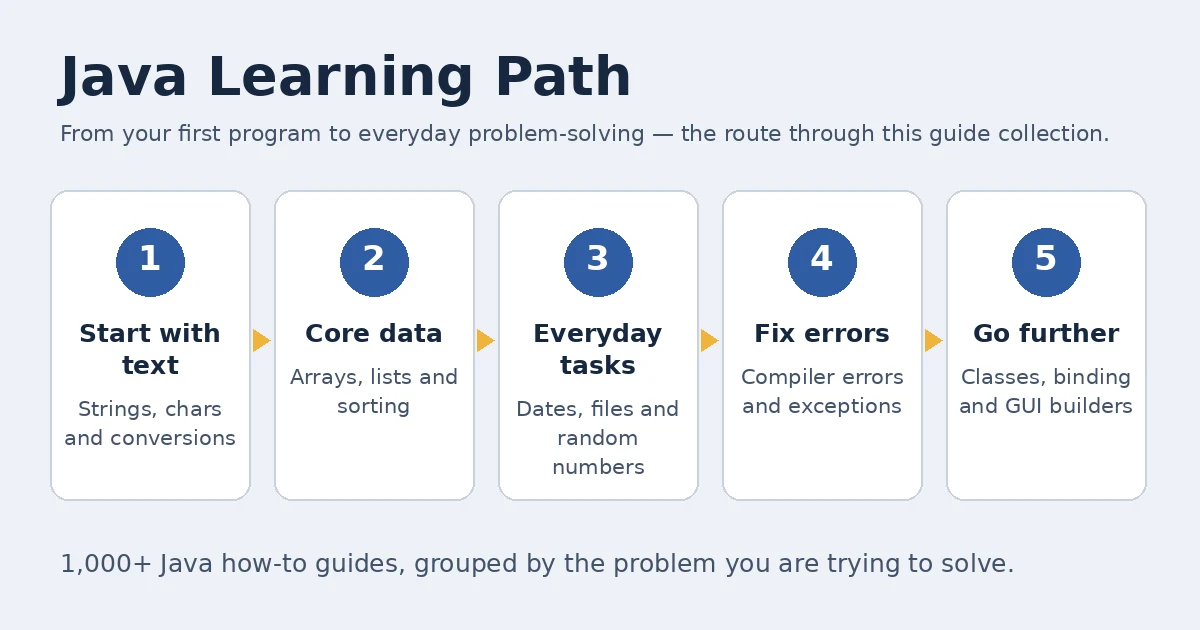
The Java Learning Path
You do not need to read 1,000 guides in order. A reliable route is to start with strings and characters, because every program manipulates text, then learn how arrays and lists hold data, then add the everyday utilities — dates, random numbers, files — and only then spend serious time on compiler errors and object-oriented concepts such as binding. Java rewards this order: once you know what code is trying to express, the compiler’s strict error messages become readable. Treat the stages below as a checklist; when one feels easy, move on.
- Start with text. Learn to get the last character of a string and to convert a string to a char —
charhandling appears in almost every beginner program. - Core data. Sum an array and initialize array elements to zero; arrays are where loops and indexes click into place.
- Everyday tasks. Print today’s date, generate a random number, read every file in a folder: the dates and file groups below cover this daily work.
- Fix errors. When the compiler refuses your code, the identifier expected guide and the other error guides show how to find the cause instead of guessing.
- Go further. See how static and dynamic binding differ, or build a first window with a GUI builder.
After the path, use this page as a reference: every group below is self-contained, and the full alphabetical index under each section lists all 1,000+ guides, including the long tail the curated lists cannot cover.
Strings & Chars
Text work in Java starts with an awkward fact: a String is an object and a char is a primitive, and moving between the two confuses everyone at first. Read the first two guides as a pair — they cover the same final character from opposite directions. One shows how to read a string’s last character; the other, cross-referenced throughout, shows how to remove it, what you usually want when trimming a trailing delimiter or newline. After that, the char guides settle declaration questions: what a char holds by default, why it cannot be null, and how a whole string becomes a char array when you need to process it letter by letter.
- Get the last character of a string in Java — Read the final character three ways:
charAt()for achar,substring()for a one-character string, or a conversion to a char array. - Remove the last character from the string in Java — The deletion counterpart of the guide above: drop the final character with
substring()orreplaceFirst(), or with Commons LangremoveEnd()andchop()on Java 8+. - Initialize char in Java — Declare a
charwith an empty value, understand whynulldoes not apply to primitives, and know the default'\u0000'value fields start with. - Convert a string to char in Java — Take one character with
charAt(), the whole contents withtoCharArray(), and see wheregetBytes()fits — and where it does not.
Errors, Exceptions & Troubleshooting
A Java compiler error is a precise complaint, but only once you know which assumption it is reporting. The first guide gets a section of its own because the query family behind it — identifier expected and its variants — is one of the most searched Java problems here while the answers rank just off the first page: it means the compiler found a token where a name (a variable, method, or parameter) had to appear, usually because a statement sits outside any method or a parameter is missing its type. The installation guide is different in kind: the code is fine, but Windows refuses to launch it. The remaining two cover the errors you meet once your own classes grow — an operator applied to the wrong types, and a method the compiler cannot find on the type you called it on.
- Fix the
<identifier> expectederror in Java — The compiler expected a name and found something else: diagnose a missing parameter type or name, statements placed outside a method, and malformed try-with-resources declarations, with a checklist to run before recompiling. - Fix “Unable to install Java: errors in the following switches” — Repair the Windows
.jarfile association tojavaw.exe, test the JAR from the command prompt, and reinstall Java only when the launcher itself is missing or broken. - Fix the bad operand types error in Java — Work through
bad operand typereports for&,&&,==, and<=: incompatible operand types and operator precedence traps, case by case. - The method is undefined for the type error in Java — A call the compiler cannot resolve: check for typos, confirm the object’s real type, and match the method signature — or fix the inheritance so the method exists.
Arrays & Collections
Arrays are Java’s first data structure and the one every other collection builds on, so this group starts with the two operations you will write most: adding everything up and setting everything to a known start value. The sum guide doubles as a tour of modern Java style — the same loop written with streams shows how much the language has changed. The zeroing guide answers a question that surprises C programmers: Java already initializes array elements for you, and the explicit methods exist for resetting an array that is already in use. The sorting guide is the bridge to real work, where objects — not primitives — must be ordered by a field such as a date.
- Get the sum of an array in Java — Total an
intarray with a plainforloop, or with streams:Arrays.stream(...).sum(),reduce, andIntStream.of(...).sum(). - Initialize all array elements to zero in Java — Reset an array with a loop,
Arrays.fill(),nCopies(), reassignment, orArrays.setAll()— and when Java’s default zeroing already does it for you. - Sort objects in ArrayList by date in Java — Order custom objects by their date field three ways:
Comparable,Collections.sort(), andlist.sort()with a comparator.
Type Conversion & Operators
Java’s type system is strict, which makes conversion and operators a permanent source of beginner questions. The most-searched one is a missing feature: programmers arriving from JavaScript or Python look for typeof, and Java’s answer — asking the object for its runtime class — reveals how the language thinks about types. The != guide handles a famous typo with real consequences: reversed, the characters stop being a comparison and become an assignment with a negation. Read the modulo guide for negative numbers, where Java’s % and Math.floorMod() genuinely disagree, and the conversion guide when an Object must become an int and the right method depends on what the object actually holds.
- Get an object’s runtime class in Java (the
typeofquestion) — Java has notypeofoperator: usegetClass()to ask an object for its runtime class, including the wrapper-class cases that trip up comparisons. - The difference between
!=and=!in Java —!=compares two values for inequality;=!is not an operator at all — ina = !bit assigns the negated boolean, a typo that compiles and misleads. - Modulus in Java — Compute remainders with the
%operator, and switch toMath.floorMod()when negative operands must return a non-negative result. - Convert Object to int in Java — Turn an
Objectinto anintthrough theIntegerwrapper,Number.intValue(), orInteger.parseInt()— choosing by what the object really contains.
Dates, Random & Utilities
This small group converts better than any other on the page: each guide answers a short, exact question. The date guides show a library in transition — the old java.util.Date and Calendar classes still fill existing code, while java.time (LocalDate, LocalDateTime, ZonedDateTime) is what you should write today, and the guides mark which is which. The random guide covers the three generators and when each is appropriate. Clear-console and delay are the utilities every command-line program eventually needs — with honest caveats, because Java deliberately hides the terminal and because a blocking sleep is sometimes the wrong tool.
- Generate a random number between 1 and 10 in Java — Draw an inclusive 1–10 value with
java.util.Random,Math.random(), orThreadLocalRandom— and know which to pick under concurrency. - Get today’s date in Java — Today’s date with
java.util.Date, or the modernLocalDate,LocalDateTime, andZonedDateTimewhen a time zone matters. - Get the current year in Java — Read the current year via
LocalDate,Calendar,Date,YearMonth, or Joda Time, from a full date down to a single integer. - Clear the console in Java — Clear the terminal with ANSI escape sequences or an OS command via
ProcessBuilder, after checking what your terminal and operating system support. - Delay few seconds in Java — Pause with
Thread.sleep()orTimeUnit.sleep(), and schedule instead of blocking withScheduledExecutorServicewhen other work must continue.
File IO & Properties
File code in Java follows one shape — locate, read, compare or configure — and these guides cover its three everyday forms. Comparing files has a modern answer (Files.mismatch()) and several older ones worth knowing because they reveal what “equal” means: same bytes, same lines, or same length. Reading a folder scales from a flat listing to a full recursive walk, and the guide orders the approaches by how deep your directory tree goes. The properties guide closes the group: .properties files are still how Java programs take configuration — database settings, feature flags, environment values — and Spanish readers arrive looking for exactly this workflow.
- Compare content of two files in Java — Test two files for equality byte by byte or line by line, with
Files.mismatch(), Apache Commons IO, orArrays.equals(). - Read all files of a folder in Java — List and read a directory with the
Filesclass,newDirectoryStream(), or a recursivewalkFileTree()for nested folders. - Properties file in Java — Create a
.propertiesfile, set values, read a single property back, and list every key and value the file holds.
GUI & JavaFX
Java’s desktop story is old and still heavily searched, driven by one question — how to build a window without hand-writing layout code for every button. The honest answer is that Swing remains the framework in most existing code, JavaFX is the newer toolkit, and in both cases a visual builder changes the work from positioning components in code to arranging them on a canvas and wiring events. Start with the builder guide if you maintain or are starting a Swing application; the group’s other guides, in the index below, are the follow-ups for specific controls and events.
- Best GUI builders for Java Swing applications — Build Swing interfaces visually with WindowBuilder in Eclipse or the NetBeans GUI builder: install the plugin, create the class, and design on canvas instead of in code.
Classes & Methods
This group is deliberately selective — two guides, each unlocking a larger topic. Decompiling answers a practical emergency: you have a .class file or a library JAR and no source, and you need to know what the code does. Binding answers a conceptual question that interviews and exams love, because it decides which method actually runs: the choice made at compile time from the reference type, or the choice made at runtime from the object itself. Read the binding guide with the errors group in mind — half of “method undefined” confusion is really a binding misunderstanding.
- Decompile a Java class — Recover readable source from a
.classfile with JD-GUI, FernFlower, or JD-CLI, or from inside Eclipse and IntelliJ IDEA. - Static vs dynamic binding in Java — Compile-time binding for overloaded and static methods versus runtime binding for overridden ones, with examples of which call resolves when.
Frequently Asked Questions
What causes the “identifier expected” error in Java?
The compiler reached a place where the grammar requires a name — of a variable, method, or parameter — and found something else instead. The usual causes are a statement written directly in the class body instead of inside a method, a parameter declared without its type, a misplaced brace that ends a method early, or a resource declared incorrectly in try-with-resources. Read the line it names, then check what immediately precedes it. The identifier expected guide works through each cause with a pre-compile checklist.
How do I generate a random number between 1 and 10 in Java?
Create a Random and call nextInt(10) + 1: nextInt(10) returns 0–9, so the shift makes the range inclusive at both ends. For a quick one-off, (int) (Math.random() * 10) + 1 does the same job, and in concurrent code ThreadLocalRandom.current().nextInt(1, 11) avoids contention — note its upper bound is exclusive. The random number guide compares the three approaches and their ranges.
Is there a typeof in Java?
No — Java has no typeof operator. The closest equivalents are obj.getClass(), which returns the object’s runtime class, and instanceof, which tests whether an object belongs to a type or one of its subtypes. Which one you want depends on the question: getClass() answers “what exactly is this?”, while instanceof answers “can I treat it as one of these?”. Wrapper objects add a wrinkle, since an Integer reports Integer.class, never int. The runtime class guide shows both, with the wrapper cases.
How do I delay execution for a few seconds in Java?
Call Thread.sleep(3000) to pause the current thread for three seconds, and handle the InterruptedException it declares — either catch it or let it propagate. TimeUnit.SECONDS.sleep(3) expresses the same delay in a named unit and reads better in reviewed code. If the thread has other work to do, do not block it at all: schedule the delayed step with ScheduledExecutorService instead. The delay guide covers both the blocking calls and the scheduling route.
Why does Java installation fail with “errors in the following switches”?
This Windows message usually means a .jar file was passed to the Java installer or launcher with switches it does not understand — most often because the .jar file association points at the wrong executable, so double-clicking a program triggers an install-style error. Point the association at javaw.exe, then test the same JAR from the command prompt to separate an association problem from a broken download. Reinstalling Java helps only when the launcher itself is missing or damaged. The installation switches guide goes through the checks in order.
Next Steps
Two groups above are growing into dedicated sub-guides: Errors, Exceptions & Troubleshooting, where readers arrive with urgent problems and the identifier expected cluster already acts as a topic of its own, and Strings & Chars, this collection’s most-clicked group. Until they land, the sections above are the entry points. For a dynamically typed language or a different ecosystem, continue with the Python how-to guides or the C# how-to guides.