HOWTO · R
How to Create Grouped Boxplots in R
This article introduces how to create grouped boxplots in R
On this page
A grouped boxplot in ggplot2 comes down to one decision: which variable should split the data into the groups you want to compare. You can map that variable to the fill aesthetic so that geom_boxplot() draws side-by-side boxes inside each x position, or you can split the data into separate panels with facet_wrap(). The examples below use the gapminder data set together with the dplyr package, and each method produces a grouped boxplot you can adapt to your own columns.
Build a grouped boxplot with geom_boxplot()
The ggplot function together with geom_boxplot is generally used to construct boxplot objects. The first argument of ggplot is the data set, and the second is the list of aesthetic mappings created with aes. In the mappings below, x and y point to the continent and lifeExp columns of gapminder, filtered to three selected years with dplyr functions.
if (requireNamespace("ggplot2", quietly = TRUE) &&
    requireNamespace("gapminder", quietly = TRUE) &&
    requireNamespace("dplyr", quietly = TRUE)) {
  library(ggplot2)
  library(gapminder)
  library(dplyr)

  dat <- gapminder %>%
    filter(year %in% c(1972, 1992, 2007))

  print(ggplot(dat, aes(x = continent, y = lifeExp)) +
    geom_boxplot() +
    scale_y_continuous(name = "Average Life Expectancy") +
    scale_x_discrete(labels = abbreviate, name = "Continent"))
}
This call draws one box per continent. It is already grouped by the x variable, but the years within each continent are still pooled together. The next step is to add the second grouping variable. The requireNamespace guard lets the script exit cleanly where the plotting packages are not installed; the drawing is skipped in that case, so treat the code as a syntax illustration and rely on the rendered figures later in the article.
Group boxes with the fill aesthetic
Mapping a column to fill tells geom_boxplot to draw a separate box for each of its groups inside every x position. There is one catch: fill only creates distinct groups when the mapped variable is discrete. The year column in gapminder is numeric, so fill = year is treated as a continuous color gradient and the plot does not split into yearly boxes. Wrapping it in factor converts the numbers into categorical levels, which produces the intended side-by-side boxes. You can see the distinction in plain R:
year <- c(1972, 1992, 2007)

print(class(year))
print(class(factor(year)))
print(levels(factor(year)))
[1] "numeric"
[1] "factor"
[1] "1972" "1992" "2007"
A numeric year stays a continuous value, while factor(year) carries named levels — and fill only fans out into separate boxes for the second form. In ggplot2 the same distinction decides the layout:
if (requireNamespace("ggplot2", quietly = TRUE) &&
    requireNamespace("gridExtra", quietly = TRUE) &&
    requireNamespace("gapminder", quietly = TRUE) &&
    requireNamespace("dplyr", quietly = TRUE)) {
  library(ggplot2)
  library(gridExtra)
  library(gapminder)
  library(dplyr)

  dat <- gapminder %>%
    filter(year %in% c(1972, 1992, 2007))

  p1 <- ggplot(dat, aes(x = continent, y = lifeExp, fill = year)) +
    geom_boxplot() +
    scale_y_continuous(name = "Average Life Expectancy") +
    scale_x_discrete(labels = abbreviate, name = "Continent")

  p2 <- ggplot(dat, aes(x = continent, y = lifeExp, fill = factor(year))) +
    geom_boxplot() +
    scale_y_continuous(name = "Average Life Expectancy") +
    scale_x_discrete(labels = abbreviate, name = "Continent")

  grid.arrange(p1, p2, nrow = 2)
}
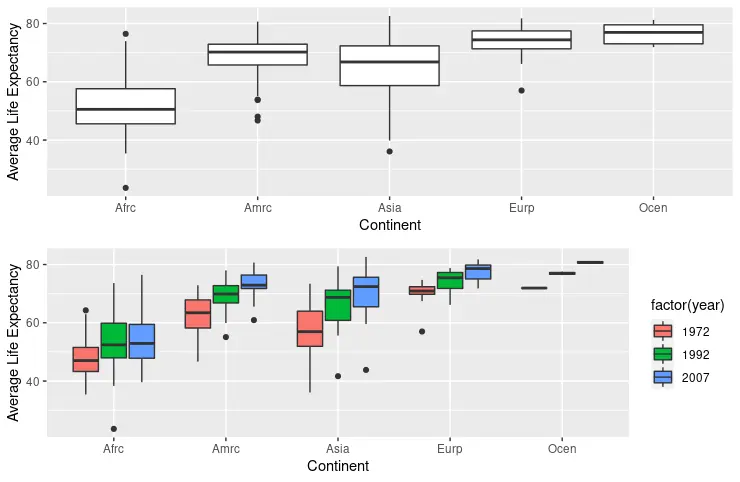
The top panel keeps year numeric and stays ungrouped, while the bottom panel uses factor(year) and shows three boxes per continent, one for each selected year.
Split groups into panels with facet_wrap()
The facet_wrap function is another option for drawing boxplots grouped by a chosen variable. Here it creates one panel per year. facet_wrap works without a fill mapping, but keeping fill = factor(year) colors the boxes so the panels are easier to tell apart.
if (requireNamespace("ggplot2", quietly = TRUE) &&
    requireNamespace("gapminder", quietly = TRUE) &&
    requireNamespace("dplyr", quietly = TRUE)) {
  library(ggplot2)
  library(gapminder)
  library(dplyr)

  dat <- gapminder %>%
    filter(year %in% c(1972, 1992, 2007))

  p3 <- ggplot(dat, aes(x = continent, y = lifeExp, fill = factor(year))) +
    geom_boxplot() +
    facet_wrap(~year) +
    scale_y_continuous(name = "Average Life Expectancy") +
    scale_x_discrete(labels = abbreviate, name = "Continent")

  print(p3)
}
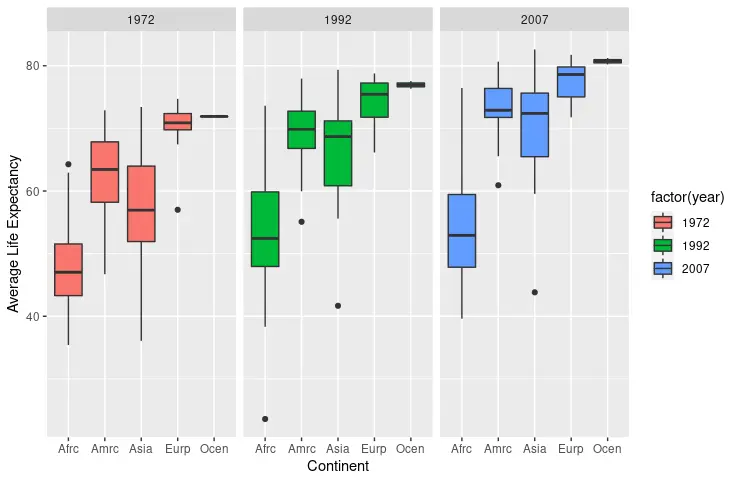
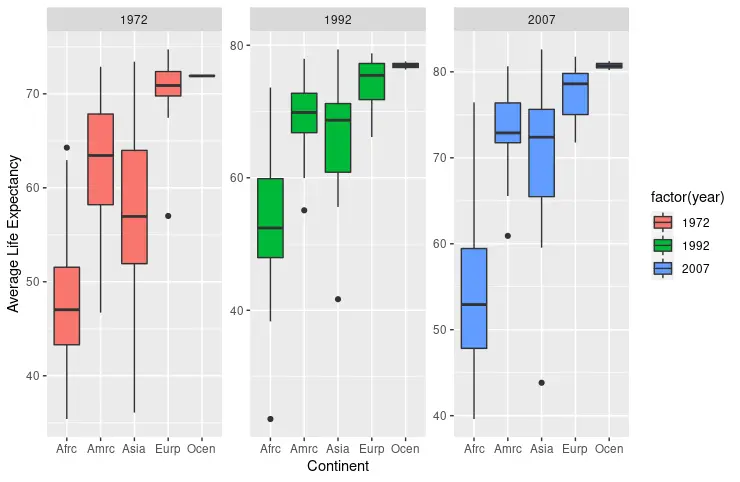
By default, every panel produced by facet_wrap shares the same scales, which keeps values directly comparable across panels. Passing scales = "free" lets each panel adjust its own axes to the data it contains; that can reveal detail in a narrow panel, but it also makes cross-panel comparisons misleading because identical heights no longer mean identical values.
if (requireNamespace("ggplot2", quietly = TRUE) &&
    requireNamespace("gapminder", quietly = TRUE) &&
    requireNamespace("dplyr", quietly = TRUE)) {
  library(ggplot2)
  library(gapminder)
  library(dplyr)

  dat <- gapminder %>%
    filter(year %in% c(1972, 1992, 2007))

  p4 <- ggplot(dat, aes(x = continent, y = lifeExp, fill = factor(year))) +
    geom_boxplot() +
    facet_wrap(~year, scales = "free") +
    scale_y_continuous(name = "Average Life Expectancy") +
    scale_x_discrete(labels = abbreviate, name = "Continent")

  print(p4)
}
Choose a layout and check the result
Use fill grouping when you have a small number of groups and want them compared directly inside each x category; use facet_wrap when there are many groups or when each subset deserves its own panel. You can also swap which variable fills and which one facets. The example below returns to the unfiltered gapminder data set, maps continent to fill, and lets facet_wrap take every available year.
if (requireNamespace("ggplot2", quietly = TRUE) &&
    requireNamespace("gapminder", quietly = TRUE)) {
  library(ggplot2)
  library(gapminder)

  p5 <- ggplot(gapminder, aes(x = continent, y = lifeExp, fill = continent)) +
    facet_wrap(~year) +
    geom_boxplot() +
    scale_y_continuous(name = "Average Life Expectancy") +
    scale_x_discrete(labels = abbreviate, name = "Continent")

  print(p5)
}
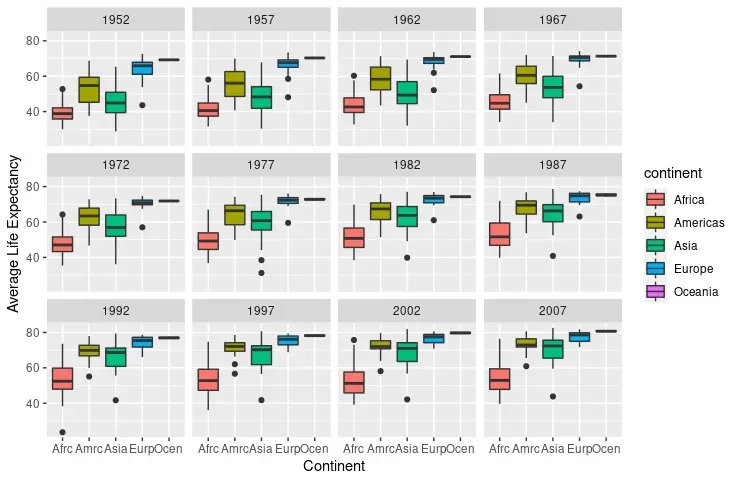
Whichever layout you choose, check the rendered plot for the expected number of boxes or panels per group. If a numeric column produces a smooth color legend instead of separate boxes, convert it with factor first; if panels look identical in shape but differ in position, confirm that the scales are shared before reading values off the chart.