HOWTO · R
在 R 中创建分组箱线图
本文介绍如何在 R 中创建分组箱线图
本页内容
在 ggplot2 中绘制分组箱线图,关键在于一个决定:用哪个变量把数据拆分成你想要比较的组。你可以把这个变量映射到 fill 美学属性,让 geom_boxplot() 在每个 x 位置内绘制并排箱体;也可以用 facet_wrap() 把数据拆成独立面板。下面的示例使用 gapminder 数据集和 dplyr 包,每种方法都会生成一个可以套用到你自己列上的分组箱线图。
使用 geom_boxplot() 构建分组箱线图
ggplot 函数通常与 geom_boxplot 一起用于构建箱线图对象。ggplot 的第一个参数是数据集,第二个参数是用 aes 创建的美学映射列表。在下面的映射中,x 和 y 分别指向 gapminder 的 continent 和 lifeExp 列,数据已用 dplyr 函数筛选为三个选定年份。本节代码中显示的坐标轴标签等文字仍为英文。
if (requireNamespace("ggplot2", quietly = TRUE) &&
    requireNamespace("gapminder", quietly = TRUE) &&
    requireNamespace("dplyr", quietly = TRUE)) {
  library(ggplot2)
  library(gapminder)
  library(dplyr)

  dat <- gapminder %>%
    filter(year %in% c(1972, 1992, 2007))

  print(ggplot(dat, aes(x = continent, y = lifeExp)) +
    geom_boxplot() +
    scale_y_continuous(name = "Average Life Expectancy") +
    scale_x_discrete(labels = abbreviate, name = "Continent"))
}
这次调用会为每个洲绘制一个箱体。它已经按 x 变量分组,但每个洲内的年份仍被合并在一起。下一步是加入第二个分组变量。requireNamespace 守卫会在绘图包未安装时让脚本干净退出;此时会跳过绘图,因此请把这段代码当作语法示例,并以本文后面的渲染图为准。
用 fill 美学属性对箱体分组
把某一列映射到 fill 会告诉 geom_boxplot 在每个 x 位置内为该列的每个组各画一个箱体。有一个要点:只有当被映射的变量是离散变量时,fill 才会生成不同的组。gapminder 中的 year 列是数值型,所以 fill = year 会被当作连续的颜色渐变,图也不会拆分成按年份的箱体。把它包进 factor 会把这些数字转换为分类水平,从而得到预期的并排箱体。在基础 R 中可以直接看到这种区别:本节代码和输出中显示的文字仍为英文。
year <- c(1972, 1992, 2007)

print(class(year))
print(class(factor(year)))
print(levels(factor(year)))
[1] "numeric"
[1] "factor"
[1] "1972" "1992" "2007"
数值型的 year 仍是连续值,而 factor(year) 带有命名水平——fill 只会对第二种形式展开成独立的箱体。在 ggplot2 中,同样的区别决定了布局:下面示例代码中的坐标轴标签仍为英文。
if (requireNamespace("ggplot2", quietly = TRUE) &&
    requireNamespace("gridExtra", quietly = TRUE) &&
    requireNamespace("gapminder", quietly = TRUE) &&
    requireNamespace("dplyr", quietly = TRUE)) {
  library(ggplot2)
  library(gridExtra)
  library(gapminder)
  library(dplyr)

  dat <- gapminder %>%
    filter(year %in% c(1972, 1992, 2007))

  p1 <- ggplot(dat, aes(x = continent, y = lifeExp, fill = year)) +
    geom_boxplot() +
    scale_y_continuous(name = "Average Life Expectancy") +
    scale_x_discrete(labels = abbreviate, name = "Continent")

  p2 <- ggplot(dat, aes(x = continent, y = lifeExp, fill = factor(year))) +
    geom_boxplot() +
    scale_y_continuous(name = "Average Life Expectancy") +
    scale_x_discrete(labels = abbreviate, name = "Continent")

  grid.arrange(p1, p2, nrow = 2)
}
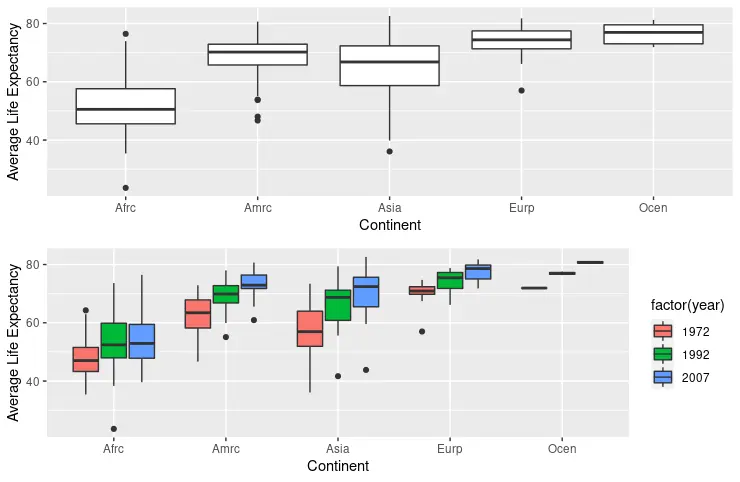
上方面板把 year 保持为数值型且不分组,下方面板使用 factor(year),每个洲显示三个箱体,分别对应一个选定年份。
用 facet_wrap() 把组拆分成面板
facet_wrap 函数是另一种按选定变量绘制分组箱线图的选项。这里它为每个年份创建一个面板。facet_wrap 在没有 fill 映射时也能工作,但保留 fill = factor(year) 会给箱体着色,让各面板更容易区分。本节代码中显示的坐标轴标签仍为英文。
if (requireNamespace("ggplot2", quietly = TRUE) &&
    requireNamespace("gapminder", quietly = TRUE) &&
    requireNamespace("dplyr", quietly = TRUE)) {
  library(ggplot2)
  library(gapminder)
  library(dplyr)

  dat <- gapminder %>%
    filter(year %in% c(1972, 1992, 2007))

  p3 <- ggplot(dat, aes(x = continent, y = lifeExp, fill = factor(year))) +
    geom_boxplot() +
    facet_wrap(~year) +
    scale_y_continuous(name = "Average Life Expectancy") +
    scale_x_discrete(labels = abbreviate, name = "Continent")

  print(p3)
}
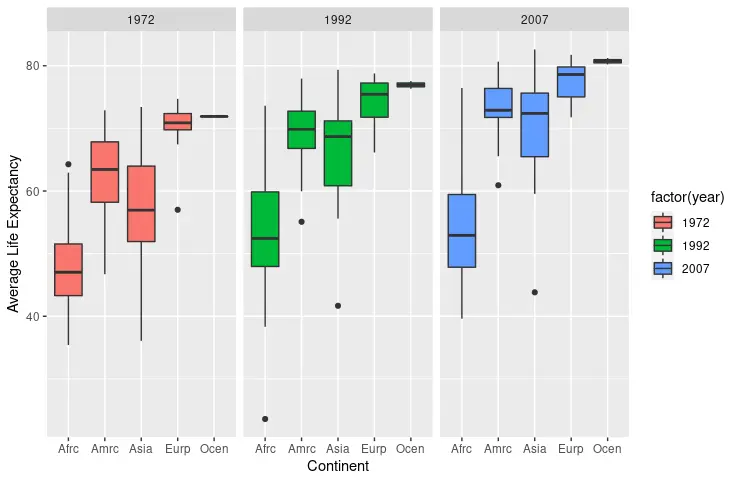
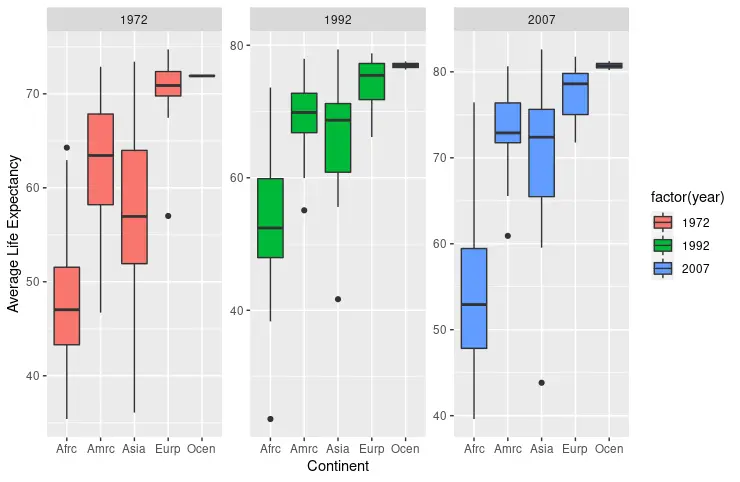
默认情况下,facet_wrap 生成的每个面板共享相同刻度,因此跨面板的数值可以直接比较。传入 scales = "free" 会让每个面板根据所含数据自行调整坐标轴;这能在取值范围较窄的面板中显示更多细节,但也会让跨面板比较产生误导,因为相同的高度不再代表相同的数值。下面示例代码中的坐标轴标签仍为英文。
if (requireNamespace("ggplot2", quietly = TRUE) &&
    requireNamespace("gapminder", quietly = TRUE) &&
    requireNamespace("dplyr", quietly = TRUE)) {
  library(ggplot2)
  library(gapminder)
  library(dplyr)

  dat <- gapminder %>%
    filter(year %in% c(1972, 1992, 2007))

  p4 <- ggplot(dat, aes(x = continent, y = lifeExp, fill = factor(year))) +
    geom_boxplot() +
    facet_wrap(~year, scales = "free") +
    scale_y_continuous(name = "Average Life Expectancy") +
    scale_x_discrete(labels = abbreviate, name = "Continent")

  print(p4)
}
选择布局并检查结果
当组数不多、希望在每个 x 类别内直接比较时,使用 fill 分组;当组很多,或每个子集都值得拥有独立面板时,使用 facet_wrap。你也可以交换哪个变量映射到 fill、哪个变量负责分面。下面的示例回到未筛选的 gapminder 数据集,把 continent 映射到 fill,并让 facet_wrap 使用所有可用年份。本节代码中显示的坐标轴标签仍为英文。
if (requireNamespace("ggplot2", quietly = TRUE) &&
    requireNamespace("gapminder", quietly = TRUE)) {
  library(ggplot2)
  library(gapminder)

  p5 <- ggplot(gapminder, aes(x = continent, y = lifeExp, fill = continent)) +
    facet_wrap(~year) +
    geom_boxplot() +
    scale_y_continuous(name = "Average Life Expectancy") +
    scale_x_discrete(labels = abbreviate, name = "Continent")

  print(p5)
}
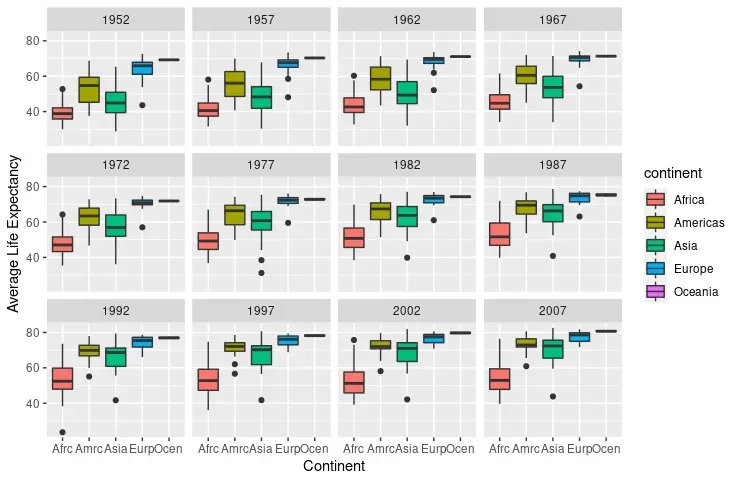
无论选择哪种布局,都要检查渲染后的图中每组的箱体或面板数量是否符合预期。如果某个数值列产生的是平滑的颜色图例而不是独立箱体,先用 factor 转换;如果面板形状相同但位置不同,先确认刻度是共享的,再从图上读取数值。