HOWTO · PHP
How to Convert a String Into an Array in PHP
This tutorial demonstrates the use of different functions in turning a string into an array in PHP.
On this page
PHP is a powerful scripting language, and it provides us with many in-built solutions to convert a string into an array by using its built-in functions that can be used for different requirements.
This tutorial will discuss using PHP to convert a string to an array.
Convert a String Into an Array Using the explode() Function in PHP
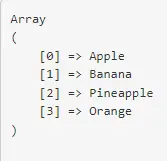
Let’s imagine we have a string list of fruits, and we want to convert it into an array. The explode() function is used in the code example below.
The explode() function is a PHP method used to convert a string into an array. The function uses a separator or a delimiter that needs to be passed as an argument, and it takes in 2 arguments, the first one is a delimiter and the second one is a string.
Code:
<?php
    $string = "Apple, Banana, Pineapple, Orange";
    $converted = explode(", ", $string);
    print_r($converted);
Output:
Convert a String Into an Array Using the str_split() Function in PHP
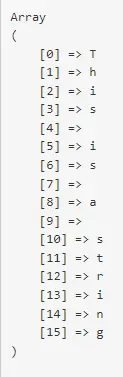
Suppose we want to convert a string into an array so that each letter from a string is stored separately. We can achieve this scenario using the function str_split().
This function will convert a string into an array by breaking the string into small substrings. We can define the length of the substrings, and it doesn’t need a separator or a delimiter.
Code:
<?php
    $str = "This is a string";
    $newStr = str_split($str, 1);
    print_r($newStr);
Output:
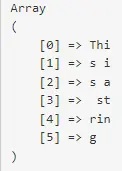
In the last example, we want to separate the string into an array that breaks down after 3 letters instead of separating each letter.
Code:
<?php
    $str = "This is a string";
    $newStr = str_split($str, 3);
    print_r($newStr);
Output: