HOWTO · Matplotlib
Set Marker Size in a Matplotlib Scatter Plot
Set one marker size or a size for each point with Matplotlib scatter, scale marker areas correctly, and fix a mismatched size array.
On this page
Use the s argument of Axes.scatter to set marker size in a Matplotlib scatter plot. A scalar applies one nominal area to every point, while a one-dimensional list or array assigns an area to each point and must match the lengths of x and y.
Set Marker Size with s
Pass the s argument to Axes.scatter to set marker size in a Matplotlib scatter plot. A scalar such as s=80 gives every point the same nominal area. A one-dimensional list or array gives each point its own area, but it must contain the same number of values as x and y. For example, use ax.scatter(x, y, s=80) for one size or ax.scatter(x, y, s=[20, 40, 80, 160]) for four points with different sizes.
Use scatter when sizes vary per observation. The related plot method uses markersize for one linear marker dimension instead.
Set One Size or One Size per Point
The following deterministic example puts a scalar-sized collection beside a collection whose sizes are derived from data. It also maps the same values to color and uses alpha to make overlapping markers easier to see. The saved image makes the expected result inspectable without requiring an interactive backend.
import matplotlib.pyplot as plt

x = [1, 2, 3, 4, 5]
y = [2, 3, 5, 7, 11]
values = [1, 2, 4, 7, 11]
sizes = [40 + value * 20 for value in values]

fig, (top, bottom) = plt.subplots(2, 1, figsize=(6, 7), layout="constrained")
uniform = top.scatter(x, y, s=80, color="tab:blue")
varying = bottom.scatter(x, y, s=sizes, c=values, cmap="viridis", alpha=0.75)

top.set(title="s = 80", xlabel="x", ylabel="y")
bottom.set(title="s = [60, 80, 120, 180, 260]", xlabel="x", ylabel="y")
fig.colorbar(varying, ax=bottom)

print("scalar sizes:", uniform.get_sizes().tolist())
print("per-point sizes:", varying.get_sizes().tolist())
fig.savefig("scatter-marker-sizes.webp", dpi=120)
The two PathCollection objects report the exact s values that Matplotlib retained:
scalar sizes: [80]
per-point sizes: [60, 80, 120, 180, 260]
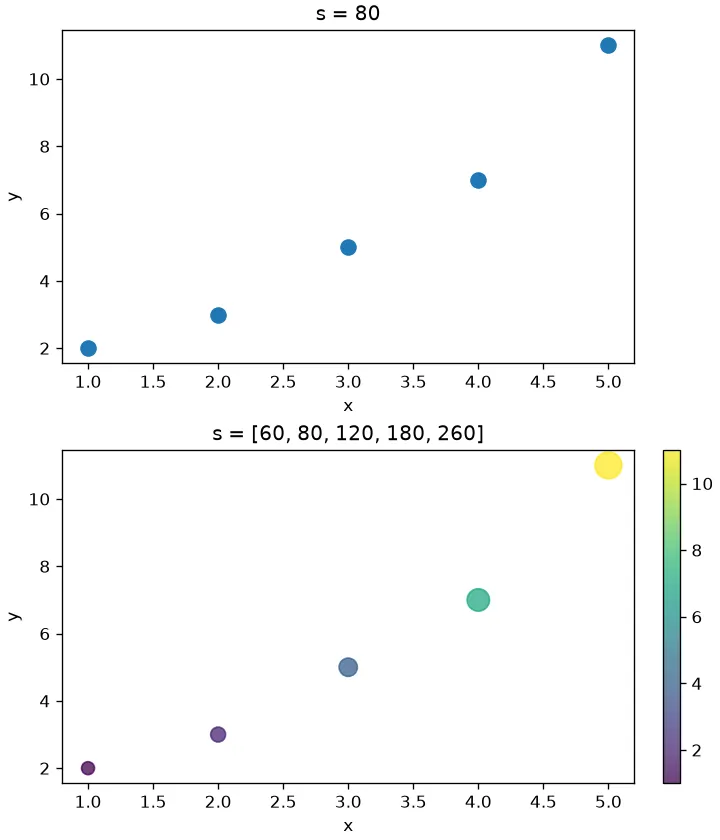
The transformation starts at 40 and adds 20 for each data unit, so even the smallest value remains visible and the largest does not overwhelm the axes. For real data, choose a documented lower and upper size range rather than passing extreme raw values directly. Color can encode the same variable, as above, or a different variable; include a colorbar whenever the colors carry quantitative meaning.
Understand Points Squared and the Default
The Matplotlib scatter reference defines s in points squared (pt²), where one typographic point is 1/72 inch. Its default is rcParams['lines.markersize'] ** 2. Thus s is proportional to nominal marker area, but s=100 does not promise a literal 10-by-10-point visible shape. The marker path, figure DPI, and edge styling affect its final outline.
Edges matter most for small markers. When linewidths is greater than zero and edgecolors is visible, the stroke is centered on the marker boundary and increases the effective extent by half the line width. Use linewidths=0 or edgecolors="none" when comparing small filled markers and the edge should not change their apparent size.
Marker size is a display-space measurement, not an x- or y-axis data unit. Zooming or changing axis limits therefore does not make a marker represent a data-coordinate radius.
Scale Marker Area and Linear Width Correctly
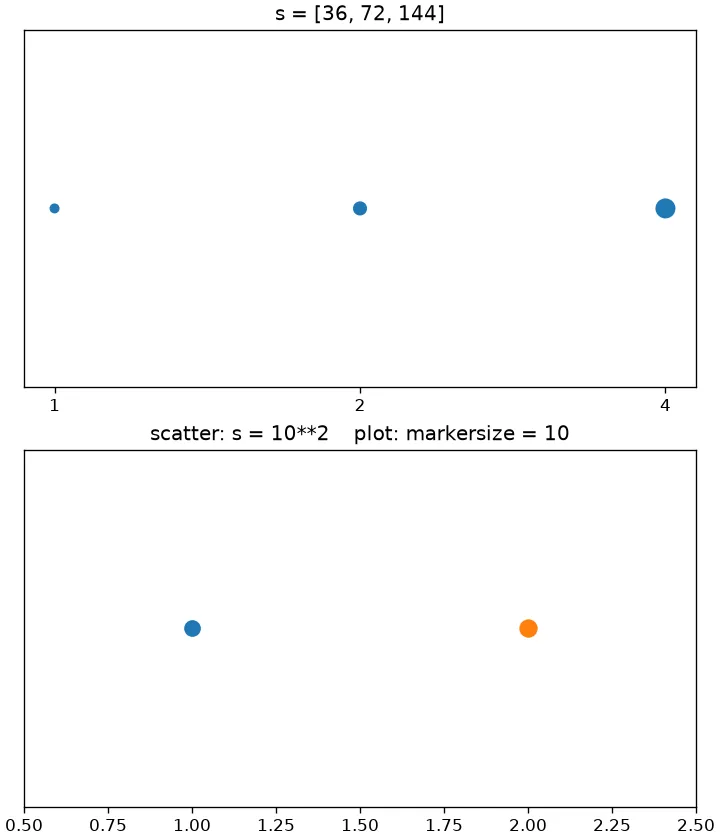
Multiplying s by a factor of two doubles the nominal area. Because linear extent grows approximately with the square root of area, multiplying s by four makes a similarly shaped marker about twice as wide. This is a proportional visual rule, not an exact geometric guarantee for every marker path.
import matplotlib.pyplot as plt

base = 36
area_sizes = [base, 2 * base, 4 * base]

fig, (top, bottom) = plt.subplots(2, 1, figsize=(6, 7), layout="constrained")
top.scatter([1, 2, 3], [1, 1, 1], s=area_sizes, linewidths=0)
top.set(title="s = [36, 72, 144]", yticks=[])
top.set_xticks([1, 2, 3], ["1", "2", "4"])

bottom.scatter([1], [1], s=10**2, linewidths=0)
(line,) = bottom.plot([2], [1], marker="o", linestyle="none", markersize=10,
                     color="tab:orange")
bottom.set(title="scatter: s = 10**2    plot: markersize = 10", xlim=(0.5, 2.5), yticks=[])

print("scatter areas:", area_sizes)
print("plot markersize:", line.get_markersize())
fig.savefig("scatter-size-scaling.webp", dpi=120)
The selected values and the Line2D marker dimension are:
scatter areas: [36, 72, 144]
plot markersize: 10.0
Choose scatter(s=...) or plot(markersize=...)
Use scatter(s=...) for a scatter plot, especially when each observation needs its own area or color. Use plot(marker="o", markersize=10) when drawing a Line2D whose nodes all share one marker size. As the Matplotlib plot reference documents, markersize (or ms) is a linear size in points; it is not the points-squared area accepted by scatter.
Although scatter(s=10**2) and plot(markersize=10) express related nominal dimensions for circular markers, do not depend on pixel-perfect equality. Collection and line markers can differ because of their normalized paths, edges, rendering backend, and rasterization.
Fix a Size Array That Does Not Match the Points
A non-scalar s must have the same length as the plotted points. This example catches the current Matplotlib diagnostic so it can be displayed without a full traceback:
import matplotlib.pyplot as plt

x = [1, 2, 3]
y = [1, 4, 9]

try:
    plt.scatter(x, y, s=[40, 80])
except ValueError as error:
    print(f"{type(error).__name__}: {error}")
else:
    raise AssertionError("a mismatched size array should fail")
With Matplotlib 3.11.2, the output is:
ValueError: s (size 2) cannot be broadcast to match x and y (size 3)
Older Matplotlib releases may phrase the ValueError differently, but the correction is the same: supply three size values for three (x, y) points, or pass one scalar size.