HOWTO · Java
How to Rotate Text in JavaFX
This tutorial demonstrates how to rotate text in JavaFX.
The text nodes can be created using the JavaFX.scene.text.Text class, and to rotate the text we use setRotate() in JavaFX.
This tutorial demonstrates how to rotate text in JavaFX.
JavaFX Text Rotate
The setRotate() method is used in JavaFX to rotate the text. The text nodes are placed on the scene and will be rotated around the x and y positions.
These x and y positions are passed into the text when instantiating the Text class.
Syntax:
text.setRotate(int);
The int in the above syntax is the text’s rotation value. The following are the steps to rotate the text in JavaFX.
-
Create a class that extends the
Applicationclass. -
Set the title to the stage in the
startmethod. -
Create a group by instantiating the
Groupclass. -
Create a scene by instantiating the
Sceneclass and passing theGroupto it. -
Initialize the
x,y, andRGBwith the given values. -
Create the text by instantiating the
Textclass and passing thex,y, andtextvalues. -
Fill the color to the text by the
SetFill()method. -
Set the rotation degree using the
setRotate()method. -
Add the
textto thegroup. -
Pass the scene to the stage and display the stage by the
Showmethod and launch the Application in themainmethod.
Let’s try to implement an example based on the above steps.
Full Source Code:
package delftstack;

import javafx.application.Application;
import javafx.scene.Group;
import javafx.scene.Scene;
import javafx.scene.paint.Color;
import javafx.scene.text.Text;
import javafx.stage.Stage;

public class JavaFX_TextRotate extends Application {
  @Override
  public void start(Stage Demo_Stage) {
    Demo_Stage.setTitle("Text");
    Group Group_Root = new Group();
    Scene Demo_Scene = new Scene(Group_Root, 300, 250, Color.WHITE);
    int x = 150;
    int y = 150;
    int RED = 30;
    int GREEN = 40;
    int BLUE = 50;

    Text Demo_Text = new Text(x, y, "Delftstack");

    Demo_Text.setFill(Color.rgb(RED, GREEN, BLUE, .99));
    Demo_Text.setRotate(45);
    Group_Root.getChildren().add(Demo_Text);

    Demo_Stage.setScene(Demo_Scene);
    Demo_Stage.show();
  }
  public static void main(String[] args) {
    Application.launch(args);
  }
}
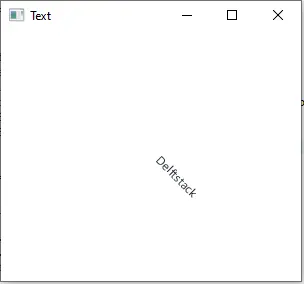
The code above will rotate the text to 45 degrees.
Output:
Here is another example that rotates the multiple texts based on the random x and y positions and random degrees of rotation.
Example Code:
package delftstack;

import java.util.Random;
import javafx.application.Application;
import javafx.scene.Group;
import javafx.scene.Scene;
import javafx.scene.paint.Color;
import javafx.scene.text.Text;
import javafx.stage.Stage;

public class JavaFX_Rotate extends Application {
  @Override
  public void start(Stage Demo_Stage) {
    Demo_Stage.setTitle("TEXT");
    Group Group_Root = new Group();
    Scene Demo_Scene = new Scene(Group_Root, 300, 250, Color.WHITE);
    Random Random_Number = new Random(System.currentTimeMillis());
    for (int i = 0; i < 100; i++) {
      int x = Random_Number.nextInt((int) Demo_Scene.getWidth());
      int y = Random_Number.nextInt((int) Demo_Scene.getHeight());
      int RED = Random_Number.nextInt(255);
      int GREEN = Random_Number.nextInt(255);
      int BLUE = Random_Number.nextInt(255);

      Text Demo_Text = new Text(x, y, "Delftstack");

      int Rotation = Random_Number.nextInt(180);
      Demo_Text.setFill(Color.rgb(RED, GREEN, BLUE, .99));
      Demo_Text.setRotate(Rotation);
      Group_Root.getChildren().add(Demo_Text);
    }

    Demo_Stage.setScene(Demo_Scene);
    Demo_Stage.show();
  }

  public static void main(String[] args) {
    Application.launch(args);
  }
}
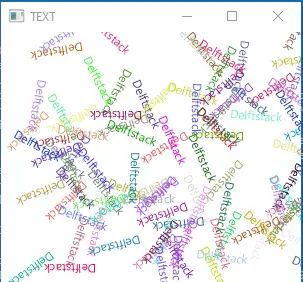
The code above will rotate multiple texts using the random x, y, RGB, and rotation degree.
Output: