HOWTO · Python
How to Fix Python ImportError: No Module Named
This tutorial will teach you to fix ImportError: No module named in Python.
The ImportError occurs when a specified module or a member of a module cannot be imported. This error can be raised due to multiple reasons in Python.
For example, the module is not installed on the Python environment or has a typographical error in the module name.
This tutorial will teach you to fix ImportError: No module named in Python.
Install the Module to Fix ImportError: No module named in Python
Python includes several built-in modules. But the module you are trying to import may not be installed by default.
To use the module, you have to install it first.
The following example uses the pandas module to read the CSV file.
import pandas as pd

df = pd.read_csv("C:\\Users\\rhntm\\samplecar.csv")
print(df)
Output:
Traceback (most recent call last):
  File "c:\Users\rhntm\myscript.py", line 1, in <module>
    import pandas as pd
ModuleNotFoundError: No module named 'pandas'
The above script raises an ImportError because the pandas module is not found in the Python environment.
You can install the pandas module using the command below to solve the error.
pip install pandas
Output:
Successfully installed pandas-1.4.3 pytz-2022.1
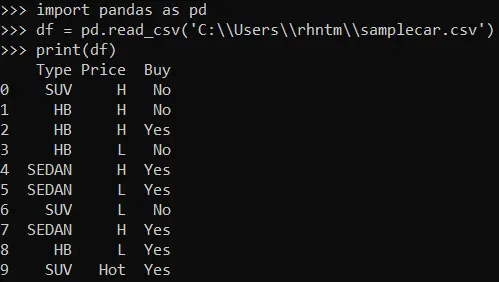
Once the module is installed, the code will run successfully.
import pandas as pd

df = pd.read_csv("C:\\Users\\rhntm\\samplecar.csv")
print(df)
Output:
Check Typographical Errors to Fix ImportError: No module named in Python
If there is a spelling mistake in the module name, you can get an error saying No module named in Python. So, ensure the given module name is correct in your code.
Let’s see an example of this.
import panda as pd

df = pd.read_csv("C:\\Users\\rhntm\\samplecar.csv")
print(df)
Here, we are trying to import the pandas module. But the typed module name is panda instead of pandas.
When you run the script, it will return an error saying No module named 'panda'.
Output:
Traceback (most recent call last):
  File "c:\Users\rhntm\myscript.py", line 1, in <module>
    import panda as pd
ModuleNotFoundError: No module named 'panda'
You can fix this issue by correcting the spelling of the module name. Let’s change the name to pandas and run the script again.
import pandas as pd

df = pd.read_csv("C:\\Users\\rhntm\\samplecar.csv")
print(df)
Output:
As you can see, the problem is solved.
Check Installation Path to Fix ImportError: No module named in Python
Another possible cause can be the incorrect path configuration in the PYTHONPATH. For example, the installed module’s directory is not added to the environment variable.
You can use the following commands to list all paths used by Python for importing modules.
import sys

print(sys.path)
If the required module’s directory is not found in the list, use the sys.path.append method to add a new directory.
import sys

sys.path.append("C:\\Users\\rhntm\\Test\\myproject")
The ImportError occurs when you try to import the module which does not exist in your Python environment. You can fix it by installing the module or checking whether the module name is correct and available in the Python library.
Now you know the reasons for ImportError and how to handle that error in Python. We hope you found this tutorial helpful.