TUTORIAL
PyQt5 Tutorial - CheckBox
This tutorial introduces PyQt5 QCheckbox widget with examples, like how to create the checkbox and how to add slot to the checkbox stateChanged signal.
On this page
In this tutorial we are going to learn QCheckBox in PyQt5. A QCheckBox is an option button that could be checked or unchecked. User could check multiple options from the checkbox group.
CheckBox Example
import sys
from PyQt5.QtWidgets import QWidget, QLabel, QHBoxLayout, QCheckBox, QApplication


class basicWindow(QWidget):
    def __init__(self):
        super().__init__()

        layout = QHBoxLayout()
        self.setLayout(layout)

        self.checkBoxA = QCheckBox("Select This.")
        self.labelA = QLabel("Not slected.")

        layout.addWidget(self.checkBoxA)
        layout.addWidget(self.labelA)

        self.setGeometry(200, 200, 300, 200)

        self.setWindowTitle("CheckBox Example")


if __name__ == "__main__":
    app = QApplication(sys.argv)
    windowExample = basicWindow()
    windowExample.show()
    sys.exit(app.exec_())
Where,
self.checkBoxA = QCheckBox("Select This.")
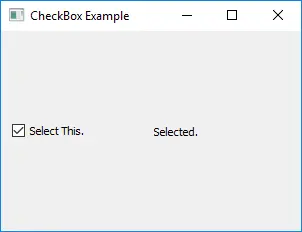
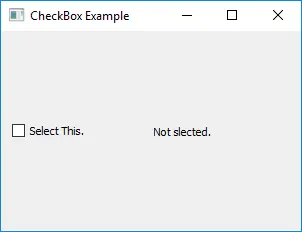
self.checkBoxA is an instance of QCheckBox widget in PyQt5. The text given - Select This. will be displayed next to the CheckBox hollow square.
CheckBox Event
Basically a user should check or uncheck the checkbox, then the action should be performed based on the state change signal.
import sys
from PyQt5.QtWidgets import QWidget, QLabel, QHBoxLayout, QCheckBox, QApplication
from PyQt5 import QtCore


class basicWindow(QWidget):
    def __init__(self):
        super().__init__()

        layout = QHBoxLayout()
        self.setLayout(layout)

        self.checkBoxA = QCheckBox("Select This.")
        self.labelA = QLabel("Not slected.")

        self.checkBoxA.stateChanged.connect(self.checkBoxChangedAction)

        layout.addWidget(self.checkBoxA)
        layout.addWidget(self.labelA)

        self.setGeometry(200, 200, 300, 200)

        self.setWindowTitle("CheckBox Example")

    def checkBoxChangedAction(self, state):
        if QtCore.Qt.Checked == state:
            self.labelA.setText("Selected.")
        else:
            self.labelA.setText("Not Selected.")


if __name__ == "__main__":
    app = QApplication(sys.argv)
    windowExample = basicWindow()
    windowExample.show()
    sys.exit(app.exec_())
self.checkBoxA.stateChanged.connect(self.checkBoxChangedAction)
We connect the slot method checkBoxChangeAction() to the CheckBox stateChanged signal. Every time when the user checks or unchecks the check box, it will call checkBoxChangeAction().
def checkBoxChangedAction(self, state):
    if QtCore.Qt.Checked == state:
        self.labelA.setText("Selected.")
    else:
        self.labelA.setText("Not Selected.")
The state argument is the state of the CheckBox passed and the labelA text will change to Selected. if the CheckBox is checked, or to Not Selected. if it is unchecked.