HOWTO · R
How to Perform Levene Test in R
Perform Levene's test in R with the car package: prepare grouped data, test equal variances, interpret the p-value, and create a boxplot.
On this page
To perform Levene’s test in R, use the car package’s leveneTest() function with a numeric response and a grouping factor. The formula value ~ group compares the variability of value across categories in group.
Understanding Levene’s Test
The null hypothesis is that all group variances are equal; the alternative is that at least one differs. Observations should be independent.
By default, leveneTest() uses absolute deviations from group medians, often called the Brown–Forsythe variant. Use center = mean for the original mean-centered test.
Installing and Loading the car Package
Install car once per R environment with install.packages("car"); this requires repository access and may install dependencies. Load it in each session with library(car).
Use car::leveneTest() to access the function without attaching the package; installation is still required. If R reports that there is no package called ‘car’, install it in the R environment running your script, or use the base R calculation below. Both fenced base R examples below were executed. Package installation and the separate car::leveneTest() illustration remain unverified, and the rendered PDF has not been visually reviewed.
Preparing Grouped Data
Use one row per observation, with numeric measurements and categorical group labels. The example generates 30 measurements per group, all with mean 5 but with standard deviations of 1, 1.5, and 2. set.seed(123) makes the simulation reproducible, and factor() explicitly prepares the grouping column.
For your own data, inspect missing measurements and labels before analysis. After exclusions, retain at least two populated groups and enough observations to estimate within-group variation.
Running Levene’s Test in R
The median-centered test can also be calculated with base R: compute absolute deviations from each group’s median, then fit a one-way ANOVA to those deviations. This self-contained example requires no additional packages. It is presented here as an unexecuted example, without captured console output. Run it to print the ANOVA table:
set.seed(123)
group1 <- rnorm(30, mean = 5, sd = 1)
group2 <- rnorm(30, mean = 5, sd = 1.5)
group3 <- rnorm(30, mean = 5, sd = 2)
data <- data.frame(
  value = c(group1, group2, group3),
  group = factor(rep(c("Group 1", "Group 2", "Group 3"), each = 30))
)
data$deviation <- abs(data$value - ave(data$value, data$group, FUN = median))
levene_result <- anova(lm(deviation ~ group, data = data))
print(levene_result)
Read the resulting table’s F value, the group and Residuals degrees of freedom, and Pr(>F). Compare the p-value with your prespecified significance level, as explained in the next section.
ave() assigns each observation its group median. The formula deviation ~ group compares average absolute deviations across groups, and data = data locates its columns. With car installed, the equivalent function call is car::leveneTest(value ~ group, data = data, center = median); this package-dependent call is an unexecuted illustration.
Interpreting the Results
The table’s F value, 3.2694, compares between-group differences in average absolute deviations with within-group variation. The group and Residuals rows under Df give the numerator and denominator degrees of freedom: 2 and 87 for three groups and 90 observations. Pr(>F) in the group row is the p-value, 0.04275.
Choose a significance level, such as 0.05, beforehand. At a prespecified significance level of 0.05, this example’s p-value of 0.04275 provides evidence against equal group variances, so reject the null hypothesis. Otherwise, a p-value at or above the chosen level means failing to reject the null; this does not prove equality, particularly with small samples. The test neither identifies which groups differ nor establishes every ANOVA assumption.
For subsequent group-mean comparisons when equal variances are doubtful, consider Welch’s ANOVA alongside the study design and other assumptions.
Visualizing Group Distributions
This standalone example recreates the data and writes a boxplot to a temporary PDF. Open the file identified by plot_path in your R session.
set.seed(123)
data <- data.frame(
  value = c(
    rnorm(30, mean = 5, sd = 1),
    rnorm(30, mean = 5, sd = 1.5),
    rnorm(30, mean = 5, sd = 2)
  ),
  group = factor(rep(c("Group 1", "Group 2", "Group 3"), each = 30))
)
plot_path <- tempfile(fileext = ".pdf")
pdf(plot_path)
boxplot(value ~ group, data = data,
        xlab = "Group", ylab = "Value", main = "Group distributions")
invisible(dev.off())
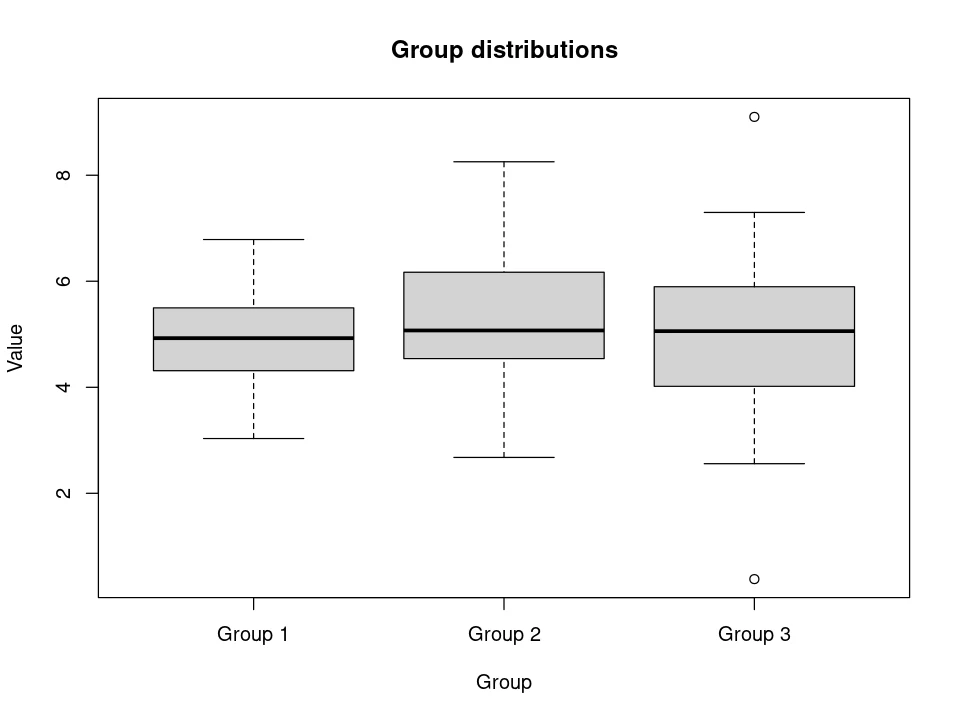
Compare box heights, whiskers, and outlying points for differences in spread. The plot complements the test; it does not replace it or directly display variances.