Practical solutions

Batch Howtos How-To Guides

Solve the problem. Keep building. Collection of Windows batch-file how-to articles

Find the answer you need

Browse practical solutions, grouped by the task you're working on.

__COUNT__ entries on this page
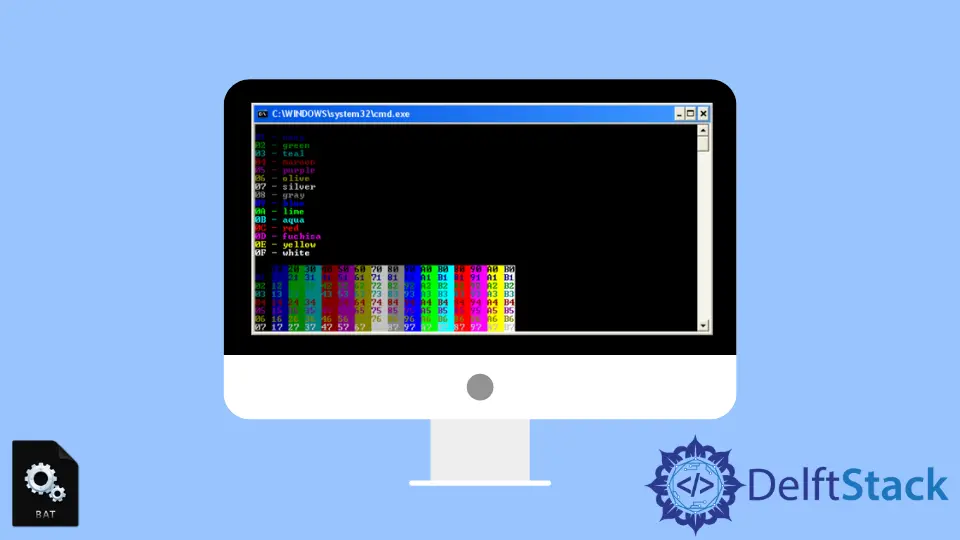
How to Delete Files Older Than N Days Using Batch ScriptUse FORFILES in a Windows Batch script to select files by last-modified age, preview matches, and schedule cleanup safely. Color in Batch ScriptLearn how the Windows COLOR command sets Batch text and background colors, use the hexadecimal color codes, and distinguish messages and errors. How to Run Python File in Batch ScriptThis tutorial covers how to run a Python file in Batch Script, providing step-by-step methods and code examples. Learn how to streamline your workflows by executing Python scripts directly from Batch files, passing arguments, and specifying Python paths. Perfect for developers and automation enthusiasts, this guide will enhance your scripting skills. How to Create a Function in Batch ScriptThis article explains how to define and call label-based subroutines in Windows Batch, pass positional arguments, return results through environment variables, and use exit codes to handle missing input. How to Prompt User Input and Use Results in Batch ScriptThis tutorial teaches you how to prompt user input and utilize the results in batch scripts. Learn to create interactive scripts that enhance user experience by capturing and validating input effectively. Explore practical examples and advanced techniques to automate tasks seamlessly. Step Scope in Spring BatchThis tutorial teaches about working of Step Scope in Spring Batch. The PAUSE Keyword in Batch ScriptThis tutorial explains how PAUSE waits for a key in a Windows batch script, how to display a message before the wait, and how CMD /K keeps the command window open so you can read output. How to Run CMD Commands in Batch ScriptThis tutorial provides a comprehensive guide on how to run CMD commands in a batch script. Learn about batch scripting basics, combining commands, using variables, and implementing conditional logic to automate tasks efficiently in Windows. Discover practical examples and detailed explanations to enhance your scripting skills and streamline your workflow. XCOPY Overwrite in BatchThis tutorial teaches how to use XCOPY in batch to overwrite existing files, including how to overwrite all files without a prompt. How to Sleep or Wait X Seconds in a Bat FileLearn how to pause a batch file for a number of seconds: use the built-in timeout command, or the ping workaround for systems where timeout is unavailable. How to Add Comments in Batch ScriptThis tutorial provides a comprehensive guide on how to add comments in Batch scripts. Learn the available methods, including the REM command and double colons, and why GOTO — which redirects execution — is not a comment method. Discover best practices for writing effective comments that clarify your code for yourself and others. How to Download File From URL in Batch ScriptUse curl from a Windows batch script to download one file or several files to chosen paths, then check whether each transfer succeeded. How to Replace Text From File in Batch ScriptReplace text in a file via a batch for loop with delayed expansion, PowerShell's -replace (UTF-8 output), or a sed port; write to a new file and check it first. If ELSE Condition in Batch ScriptLearn how to write IF ... ELSE conditions in Windows CMD batch files, compare values, nest conditions, and check files. How to Handle Errors in Batch FilesLearn how to check command exit codes in Windows batch files, branch on success or failure, log diagnostic output, and return a useful status. How to Use Batch File to Write to a Text FileLearn how to create or overwrite a text file with a Batch script, append lines, write variables, and save command output. How to Extract or Unzip File in Batch ScriptLearn how to extract or unzip files in batch scripts with this comprehensive tutorial. Discover methods using Windows built-in tools and 7-Zip for efficient file management. Master batch scripting to automate your workflow and save time on repetitive tasks. Perfect for beginners and experienced users alike! How to Run Batch File as AdministratorLearn how to run a batch file as administrator once or configure a shortcut for repeated use. Wait for a Command or Program to Finish in a Windows Batch FileRun commands in order in a Windows batch file: call another batch file with CALL, wait for a STARTed program with START "" /WAIT, and use TIMEOUT only for a delay. The FOR Loop in Batch ScriptsUse the Windows cmd.exe FOR command in batch files to iterate over lists, number ranges, directories, files, parsed text, and command-line arguments. How to Rename a File in a Batch ScriptLearn how to rename one file or a group of files in a Windows batch script with ren, rename, wildcards, paths, variables, and for loops. How to Remove Double Quotes From a Variable in a Batch FileLearn when to use %~1, variable substitution, or FOR /F to remove surrounding or all double quotes in a Windows batch file. How to Delete File Using Batch ScriptLearn how to delete files using Batch Script in this comprehensive tutorial. Discover simple methods like the DEL and ERASE commands for efficient file management. Whether you're automating tasks or cleaning up your system, this guide provides clear examples and explanations to help you master Batch Scripting. How to Declare Variables in Batch ScriptThis tutorial provides a comprehensive guide on how to declare variables in Batch Script. Learn the different methods for defining and using variables, including the set command, delayed expansion, and environment variables. With clear examples and explanations, this article is perfect for both beginners and experienced users looking to enhance their Batch scripting skills.