The $unset Operator in MongoDB
- What is the $unset Operator?
- How to Use the $unset Operator
- Practical Applications of the $unset Operator
- Conclusion
- FAQ
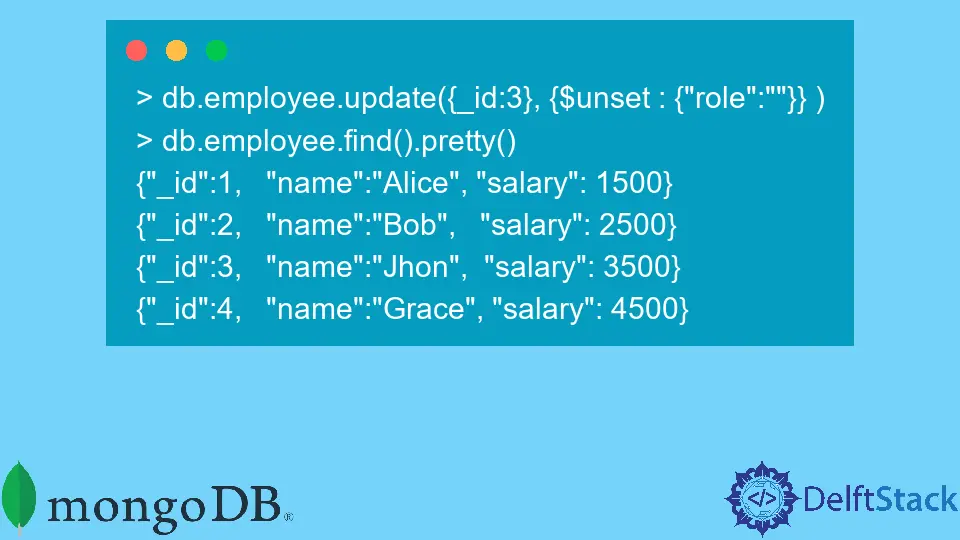
When working with MongoDB, managing your data efficiently is crucial. One of the powerful tools at your disposal is the $unset operator. This operator allows you to remove fields from documents in your MongoDB collections seamlessly. Whether you’re cleaning up outdated data or simply restructuring your documents, understanding how to use $unset can save you a lot of time and effort.
In this article, we will dive deep into the $unset operator, exploring its syntax, practical applications, and how it can enhance your data management strategies in MongoDB. By the end, you’ll be equipped with the knowledge to effectively use the $unset operator in your projects, making your database interactions more efficient and organized.
What is the $unset Operator?
The $unset operator is a MongoDB feature that allows you to delete a specific field from a document. When you use $unset, the specified field is removed entirely, and the document is updated accordingly. This is particularly useful when you need to clear out unnecessary or deprecated fields without deleting the entire document.
For instance, if you have a user profile document and want to remove the age field, you can easily do so using the $unset operator. This operator is versatile and can be used in various scenarios, from cleaning up your database to managing user data effectively.
How to Use the $unset Operator
To utilize the $unset operator, you need to structure your MongoDB update queries correctly. The basic syntax for using $unset is as follows:
db.collection.update(
   { <query> },
   { $unset: { <field1>: "", <field2>: "" } },
   { multi: true }
)
In this syntax:
db.collectionrefers to the MongoDB collection you are working with.<query>is the filter for selecting the documents you want to update.<field1>and<field2>are the fields you wish to remove.
This structure allows you to specify multiple fields to be removed in a single operation, making it efficient for bulk updates.
Example of $unset in Action
Let’s say you have a collection named users and you want to remove the address field from all documents where the status is “inactive”. Here’s how you can do it:
db.users.update(
   { status: "inactive" },
   { $unset: { address: "" } },
   { multi: true }
)
This command will find all documents in the users collection with a status of “inactive” and remove the address field from them. The multi: true option ensures that all matching documents are updated.
Output:
{ "nModified" : 10, "ok" : 1 }
In this output, the nModified field indicates how many documents were updated, confirming the successful removal of the specified field.
Practical Applications of the $unset Operator
Using the $unset operator can streamline your database management tasks. Here are some practical applications:
-
Data Cleanup: If your database contains fields that are no longer relevant, you can quickly remove them using
$unset, ensuring your data remains clean and organized. -
Schema Changes: As your application evolves, you may need to adjust your data schema. The
$unsetoperator allows you to remove fields that are no longer part of your schema, facilitating smoother transitions. -
User Privacy: In applications handling sensitive information, you might want to remove fields like
socialSecurityNumberorcreditCardInfowhen they are no longer needed, thus enhancing user privacy. -
Performance Optimization: Removing unnecessary fields can help reduce the size of documents, which can lead to improved performance when querying your MongoDB collections.
By leveraging the $unset operator, you can maintain a more efficient database, making it easier to manage and access your data.
Conclusion
The $unset operator in MongoDB is a powerful tool for managing your documents by allowing you to remove unnecessary fields with ease. Whether you’re cleaning up your database, adapting to schema changes, or enhancing user privacy, understanding how to use $unset effectively can significantly improve your data management strategies. By following the examples and explanations provided in this article, you can confidently apply the $unset operator in your MongoDB projects, ensuring your data remains relevant and well-structured.
FAQ
-
What does the $unset operator do in MongoDB?
The $unset operator removes a specified field from a document in a MongoDB collection. -
Can I use $unset to remove multiple fields at once?
Yes, you can specify multiple fields to be removed by including them in the $unset object. -
What happens if I use $unset on a field that doesn’t exist?
If you use $unset on a non-existent field, MongoDB will simply ignore it and no error will be thrown. -
Is $unset reversible?
No, once a field is removed using $unset, it cannot be restored unless you have a backup of the data. -
How does $unset affect document size?
Using $unset reduces the document size by removing the specified field, which can lead to improved performance in queries.