HOWTO · jQuery
jQuery Selectors
To be able to add properties and manipulate HTML elements, the instance are taken under consideration. These instances are interchangeably denoted as selectors. The basic jQuery selectors can be of three types - element selector, #id selector and .class selector.
On this page
jQuery has three basic types of selectors to initiate an instance of any HTML element, the element selector, #id selector, and .class selector.
In the following section, we’ll show examples covering these basic selectors and their functions and go through a list of other derived possibilities of selectors.
Use of element selector and #id selector in jQuery
Code Snippet:
<script src="https://code.jquery.com/jquery-3.6.0.min.js" integrity="sha256-/xUj+3OJU5yExlq6GSYGSHk7tPXikynS7ogEvDej/m4=" crossorigin="anonymous"></script>
<script>
$(document).ready(function() {
  $('button').click(function(){
    $('#title').css({'color':'blue'});
});
  });
</script>
</head>
<body>
<p id='title'>Text</p>
<button>Text Change</button>
Output:

In the code above, we have a click event to change the color of the p tags content. We have an id='title' associated with the p tag and a button element to trigger the click event. The button element will be instantiated with an element selector, and the p is fetched via the #id selector.
Use of class selector in jQuery
Code Snippet:
<script src="https://code.jquery.com/jquery-3.6.0.min.js" integrity="sha256-/xUj+3OJU5yExlq6GSYGSHk7tPXikynS7ogEvDej/m4=" crossorigin="anonymous"></script>
<script>
$(document).ready(function() {
    $('.x:even').css({'color':'red'});
});
</script>
</head>
<body>
<p class='x'>Text</p>
<p class='x'>Text</p>
<p class='x'>Text</p>
<p class='x'>Text</p>
<p class='x'>Text</p>
<p class='x'>Text</p>
Output:
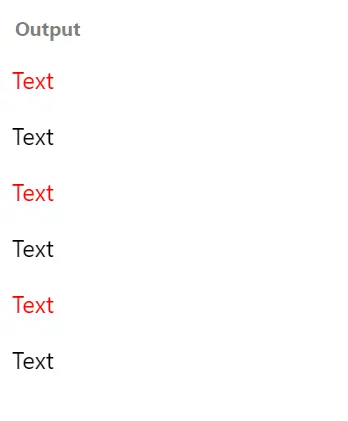
We considered some p tags followed by the similar class x, and we manipulated them via the .class selector, making the contents easier to understand.
The even positioned p tags have been colored red, and the property was triggered when we considered the .class selector.
jQuery Selectors
The other selectors in the following segment make handling the web content effortless.
| Selectors | Description |
|---|---|
$(':button') |
This implied all the <button> elements and also the <input> elements with the button type. |
$('class/element/id:even/odd') |
This implies a specific selector and the even or odd positioned contents. |
$('p.x') |
This implies a p tag followed by class x. |
$('*') |
This implies all element. |
$(this) |
This implies the current HTML element. |
$('p:first') |
This implies first element of p tag. |
$('ul li:first') |
This implies first li of first ul. |
$('ul li:first-child') |
This implies first li of all ul. |
$('[href]') |
This implies all elements with href. |