HOWTO · Tkinter
How to Create Dropdown Menu in Tkinter
This tutorial shows how to create drop down menu in Tkinter
It has some methods to create a dropdown menu in Tkinter.
- Use Combobox as introduced in the Tkinter tutorial Combobox chapter.
- Use
OptionMenuWidget.
The OptionMenu is similar to the Combobox widget but is already included in the Tkinter itself; therefore, you don’t need to import ttk module like in the case of Combobox.
We will introduce how to create a dropdown menu with the OptionMenu widget in this article.
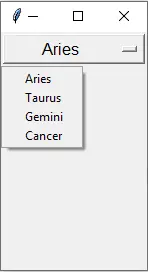
Tkinter OptionMenu Example
import tkinter as tk

OptionList = ["Aries", "Taurus", "Gemini", "Cancer"]

app = tk.Tk()

app.geometry("100x200")

variable = tk.StringVar(app)
variable.set(OptionList[0])

opt = tk.OptionMenu(app, variable, *OptionList)
opt.config(width=90, font=("Helvetica", 12))
opt.pack()

app.mainloop()
opt = tk.OptionMenu(app, variable, *OptionList)
app is the parent of the created option menu,
variable is the initial text variable that has tk.StringVar type.
*OptionList is the other menu options. * is used for unpacking the container as list type here.
Bind Command to OptionMenu When Value Changes
OptionMenu couldn’t link a command when a new value is selected from the option list. You couldn’t simply link a callback function to it like button widget
tk.Button(app, text="Increase", width=30, command=change_label_number)
You need to use a trace method to attach observer callbacks to the OptionMenu variable. Every time the variable changes, it triggers the callback functions.
OptionMenu Callback Example
import tkinter as tk

OptionList = ["Aries", "Taurus", "Gemini", "Cancer"]

app = tk.Tk()

app.geometry("100x200")

variable = tk.StringVar(app)
variable.set(OptionList[0])

opt = tk.OptionMenu(app, variable, *OptionList)
opt.config(width=90, font=("Helvetica", 12))
opt.pack(side="top")



labelTest = tk.Label(text="", font=("Helvetica", 12), fg="red")
labelTest.pack(side="top")


def callback(*args):
    labelTest.configure(text="The selected item is {}".format(variable.get()))


variable.trace("w", callback)

app.mainloop()
The trace observer has three modes,
observer mode |
Explanation |
|---|---|
w |
when variable is written by someone |
r |
when variable is read by someone |
u |
when variable is deleted |
Then variable.trace("w", callback) means it will call callback function when variable is written or selected by the user.