
HOWTO · MongoDB
The in Operator in MongoDB
This MongoDB tutorial will tell you what is $in operator MongoDB and what is the syntax of $in operator in MongoDB. It is explained that how you can use $in operator to match values in database collection and how you can use it to update records in database.
On this page
This MongoDB tutorial article will discuss the problem of using the $in operator in MongoDB.
IN Operator ($in) in MongoDB
MongoDB comes with many operators that are used for a range of tasks. The $in operator allows you to locate documents precisely, and the find() and update() methods can be used with this operator.
The $in operator compares the values of a field with the provided value in the array to choose a document inside a collection. If the value of a document’s field is an array, MongoDB’s $in operator will choose only those documents whose fields include an array with at least one item that matches the provided value.
Syntax:
{ field: { $in: [<value1>, <value2>, ... <valuen> ] }
Use the $in Operator in MongoDB to Match Values
Suppose you have a fruits store database management system and have a database where all data of your fruit items like their prices, quantity, weight, etc., is stored. We’ll discuss how to extract documents whose results match based on a given value in the following.
First, start your MongoDB server and pass the command below to list all your databases and use your database.
Command:
show dbs
use data
Let’s list out all the documents in the collection you have. You can then use the $in operator on them to filter out based on specific values.
db={
  "data": [
    {
      "_id": ObjectId("6034fd2bf74cfd0438bdb19b"),
      "onSale": false,
      "name": "Orange",
      "price": 500,
      "weight": "1 kilograms",
      "__v": 0
    },
    {
      "_id": ObjectId("603502ba24df1c2350e676e7"),
      "onSale": false,
      "name": "Banana",
      "price": 350,
      "weight": "2 dozen",
      "__v": 0
    },
    {
      "_id": ObjectId("603502ba24df1c2350e676e8"),
      "onSale": false,
      "name": "Apple",
      "price": 125,
      "weight": "500 grams",
      "__v": 0
    },
    {
      "_id": ObjectId("603502ba24df1c2350e676e9"),
      "onSale": false,
      "name": "Mango",
      "price": 300,
      "weight": "4 kilograms",
      "__v": 0
    }
  ]
}
Update Documents Using the $in Operator in MongoDB
Use the update() method on the documents to update the values of some documents.
db={
  "data": [
    {
      "_id": ObjectId("6034fd2bf74cfd0438bdb19b"),
      "onSale": false,
      "name": "Orange",
      "price": 500,
      "weight": "1 kilograms",
      "__v": 0
    },
    {
      "_id": ObjectId("603502ba24df1c2350e676e7"),
      "onSale": false,
      "name": "Banana",
      "price": 350,
      "weight": "2 dozen",
      "__v": 0
    },
    {
      "_id": ObjectId("603502ba24df1c2350e676e8"),
      "onSale": false,
      "name": "Apple",
      "price": 125,
      "weight": "500 grams",
      "__v": 0
    },
    {
      "_id": ObjectId("603502ba24df1c2350e676e9"),
      "onSale": false,
      "name": "Mango",
      "price": 300,
      "weight": "4 kilograms",
      "__v": 0
    }
  ]
}
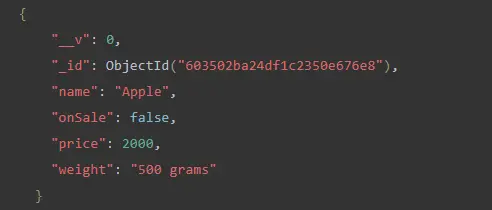
If you want to change the price of the fruit "Apple". You can pass this query to change the price of "Apple" to "200".
Query:
db.data.update({
  name: {
    $in: [
      "Apple"
    ]
  }
},
{
  $set: {
    price: 200
  }
})
After using the find() method, you will get the result below. The price of "Apple" was updated from 125 to 200 using the $in operator in the update() method.
Output:
Through this MongoDB tutorial article, you have learned what the $in operator is, how you can utilize the $in operator to match values in collections of databases, and how to update or edit the given collection in the database.