
HOWTO · Linux
How to Read CPU Flags From Cpuinfo
Learn how to read Linux CPU information and interpret the flags reported by the running system.
On this page
Linux exposes processor information in /proc/cpuinfo. You can display it, find the reported CPU flags, and use a few examples to understand what the system reports. The exact fields and flag names depend on the processor, architecture, kernel, and whether Linux is running in a virtual machine.
Read /proc/cpuinfo
Run this example:
cat /proc/cpuinfo
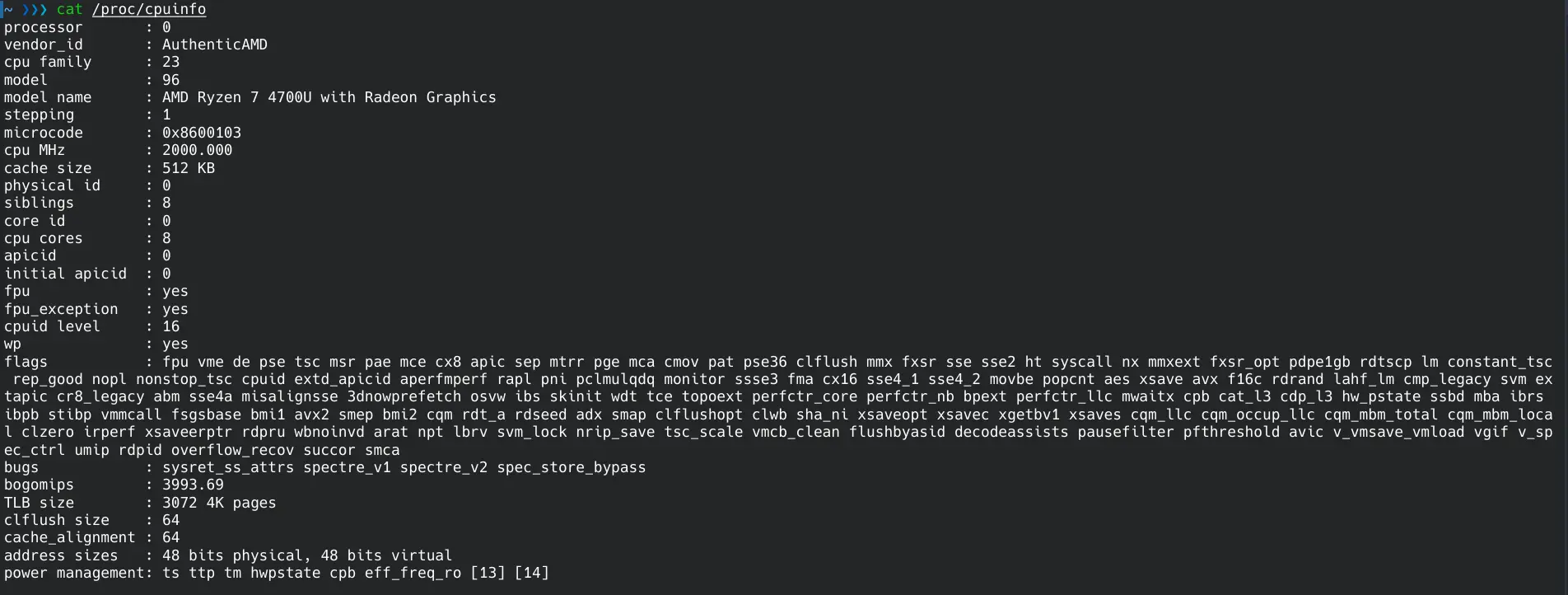
This prints the file as selectable text in a terminal. The supplied runtime execution successfully ran this command on a different system; its output varies between systems. The terminal image shows a separate AMD Ryzen system’s output, not the runtime execution.
Identify the fields in the output
The file commonly contains a block of fields for each logical processor. processor identifies a logical processor entry; it is not a count of physical cores. vendor_id and model name identify the reported processor family and model, while cpu MHz is a reported frequency value and can change with power management. Fields such as cache size, address sizes, and cpu cores may be present, but their availability and interpretation vary by architecture and kernel. Do not assume every line is meaningful on every machine.
On a multicore system, repeated blocks are normal. Read the processor values to see the logical entries Linux exposes, and use cpu cores only as a value reported by that system. These fields alone do not reliably describe the number of sockets or the complete physical topology.
Find and interpret CPU flags
In x86 output, look for the flags field; on some other architectures, a similar list is named Features. To locate a representative list, you can search the file with grep -m1 -E '^(flags|Features)[[:space:]]*:' /proc/cpuinfo. The names after the colon are space-separated identifiers, not descriptions. Their spelling is part of the processor and kernel interface, so keep names such as sse4_2, avx, and lm unchanged when searching documentation or comparing systems.
For example, lm denotes long mode support on x86, and sse4_2 and avx identify instruction-set extensions. A flag is a concise capability name, not a performance rating. Use the exact flag list from the machine you care about; another processor, virtual machine, or architecture may report a different set. The Linux kernel’s x86 CPU feature definitions for version 4.1.3 can help interpret names in that version, but it is not a current exhaustive catalog.
Understand the limits of CPU flag output
/proc/cpuinfo describes information Linux exposes for the running system. A virtual machine may show a filtered set of host capabilities, and kernels can expose architecture-specific names or differ in which fields they provide. A listed instruction-set feature also does not prove that a particular program uses it: software may need operating-system support, suitable compiler settings, or runtime feature detection.
Use the flags as evidence about reported capabilities, then check the processor, kernel, virtualization setup, and application’s own requirements before relying on a feature. They cannot tell you by themselves how fast a workload will run, whether software selected an optimized code path, or whether every logical processor offers the same usable feature set.
