HOWTO · Kotlin
Difference Between Open and Public Keywords in Kotlin
This article will introduce the use of Kotlin open and public keywords. We will also learn about the open keyword in details with suitable examples.
On this page
Kotlin allows using the open and public keywords for different purposes. Since they have different uses, we should not confuse them with each other.
The open keyword symbolizes open for extension. With the open keyword, any other class can inherit from this class.
On the other hand, the public keyword is an access modifier. It is the default access modifier in Kotlin.
Let’s learn about them in detail.
Kotlin open Keyword
As mentioned, the Kotlin open keyword allows an extension. In comparison to Java, we can think of it as a keyword that works opposite to Java final.
The Java final keyword is used with classes and methods to prevent extension. It prevents overriding methods and extensions in classes.
Having the final keyword is to extend Java classes easily.
But when it comes to Kotlin, they are by default final. It means that the default Kotlin classes do not allow extension.
Hence, we can use the open keyword to make a Kotlin method overridable and a class extendable.
Extend Kotlin Class Without Using the Open Keyword
We will try to extend a class without declaring it with the open keyword in the example.
class parent
class child:parent()
fun main() {
    println("Welcome!")
}
Output:

As we can see, the compiler throws an error as we haven’t declared the class open.
Extend Kotlin Class Using the open Keyword
We will use the open keyword to extend the class.
open class parent
class child:parent()
fun main() {
    println("Welcome!")
}
Output:

Use the open Keyword With Functions and Variables
Like the classes, even functions and variables are, by default, like Java final in nature. Hence, we need to use the Kotlin open keyword to make them accessible and overridable.
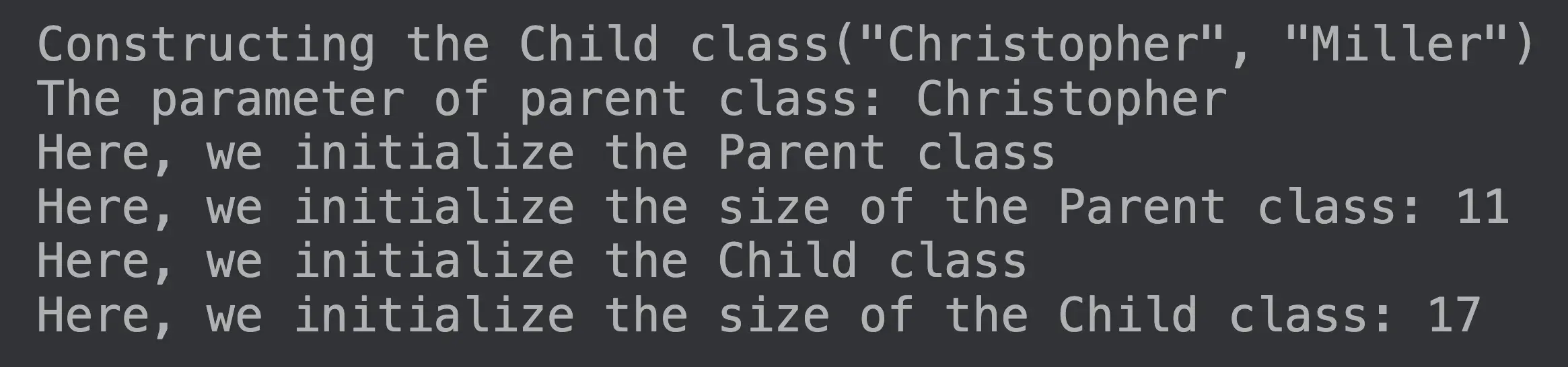
Here’s an example of using the Kotlin open keyword with classes and variables.
open class Parent(val first_name: String) {

    init { println("Here, we initialize the Parent class") }

    open val size: Int =
        first_name.length.also { println("Here, we initialize the size of the Parent class: $it") }
}

class Child(
    first_name: String,
    val last_name: String,
) : Parent(first_name.replaceFirstChar { it.uppercase() }.also { println("The parameter of parent class: $it") }) {

    init { println("Here, we initialize the Child class") }

    override val size: Int =
        (super.size + last_name.length).also { println("Here, we initialize the size of the Child class: $it") }
}

fun main() {
    println("Constructing the Child class(\"Christopher\", \"Miller\")")
    Child("Christopher", "Miller")
}
Output:
Kotlin public Keyword
The public keyword is a visibility modifier. The other modifiers are private, protected, and internal.
The public keyword enables any client who sees the declaring class to view its public members.
public is the default declaration in Kotlin. Hence, if we don’t specify anything specific, the member functions and variables are publicly accessible.