HOWTO · jQuery
jQuery 제거 클래스
이 튜토리얼은 jQuery에서 클래스 이름을 제거하는 방법을 보여줍니다.
이 페이지의 내용
jQuery의 removeclass() 메소드는 단일 또는 다중 클래스 이름을 제거합니다. 이 튜토리얼은 jQuery에서 removeclass() 메소드를 사용하는 방법을 보여줍니다.
jQuery 제거 클래스
removeclass() 메서드는 요소 그룹 또는 일치하는 요소 집합에서 각 HTML 요소의 단일 클래스 또는 여러 클래스를 제거합니다. 이 방법은 클래스 수에 따라 여러 가지 방법으로 사용할 수 있습니다.
아래 구문을 참조하세요.
// Method 1:
removeClass(ClassName)

// Method 2:
removeClass(ClassNames)

// Method 3:
removeClass(function)
Function(Integer index, String className) => String

// Method 4:
removeClass(function)
Function(Integer index, String className) => String | Array
- 방법 1은 일치하는 모든 요소의 class 속성을 사용하여 공백으로 구분된 하나 이상의 클래스를 제거합니다.
ClassName매개변수는 이 메소드의 문자열입니다. - 방법 2는 일치하는 요소 집합에서 여러 클래스를 제거합니다.
ClassNames매개변수는 이 메소드의 배열입니다. - 방법 3은 함수에서 반환되는 공백으로 구분된 하나 이상의 클래스를 제거합니다. 이 메소드는 세트에 있는 요소의 인덱스를 수신하고 이전 클래스 값은 인수로 사용됩니다.
- 방법 4는 함수에서 반환되는 공백으로 구분된 하나 이상의 클래스를 제거합니다.
className은 문자열 또는 클래스 배열일 수 있습니다. 이 메서드는 집합에 있는 요소의 인덱스도 수신하고 이전 클래스 값은 인수로 사용됩니다.
removeClass() 메소드에 대한 예제를 시도해 보겠습니다.
<!doctype html>
<html lang="en">
<head>
    <meta charset="utf-8">
    <title>jQuery removeClass</title>
    <style>
    p {
        font-weight: bolder;
    }
    .FontSize {
        font-size: 25px;
    }
    .UnderLine {
        text-decoration: underline;
    }
    .Highlight {
        background: lightgreen;
    }
    </style>
    <script src="https://code.jquery.com/jquery-3.5.0.js"></script>
</head>
<body>

    <p class="FontSize UnderLine">Hello</p>
    <p class="FontSize UnderLine Highlight">This</p>
    <p class="FontSize UnderLine Highlight">is</p>
    <p class="FontSize UnderLine">Delftstack</p>
    <p class="FontSize UnderLine">Site</p>

    <script>
    $( "p" ).even().removeClass( "FontSize" );
    </script>

</body>
</html>
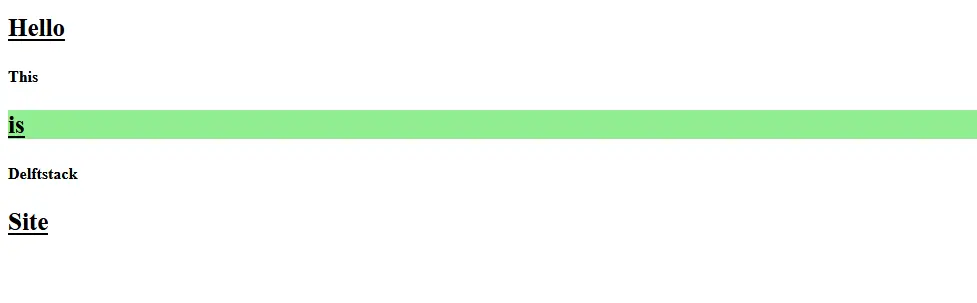
위의 코드에는 FontSize, UnderLine 및 Highlight를 포함하여 둘 이상의 공백으로 구분된 클래스가 있는 여러 단락이 포함되어 있습니다. 코드는 짝수 단락에서 FontSize 클래스를 제거합니다.
출력 참조:
둘 이상의 공백으로 구분된 클래스를 제거하려면 아래 예를 참조하세요.
<!doctype html>
<html lang="en">
<head>
    <meta charset="utf-8">
    <title>jQuery removeClass</title>
    <style>
    p {
        font-weight: bolder;
    }
    .FontSize {
        font-size: 25px;
    }
    .UnderLine {
        text-decoration: underline;
    }
    .Highlight {
        background: lightgreen;
    }
    </style>
    <script src="https://code.jquery.com/jquery-3.5.0.js"></script>
</head>
<body>

    <p class="FontSize UnderLine">Hello</p>
    <p class="FontSize UnderLine Highlight">This</p>
    <p class="FontSize UnderLine Highlight">is</p>
    <p class="FontSize UnderLine">Delftstack</p>
    <p class="FontSize UnderLine">Site</p>

    <script>
    $( "p" ).even().removeClass( "FontSize UnderLine Highlight" );
    </script>

</body>
</html>
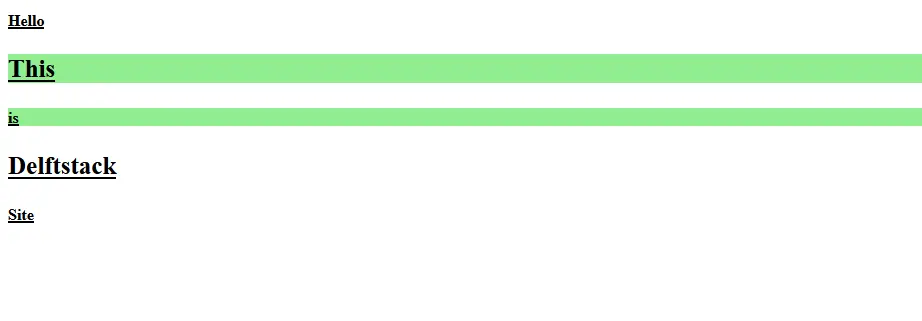
마찬가지로 removeClass 메소드에서 공백으로 구분된 클래스 이름을 지정하여 여러 클래스를 제거할 수 있습니다. 출력 참조:
위의 코드는 짝수 단락에서 FontSize, UnderLine 및 Highlight 클래스를 제거했습니다.
이제 배열을 사용하여 여러 클래스를 제거해 보겠습니다. 예를 참조하십시오.
<!doctype html>
<html lang="en">
<head>
    <meta charset="utf-8">
    <title>jQuery removeClass</title>
    <style>
    p {
        font-weight: bolder;
    }
    .FontSize {
        font-size: 25px;
    }
    .UnderLine {
        text-decoration: underline;
    }
    .Highlight {
        background: lightgreen;
    }
    </style>
    <script src="https://code.jquery.com/jquery-3.5.0.js"></script>
</head>
<body>

    <p class="FontSize UnderLine">Hello</p>
    <p class="FontSize UnderLine Highlight">This</p>
    <p class="FontSize UnderLine Highlight">is</p>
    <p class="FontSize UnderLine">Delftstack</p>
    <p class="FontSize UnderLine">Site</p>

    <script>
    $( "p" ).even().removeClass( ["FontSize", "UnderLine", "Highlight"] );
    </script>

</body>
</html>
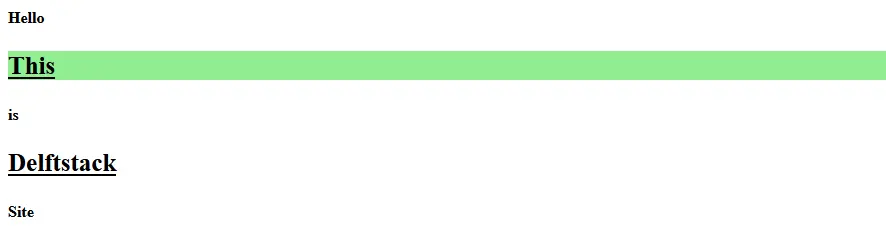
위의 코드는 예제 2와 동일한 출력을 갖게 됩니다. 이 예제에서 동일한 다중 클래스가 removeclass 메서드에 대한 배열로 제공되기 때문입니다. 출력 참조:
매개변수가 없는 removeClass 클래스는 주어진 요소에서 모든 클래스를 제거합니다. 예를 참조하십시오.
<!doctype html>
<html lang="en">
<head>
    <meta charset="utf-8">
    <title>jQuery removeClass</title>
    <style>
    p {
        font-weight: bolder;
    }
    .FontSize {
        font-size: 25px;
    }
    .UnderLine {
        text-decoration: underline;
    }
    .Highlight {
        background: lightgreen;
    }
    </style>
    <script src="https://code.jquery.com/jquery-3.5.0.js"></script>
</head>
<body>

    <p class="FontSize UnderLine">Hello</p>
    <p class="FontSize UnderLine Highlight">This</p>
    <p class="FontSize UnderLine Highlight">is</p>
    <p class="FontSize UnderLine">Delftstack</p>
    <p class="FontSize UnderLine">Site</p>

    <script>
    $( "p" ).odd().removeClass( );
    </script>

</body>
</html>
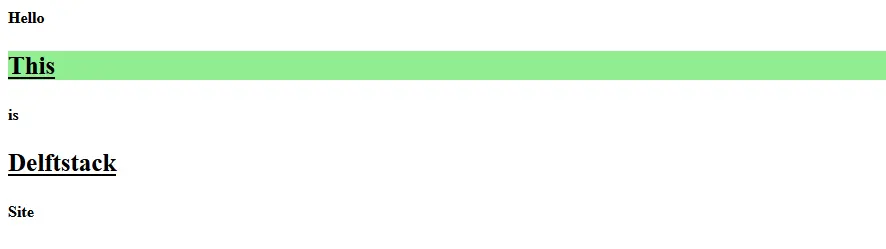
위의 코드는 홀수 단락에서 모든 클래스를 제거합니다. 출력 참조:
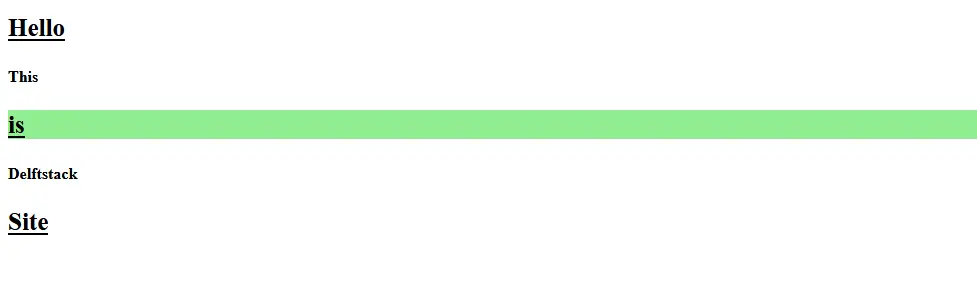
마지막으로 function을 매개변수로 사용하는 removeClass 예제입니다. 예를 참조하십시오.
<!doctype html>
<html lang="en">
<head>
    <meta charset="utf-8">
    <title>jQuery removeClass</title>
    <style>
    p {
        font-weight: bolder;
    }
    .FontSize {
        font-size: 25px;
    }
    .UnderLine {
        text-decoration: underline;
    }
    .Highlight {
        background: lightgreen;
    }
    </style>
    <script src="https://code.jquery.com/jquery-3.5.0.js"></script>
</head>
<body>

    <p class="FontSize UnderLine">Hello</p>
    <p class="FontSize UnderLine Highlight">This</p>
    <p class="FontSize UnderLine Highlight">is</p>
    <p class="FontSize UnderLine">Delftstack</p>
    <p class="FontSize UnderLine">Site</p>

    <script>
    $( "p" ).odd().removeClass(function(){
           return $(this).attr( "class" );
		   });
    </script>

</body>
</html>
위의 코드는 홀수 단락에서 모든 클래스를 제거합니다. 출력 참조: