HOWTO · MySQL
How to Get the Size of MySQL Database
This tutorial demonstrates how to find the size of a MySQL database.
On this page
There are two quick ways to check how large a MySQL database is: query the information_schema.TABLES metadata view with a SELECT statement, or read the estimate that MySQL Workbench shows in its Schema Inspector. Both report the space used by a database’s table data and indexes, so you can pick whichever fits your workflow.
Get a MySQL database size with SQL
MySQL tracks per-table storage statistics in the information_schema.TABLES view. Adding DATA_LENGTH and INDEX_LENGTH for every table in a schema gives that schema’s reported size. Run this query on your MySQL server, replacing 'your_database_name' with the schema you want to measure:
SELECT TABLE_SCHEMA AS `database`, ROUND(SUM(DATA_LENGTH + INDEX_LENGTH) / 1024 / 1024, 2) AS `size_mb` FROM information_schema.TABLES WHERE TABLE_SCHEMA = 'your_database_name' GROUP BY TABLE_SCHEMA;
DATA_LENGTH holds the bytes occupied by each table’s data and INDEX_LENGTH the bytes used by its indexes, while the division converts the byte total into megabytes. The GROUP BY TABLE_SCHEMA clause keeps the statement valid under the default ONLY_FULL_GROUP_BY SQL mode, which MySQL has enforced since version 5.7. Because the query reads live server metadata, it has to run against a real MySQL instance rather than as a standalone script, and the number it returns depends on the data actually stored in your database.
To see every database on the server instead of just one, drop the WHERE clause so the grouping covers all schemas:
SELECT TABLE_SCHEMA AS `database`, ROUND(SUM(DATA_LENGTH + INDEX_LENGTH) / 1024 / 1024, 2) AS `size_mb` FROM information_schema.TABLES GROUP BY TABLE_SCHEMA;
Interpret the reported size
The figure is a metadata-based estimate of logical data size: table contents plus secondary indexes for every table in the named schema. It is not the database’s total footprint on disk. MySQL also keeps binary logs, undo and redo logs, temporary files, and shared tablespace overhead outside the per-table counts, so measuring the data directory directly usually reports more bytes than this query.
A few details help when reading the result:
- The all-schemas version includes the built-in
mysql,sys, andinformation_schemaschemas; exclude them in theWHEREclause if you only want user databases. - If the name in
WHERE TABLE_SCHEMA = ...matches no schema — after a typo, for instance — the query returns an empty result set rather than a0orNULLrow, because no group is formed. - InnoDB statistics are approximate and can lag behind recent bulk inserts or deletes; running
ANALYZE TABLEon the relevant tables refreshes them.
Treat the number as a close estimate for capacity planning and comparisons between databases rather than an exact byte count.
Find a database size in MySQL Workbench
If you prefer a GUI, MySQL Workbench surfaces the same estimate without writing any SQL.
-
Start MySQL Workbench and connect to your server with an account that can view the schema. Root access is not required; any user that can see the schema works.
-
In the
Navigatorpanel on the left, open theSchemastab and locate the schema you want to measure. -
Right-click the schema name and choose
Schema Inspector.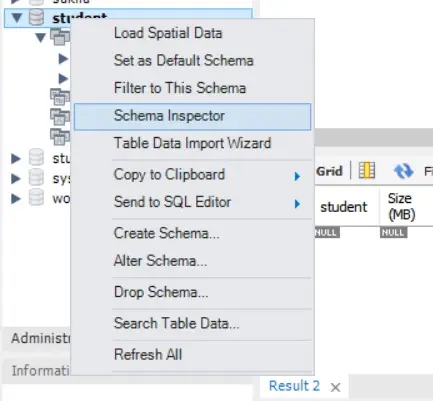
-
In the
Infotab, read the reported size, which is the same data-plus-index estimate the SQL query returns.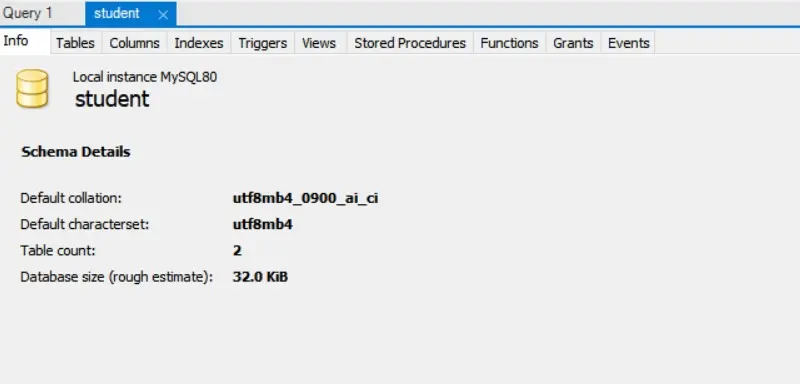
Both methods report the same metadata estimate, so use the query for scripts and repeatable checks and MySQL Workbench when a quick visual inspection is enough.