Logical OR Operator in Bash Script
- Understanding the Logical OR Operator
-
Logical
OROperator (||) With Non-Boolean Values -
Use Logical
OROperator (||) in Bash Scripting - Conclusion
- FAQ

When working with Bash scripts, understanding how to utilize logical operators is crucial for effective programming. One of the most important operators is the logical OR operator. This operator allows you to execute commands based on multiple conditions, improving the flexibility and efficiency of your scripts. Whether you’re checking for the existence of files or managing different command outcomes, knowing how to use the logical OR operator can save you time and effort.
In this article, we will explore the logical OR operator in Bash scripts. We will focus on its syntax, practical applications, and provide examples that illustrate its use in real-world scenarios. By the end of this article, you will have a solid understanding of how to implement this operator effectively in your Bash scripts, enhancing your scripting capabilities.
Understanding the Logical OR Operator
The logical OR operator in Bash is represented by two vertical bars ||. This operator evaluates conditions in a way that if the first condition is false, it will check the second condition. If either condition evaluates to true, the command following the operator will be executed. This is particularly useful in scenarios where you want to perform an action based on multiple potential conditions.
Let’s give a few examples.
True  || False --> True
False || True  --> True
True  || True  --> True
False || False --> False
Logical OR Operator (||) With Non-Boolean Values
The return value will not be a boolean if the logical OR operator (||) is used with non-boolean values like strings and numbers. Consider the example below.
param1 || param2 || param3
If the boolean value of param1 is true, it returns the value of this operand, and the other operands are ignored. Otherwise, param2 is checked.
If its boolean value is true, the result is the value of param2, and the rest of the operands are ignored. This process continues until the last operand.
If the boolean value of the last operand is also not true, the result is the last operand’s value.
The boolean value of the following expressions is false. The rest is true.
0NaNnullundefined"",''(Empty string)
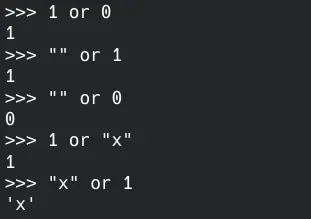
Let’s give examples for non-boolean values.
1   || 0   --> 1
""  || 1   --> 1
""  || 0   --> 0
1   || "x" --> 1
"x" || 1   --> "x"
Use Logical OR Operator (||) in Bash Scripting
The logical OR operator (||) is the same in Bash scripting. Now, we will examine the example with Bash scripting syntax.
if [ 1 -eq 2 ] || [ 1 -eq 1 ]; then
        echo "The result of the operation is true"
else
        echo "The result of the operation is false"
fi
In the above if block, the operands are given to the logical OR operator (||). The result is false in the first comparison because 1 and 2 are not equal.
Since the two values are the same in the second comparison, they are equal, resulting in true. So, our process becomes false || true. This operation returns true, and the first echo command runs as we explained above.

We can also use the -o flag for this operation.
if [ 1 -eq 2 -o 3 -eq 4 ]; then
        echo "The result of the operation is true"
else
        echo "The result of the operation is false"
fi
The logic of this code is the same as the first one. But this time, the result of the operation will be false as both comparisons are false. So, the echo command inside the else block runs.

Conclusion
Mastering the logical OR operator in Bash scripts is essential for anyone looking to enhance their scripting skills. By leveraging this operator, you can create more efficient and readable scripts that handle multiple conditions seamlessly. Whether you’re checking for file existence or managing service states, the logical OR operator provides a straightforward solution to common scripting challenges.
As you continue to explore the capabilities of Bash scripting, remember that operators like the logical OR can significantly streamline your code. Embrace these tools to improve your scripting efficiency and effectiveness.
FAQ
-
What is the logical OR operator in Bash?
The logical OR operator in Bash is represented by||and allows you to execute commands based on multiple conditions. -
How can I check if multiple files exist in Bash?
You can use the logical OR operator to check multiple files by combining conditions like[ -f file1 ] || [ -f file2 ]. -
Can I use the logical OR operator with other commands?
Yes, the logical OR operator can be used with various commands to create complex scripts that check conditions and execute commands accordingly. -
What is the benefit of using the logical OR operator in scripts?
The logical OR operator simplifies code, reduces nesting of conditional statements, and enhances script readability and maintainability. -
Is the logical OR operator only used for checking file existence?
No, the logical OR operator can be used in various scenarios, including checking service statuses, user inputs, and more.

Yahya Irmak has experience in full stack technologies such as Java, Spring Boot, JavaScript, CSS, HTML.
LinkedIn