
HOWTO · C++
How to Copy a Vector Container Object in C++
This article demonstrates how to copy a vector container object in C++.
Vectors are versatile data structures in C++ that provide dynamic array-like functionality.
Whether you’re working on a small project or a large-scale application, the need to copy vectors arises frequently. Copying a vector allows you to manipulate data without altering the original, making it an important skill for C++ developers.
In this article, we will explore various methods for copying vectors in C++. We will delve into standard library functions, user-defined functions, and modern techniques like the copy constructor and the std::vector assignment operator.
Use the Iterative Method to Copy a Vector in C++
A general method for copying a vector is by making use of a loop to push the elements of the old vector back into a new vector using the push_back() function. We should note that this is one of those rare methods that can implement deep copying of a vector.
This function, which is a pre-defined function in C++, is utilized to load up elements at the end of the given vector. In other words, the elements are pushed from the back into the vector.
The push_back() function is declared inside the <bits/stdc++.h> and the <vector> header files. The syntax for this particular function is as follows:
vector.push_back(value);
In the above syntax, the term vector represents the vector to which we have to add elements. This function contains only one parameter, which is the value parameter as seen above, and is utilized to specify the value that needs to be pushed inside at the back of the specified vector.
Consider the following code example:
#include <iostream>
#include <vector>
using namespace std;

int main() {
  vector<int> v1{1, 3, 5, 7};
  vector<int> v2;

  for (int i = 0; i < v1.size(); i++) v2.push_back(v1[i]);

  cout << "Elements of old vector : ";
  for (int i = 0; i < v1.size(); i++) cout << v1[i] << " ";
  cout << endl;

  cout << "Elements of new vector: ";
  for (int i = 0; i < v2.size(); i++) cout << v2[i] << " ";
  cout << endl;

  v1[0] = 2;

  cout << "The old vector's first element :";
  cout << v1[0] << endl;
  cout << "The new vector's first element :";
  cout << v2[0] << endl;

  return 0;
}
In the above code, v1 specifies the original vector, and v2 defines the vector in which we need to add the elements by copying it from v1. The push_back() function is then utilized along with a simple for loop as multiple elements are copied from the v1 vector.
The code proceeds to add the copied elements into v2 and displays them.
Output:
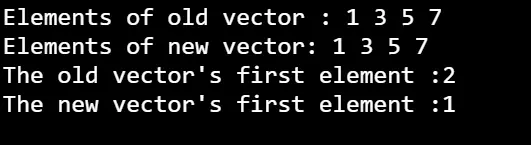
As seen in the output above, the push_back() function successfully copies the contents of the v1 vector into the v2 vector. The code also changes the first element of the v1 vector, which, in this case, does not change the value of the v2 vector.
Note: Here, we can observe that a change in the value of one vector did not alter the value of another vector, leading us to assume that both vectors do not exist by having the same address, which is proof enough that the process that is being carried out is, in fact, a deep copy operation.
Use the Initializer List Notation to Copy a Vector Container Object in C++
Initializer list notation in C++ is not limited to just initializing data members; it also offers a concise and expressive way to copy the contents of one vector into another. This notation streamlines the process of creating a new vector by specifying the range of elements to be copied from an existing vector.
Syntax:
Constrname(datatype value1, datatype value2)
    : datamember(value1), datamember(value2)
In the context of copying vectors, the syntax involves using the std::vector type and passing the begin and end iterators of the original vector within braces {}.
std::vector<int> destinationVector = {sourceVector.begin(), sourceVector.end()};
Here, sourceVector represents the original vector from which elements are to be copied, and destinationVector is the new vector being created.
It’s crucial to note that the initializer list does not conclude with a semicolon.
The std::vector is the core data structure provided in the STL containers library. It implements dynamically sized array elements, which are stored contiguously. Memory management is done automatically as the user adds or removes elements from the array.
We can make a copy of the vector object using the initializer list notation when constructing a new variable of the std::vector type. Note that we just need to pass the begin and end iterators of the original vector object that needs to be copied into a new object.
Using the same notation, you can extract any sub-vector of the object by specifying the corresponding iterators as the arguments in the braces.
Let us consider an example code:
#include <iostream>
#include <vector>

using std::copy;
using std::cout;
using std::endl;
using std::vector;

template <typename T>
void printVector(std::vector<T> v) {
  for (const auto &item : v) {
    cout << item << "; ";
  }
  cout << endl;
}

int main() {
  vector<int> vec1 = {23, 43, 324, 222, 649, 102, 40, 304};

  vector<int> vec1_c = {vec1.begin(), vec1.end()};
  vector<int> vec1_cc = {vec1.begin(), vec1.end() - 4};

  printVector(vec1_c);
  printVector(vec1_cc);

  return EXIT_SUCCESS;
}
In the above code, we make use of the original vector vec1 that we already defined to copy the elements to two fresh vectors, vec1_c and vec1_cc. The first copy, or the vec1_c vector copies all eight elements, while the vec1_cc1 copies the first four elements from the original vector.
Output:
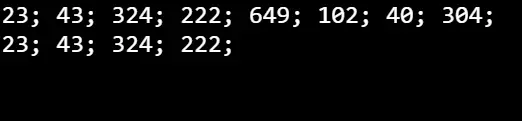
As we can see in the output above, both vec1_c and vec1_cc are displayed, which contain eight and four elements, respectively.
Use the std::copy Algorithm to Copy a Vector Container Object in C++
Another method to copy the std::vector object is to invoke the std::copy function from the STL algorithms library. It provides the generic copy operation for range-based objects.
To use the C++ STL std::copy() function, you simply need to define the <bits/stdc++.h> header file. The syntax for this particular function is as follows.
std::copy(iterator source_begin, iterator source_end, iterator target_begin);
Parameters:
iterator source_begin, iterator source_end: This marks the starting and the ending point of the source container.iterator target_begin: This marks the beginning position of the iterator of the target container.
The function has multiple overloads, but the overload utilized in the following code snippet takes three iterator arguments. The first two specify the original vector range, while the third iterator indicates the beginning of the destination vector range.
Let us take a look at the example code below:
#include <iostream>
#include <vector>

using std::copy;
using std::cout;
using std::endl;
using std::vector;

template <typename T>
void printVector(std::vector<T> v) {
  for (const auto &item : v) {
    cout << item << "; ";
  }
  cout << endl;
}

int main() {
  vector<int> vec1 = {23, 43, 324, 222, 649, 102, 40, 304};

  vector<int> vec1_c(vec1.size());
  copy(vec1.begin(), vec1.end(), vec1_c.begin());
  printVector(vec1_c);

  return EXIT_SUCCESS;
}
The above code makes use of the std::copy algorithm and takes in the original vector vec1 to copy the elements to the newly created vector vec1_c.
Output:

The output above displays the contents of the vector vec1_c, which are copied from the vector vec1.
Use the Copy Assignment Operator to Copy a Vector in C++
Alternatively, you can use the copy assignment operator to copy the contents of the std::vector container object. This notation is the most concise solution for this problem.
As the copy assignment operator is a non-static and non-template member, it has multiple forms. Let us consider an operator of class A; it can have either of the following forms.
A::operator=(A) A::operator=(A&) A::operator=(const A&) A::operator=(
    volatile A&) A::operator=(const volatile A&)
This method is relatively simple, as we just need to assign the variable of the original vector to the newly declared vector object. The example code below shows its implementation.
#include <iostream>
#include <vector>

using std::copy;
using std::cout;
using std::endl;
using std::vector;

template <typename T>
void printVector(std::vector<T> v) {
  for (const auto &item : v) {
    cout << item << "; ";
  }
  cout << endl;
}

int main() {
  vector<int> vec1 = {23, 43, 324, 222, 649, 102, 40, 304};

  vector<int> vec1_c = vec1;
  printVector(vec1_c);

  return EXIT_SUCCESS;
}
Inside the main function, a new vector, vec1_c, is declared and initialized with the elements of the original vector, vec1, using the copy assignment operator. This results in a shallow copy of the original vector, meaning both vectors now share the same underlying elements.
Output:

As we can see, the output above displays the elements of the newly created vector vec1_c that have been copied from the already existing vector vec1.
Use the Copy Constructor for Copying a Vector in C++
Initializing an object with the help of another object of the same class is what the copy constructor is mainly utilized for. The syntax of the copy constructor is as follows:
Class_name(const class_name &old_object);
Inside the copy constructor, you typically copy the data members from the old_object to the current object.
The const qualifier ensures that the original object (old_object) is not modified during the copy process. This method is a viable option when working on any version after C++ 11.
A copy constructor of the std::vector class offers a similar method to copy the vector into a newly declared vector object. In this case, we need to pass the variable of the original vector into the parentheses when the newly created vector variable is declared.
Consider the following code example:
#include <iostream>
#include <vector>

using std::copy;
using std::cout;
using std::endl;
using std::vector;

template <typename T>
void printVector(std::vector<T> v) {
  for (const auto &item : v) {
    cout << item << "; ";
  }
  cout << endl;
}

int main() {
  vector<int> vec1 = {23, 43, 324, 222, 649, 102, 40, 304};

  vector<int> vec1_c(vec1);
  printVector(vec1_c);

  return EXIT_SUCCESS;
}
In this example, the main function has a copy constructor that initializes a new vec1_c vector by copying the values from an existing vector vec1.
Output:

The output of this code displays the contents of the new vector vec1_c, the elements of which have been copied from the vector vec1 with the help of the copy constructor.
Pass a Vector as a Constructor to Carry Out Copy Operation of a Vector in C++
Another efficient approach to copy the contents of a vector is by passing an already initialized vector as a constructor parameter. This method not only simplifies the copying process but also facilitates a deep copy operation, ensuring that modifications to the original vector do not affect the newly created one.
Take a look at the example code below:
#include <bits/stdc++.h>
using namespace std;

int main() {
  vector<int> v1{1, 3, 5, 7};
  vector<int> v2(v1);

  cout << "Elements of old vector : ";
  for (int i = 0; i < v1.size(); i++) cout << v1[i] << " ";
  cout << endl;

  cout << "Elements of new vector : ";
  for (int i = 0; i < v2.size(); i++) cout << v2[i] << " ";
  cout << endl;

  v1[0] = 2;

  cout << "Old vector's first element :";
  cout << v1[0] << endl;
  cout << "New vector's first element :";
  cout << v2[0] << endl;

  return 0;
}
In this code, the first vector, v1, is initialized with some elements, and then a new vector, v2, is created by passing v1 as a constructor. The output verifies that the elements of both vectors are initially identical.
Subsequently, the code modifies the first element of the original vector (v1[0]), and by examining the first element of both vectors afterward, it demonstrates the deep copy operation, highlighting that changes to the original vector do not affect the newly created vector.
Output:
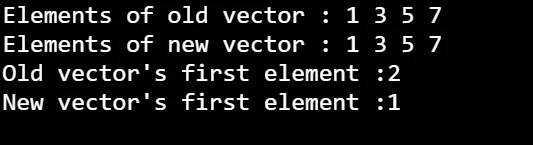
This output highlights the effectiveness of passing a vector as a constructor for copy operations in C++, providing a clean and reliable mechanism for duplicating vector contents.
Use the copy(first_iterator_o, last_iterator_o, back_inserter()) Function to Carry Out Deep Copy Operations of Vectors in C++
In C++, the copy() function, coupled with back_inserter(), offers another efficient way to conduct deep copy operations on vectors. This function requires three necessary arguments:
- The first iterator of the original specified vector.
- The last iterator of the original specified vector.
- The
back_inserter()function, which appends the values to the new vector from last to first.
Consider the following illustrative code:
#include <algorithm>
#include <iostream>
#include <iterator>
#include <vector>
using namespace std;
int main() {
  vector<int> v1{1, 3, 5, 7};
  vector<int> v2;

  copy(v1.begin(), v1.end(), back_inserter(v2));

  cout << "Elements of old vector : ";
  for (int i = 0; i < v1.size(); i++) cout << v1[i] << " ";
  cout << endl;

  cout << "Elements of new vector : ";
  for (int i = 0; i < v2.size(); i++) cout << v2[i] << " ";
  cout << endl;

  v1[0] = 2;

  cout << "Old vector's first element :";
  cout << v1[0] << endl;
  cout << "New vector's first element :";
  cout << v2[0] << endl;

  return 0;
}
Here, the copy() function is used to copy the elements from the beginning (v1.begin()) to the end (v1.end()) of the original vector v1 into the new vector v2. The back_inserter() function is then used as the third argument to ensure that elements are appended to v2 from the back, facilitating a deep copy.
Subsequently, the code displays the elements of both the original and the newly created vectors, providing a clear visual confirmation of the successful deep copy operation. Following this display, the code modifies the first element of the original vector (v1[0] = 2), and it then compares and displays the first elements of both vectors to emphasize that modifications to the original vector do not impact the copied vector.
We should also note that this method requires heavy use of the for loop alongside the specified function.
Output:
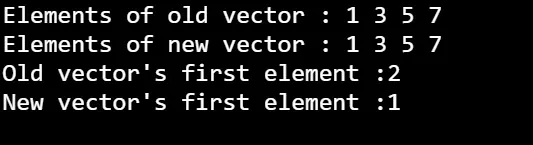
The output above displays the elements of both the original and the copied vector and also provides proof for checking that it is a deep copy operation.
Use the assign() Function to Copy a Vector in C++
The assign() function serves as a versatile tool for assigning new values to a vector, making it a powerful choice for copying vector contents. This function offers two syntax options:
x.assign(first, last);
x.assign(n, val);
In the first syntax, (first, last) defines a range, where first points to the first element, and last refers to the last element. The second syntax involves n, specifying the number of times a particular value (val) should occur in the vector.
The std::vector container provides the assign() member function, enabling the replacement of one vector’s contents with the elements of another vector. Notably, this can be achieved by initializing an empty vector and then invoking the assign() function to copy the contents of another vector.
Consider the following example code:
#include <iostream>
#include <vector>

using std::copy;
using std::cout;
using std::endl;
using std::vector;

template <typename T>
void printVector(std::vector<T> v) {
  for (const auto &item : v) {
    cout << item << "; ";
  }
  cout << endl;
}

int main() {
  vector<int> vec1 = {23, 43, 324, 222, 649, 102, 40, 304};

  vector<int> vec1_c;
  vec1_c.assign(vec1.begin(), vec1.end());
  printVector(vec1_c);

  return EXIT_SUCCESS;
}
In this example, the assign() function is used to copy the elements from the original vector vec1 into the new vector vec1_c. The code then displays the elements of the copied vector, showcasing the successful copying process.
Output:

As we see, the elements of the copied vector vec1_c are displayed. The process is a shallow copy process and, therefore, is not checked further.
Use the insert() Function to Copy a Vector in C++
The insert() function is a standard vector class function that can be utilized in cases where we are dealing with a specified range of elements that need to be copied.
Let us consider a vector x. Below is the syntax for the insert() function:
insert(iterator, val);
insert(iterator, n, val);
insert(iterator, InputIterator first, InputIterator last);
Parameters:
iterator: This defines the position in which the new elements will be inserted.val: This marks the value that needs to be inserted. It can be multiple when used with aforloop.n: This marks the number of times that we need to insert the values.(first, last): This marks the specified range of elements that need to be inserted.
Let’s take an example code:
#include <iostream>
#include <vector>
using namespace std;

int main() {
  vector<int> v1{1, 3, 5, 7};
  vector<int> v2;

  v2.insert(v2.begin(), v1.begin(), v1.end());

  cout << "Elements of old vector : ";
  for (int i = 0; i < v1.size(); i++) cout << v1[i] << " ";
  cout << endl;

  cout << "Elements of new vector : ";
  for (int i = 0; i < v2.size(); i++) cout << v2[i] << " ";
  cout << endl;

  v1[0] = 2;

  cout << "Old vector's first element :";
  cout << v1[0] << endl;
  cout << "New vector's first element :";
  cout << v2[0] << endl;

  return 0;
}
Here, the insert() function is used to copy the elements from the beginning (v1.begin()) to the end (v1.end()) of the original vector v1 into the new vector v2. Following this, the code proceeds to display the elements of both the original and the newly created vectors using cout statements and a for loop.
To further validate that a deep copy operation has taken place, the code modifies the first element of the original vector (v1[0] = 2) and subsequently compares and displays the first elements of both vectors.
Output:
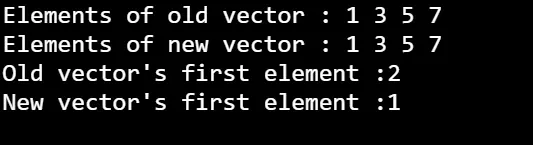
The output displays both vectors and verifies if the carried-out process is a deep copy operation or not.
Note: The
insert()function is also a method that can carry out deep copy operations.
Conclusion
In conclusion, copying vectors in C++ offers a variety of methods, each catering to different needs and scenarios.
The iterative method, employing a loop and the push_back() function, stands out for its simplicity and capability to perform deep copy operations. On the other hand, the std::copy algorithm, the copy constructor, and the assign() function provide straightforward and efficient options suitable for most use cases, creating shallow copies that are easy to understand.
The assignment operator offers a concise way to replace the contents of an existing vector, whereas passing a vector as a constructor provides a simple method for deep copying. The copy(first_iterator_o, last_iterator_o, back_inserter()) function and the insert() function are efficient copy methods, especially for smaller vectors or specified ranges.
While the initializer list notation method is versatile and applicable to vectors of any size, its complexity might pose challenges for beginners. In most cases, the copy constructor is recommended for its simplicity, clarity, and efficiency in creating vector copies.
It’s important to consider the specific requirements of your project when choosing a vector copying method in C++. Each method has its strengths and trade-offs, and understanding the context will guide you toward the most appropriate choice for your programming needs.
