HOWTO · Matplotlib
如何在 Matplotlib 中為資料列表繪製直方圖
使用 Matplotlib 的 plt.hist() 從 Python 列表繪製直方圖,然後調整其組距、密度和顏色。
本頁內容
要從 Python 列表繪製直方圖,只需將列表直接傳給 Matplotlib 的 plt.hist() 函數。該函數會把數值分到稱為組距(bin)的區間中,統計落入每個區間的數值個數,並為每個區間繪製一根長條,因此圖的形狀就能顯示數值的分布情況。輸入可以是普通的 Python 列表,無需事先轉換成 NumPy 陣列或 pandas Series。本文先繪製一個包含 21 個 0 到 9 整數的列表,然後調整組距、長條高度和長條顏色,最後展示組距數量無效以及列表為空時會發生什麼。
使用 plt.hist() 從列表繪製直方圖
不帶任何額外參數時,plt.hist() 會把資料範圍劃分為十個等寬的組距。本例還接收該函數傳回的三個值並將其印出,以便你確切地看到列表是如何被分組的:
import matplotlib.pyplot as plt

data = [3, 4, 2, 3, 4, 5, 4, 7, 8, 5, 4, 6, 2, 1, 0, 9, 7, 6, 6, 5, 4]
counts, bin_edges, patches = plt.hist(data)
print("counts:", counts.tolist())
print("bin_edges:", bin_edges.tolist())
plt.xlabel("Value")
plt.ylabel("Count")
plt.title("Histogram of data")
plt.show()
counts: [1.0, 1.0, 2.0, 2.0, 5.0, 3.0, 3.0, 2.0, 1.0, 1.0]
bin_edges: [0.0, 0.9, 1.8, 2.7, 3.6, 4.5, 5.4, 6.3, 7.2, 8.1, 9.0]
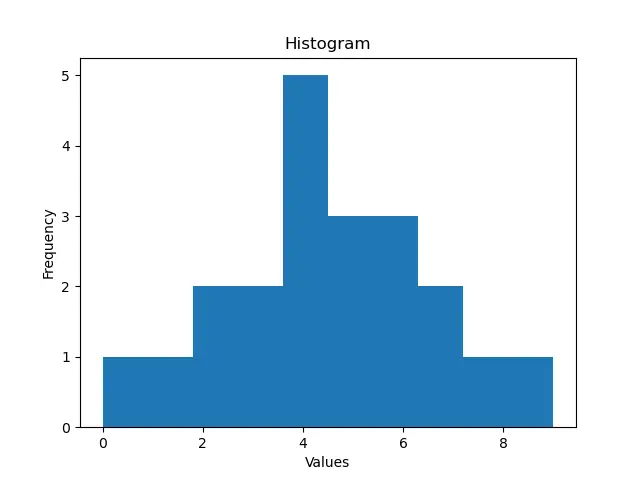
plt.hist() 傳回三個值。counts 保存每個組距中的觀測數量,bin_edges 給出區間的邊界,patches 包含長條的 artist 物件,以備事後需要單獨修改某根長條的樣式。counts 中的元素個數就是組距的數量,而 bin_edges 始終多一個元素,因為它標出了每個區間的兩端。這裡資料範圍是 0 到 9,因此十個預設組距每個寬 0.9,最高的長條是 3.6 到 4.5 的區間,其中包含數值 4 的五次出現。如果你只需要圖形,可以省略賦值,只呼叫 plt.hist(data)。
設定組距數量或組距邊界
bins 參數控制資料的劃分方式。傳入 bins=20 這樣的整數會在資料範圍內建立相應數量的等寬區間:
import matplotlib.pyplot as plt

data = [3, 4, 2, 3, 4, 5, 4, 7, 8, 5, 4, 6, 2, 1, 0, 9, 7, 6, 6, 5, 4]
counts, bin_edges, patches = plt.hist(data, bins=20)
print("counts:", counts.tolist())
print("number of bins:", len(counts))
plt.xlabel("Value")
plt.ylabel("Count")
plt.title("Histogram with 20 bins")
plt.show()
counts: [1.0, 0.0, 1.0, 0.0, 2.0, 0.0, 2.0, 0.0, 5.0, 0.0, 0.0, 3.0, 0.0, 3.0, 0.0, 2.0, 0.0, 1.0, 0.0, 1.0]
number of bins: 20
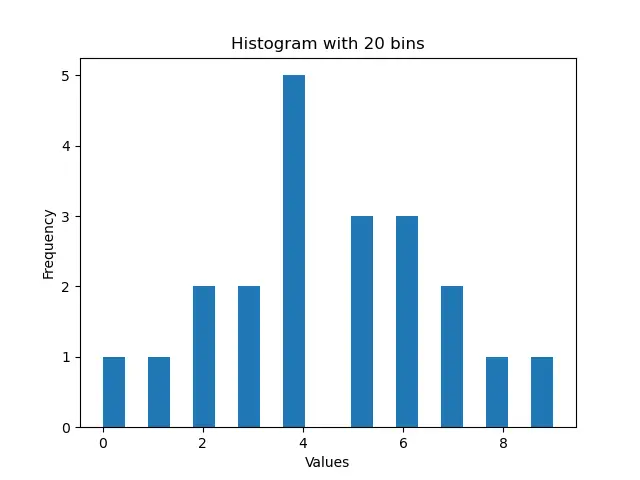
對這個小列表來說,20 個組距太多了:由於數值都是整數,每隔一個組距就是空的,分布看起來比實際更嘈雜。一般來說,組距太少會掩蓋資料中的結構,而組距太多太窄會讓小資料集看起來破碎,因此應選擇與列表大小和分散程度相稱的組距數量。除了整數,你也可以傳入 bins=[0, 2, 4, 6, 8, 10] 這樣的邊界值序列,自行設定區間邊界;這樣各區間的寬度可以各不相同。當計數跨度很大時,可選參數 log=True 會把計數軸切換為對數刻度,使較小的長條在高長條旁邊仍然可見。它只改變座標軸的刻度,不改變輸入數值,也不改變組距的劃分。
顯示機率密度而非計數
預設情況下,長條高度表示計數。當你想要機率密度時,可設定 density=True。Matplotlib 隨即縮放高度,使所有長條的總面積為 1:
import matplotlib.pyplot as plt

data = [3, 4, 2, 3, 4, 5, 4, 7, 8, 5, 4, 6, 2, 1, 0, 9, 7, 6, 6, 5, 4]
counts, bin_edges, patches = plt.hist(data, bins=10, density=True)
print("densities:", [round(d, 4) for d in counts.tolist()])
area = sum(d * (bin_edges[i + 1] - bin_edges[i]) for i, d in enumerate(counts))
print("total area:", round(area, 6))
plt.xlabel("Value")
plt.ylabel("Probability density")
plt.title("Probability histogram of data")
plt.show()
densities: [0.0529, 0.0529, 0.1058, 0.1058, 0.2646, 0.1587, 0.1587, 0.1058, 0.0529, 0.0529]
total area: 1.0
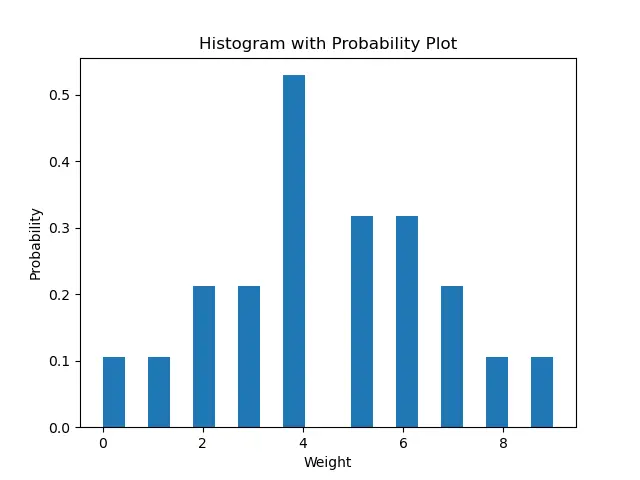
使用 density=True 後,傳回元組的第一個值保存的是密度而非計數;本例把每個密度乘以其組距寬度並累加面積,驗證歸一化結果恰好為 1。請注意,單根長條的高度是密度,而不是其區間的機率;區間的機率是長條的面積,即高度乘以寬度。當各組距寬度不同時,這一區別很重要,因為一根寬長條所代表的機率可能大於一根更高的窄長條。切換時請記得像本例那樣更新縱軸標籤,讓圖形說明其長條高度的含義。
更改長條顏色
color 參數設定長條的填充顏色:
import matplotlib.pyplot as plt

data = [3, 4, 2, 3, 4, 5, 4, 7, 8, 5, 4, 6, 2, 1, 0, 9, 7, 6, 6, 5, 4]
plt.hist(data, bins=10, color="red")
plt.xlabel("Value")
plt.ylabel("Count")
plt.title("Red histogram of data")
plt.show()
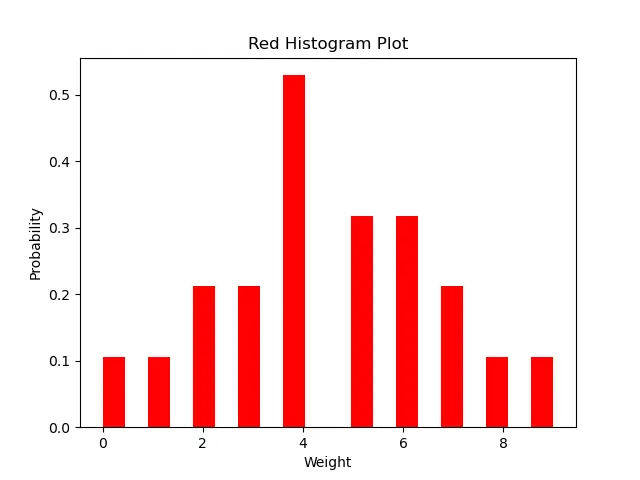
任何 Matplotlib 顏色表示法都可以使用,例如 "red" 這樣的名稱、"#1f77b4" 這樣的十六進位字串,或單字母代碼。顯示選項可以在一次呼叫中自由組合,例如 plt.hist(data, bins=20, density=True, color="red") 會繪製二十根帶密度高度的紅色長條。無論組合哪些選項,都要讓標題和軸標籤與之保持一致:密度圖不應保留計數標籤,二十個組距的圖也不應聲稱顯示的是預設的十個。
處理無效的組距數量和空列表
有兩個輸入錯誤值得在它們讓你措手不及之前就了解。第一個是組距數量不是正數:
import matplotlib.pyplot as plt

data = [3, 4, 2, 3, 4, 5, 4, 7, 8, 5, 4, 6, 2, 1, 0, 9, 7, 6, 6, 5, 4]
plt.hist(data, bins=0)
Traceback (most recent call last):
  ...
ValueError: `bins` must be positive, when an integer
bins=0(以及任何負整數)會引發 ValueError,且不會繪製任何內容。如果組距數量來自使用者輸入或計算結果,請在繪圖前驗證它是否為正整數,或者改傳一個邊界序列。第二個情況是空列表,其行為截然不同:它根本不是錯誤。
import matplotlib.pyplot as plt

counts, bin_edges, patches = plt.hist([])
print("counts:", counts.tolist())
print("bin_edges:", [round(e, 2) for e in bin_edges.tolist()])
counts: [0.0, 0.0, 0.0, 0.0, 0.0, 0.0, 0.0, 0.0, 0.0, 0.0]
bin_edges: [0.0, 0.1, 0.2, 0.3, 0.4, 0.5, 0.6, 0.7, 0.8, 0.9, 1.0]
在沒有資料時,plt.hist() 會回退到 0 到 1 的預設範圍,傳回十個為零的計數,並繪製一組空座標軸而不引發異常。這使得空列表成為一種靜默失敗模式:如果你的資料來自檔案、查詢或篩選,請在繪圖前確認列表非空,以免缺失的資料集變成一張看似有效結果的空白圖。