HOWTO · Java
JavaFX에서 KeyEvent 사용
이 튜토리얼에서는 사용자가 JavaFX에서 키를 누를 때 키 이벤트를 생성하고 간단한 코드를 실행하는 방법을 보여줍니다.
이 페이지의 내용
KeyEvent는 키 누르기를 감지하고 키를 누를 때 특정 코드 블록을 실행하는 데 사용됩니다.
이 기사에서는 키 이벤트를 생성하고 사용자가 키를 누를 때 간단한 코드를 실행하는 방법을 보여줍니다. 이해하기 쉽도록 간단한 예도 살펴보겠습니다.
JavaFX에서 KeyEvent 사용
키 이벤트를 생성하는 일반적인 형식은 다음과 같습니다.
scene.setOnKeyPressed(
    (KeyEvent event)
        -> {
            // Create a key event that execute when any key pressed from your keyboard
            //  Add the actions that we are going to take when a key pressed.
        });
사용자 키 누르기를 감지하고 키를 눌렀다는 메시지를 표시하는 예제를 볼 것입니다.
우리 예제의 소스 코드는 아래와 같을 것이며, 필요한 명령을 제공하여 각 라인을 설명할 것입니다. 한번 봅시다.
import javafx.application.Application; // Package to create application
import javafx.scene.Scene; // Package to create a scene
import javafx.scene.control.Label; // Package to create a label
import javafx.scene.input.KeyEvent; // Package to create a key event
import javafx.scene.layout.HBox; // Package for the Hbox
import javafx.stage.Stage; // Package to create a stage

public class FxKeyListen extends Application {
  Label lbl; // Declares a label
  HBox _hbox; // Declares a HBox.

  public void start(Stage SimpleStage) throws Exception {
    SimpleStage.setTitle(
        "Detect key event"); // Set the application title which is "Detect key event"
    lbl =
        new Label("No key is pressed !!!"); // Create a label with default text "No key pressed !!!"
    _hbox = new HBox(lbl); // Create a HBox  with a label
    Scene scene = new Scene(_hbox, 400, 400); // Create a scene with HBox and necessary dimentions.

    scene.setOnKeyPressed(
        (KeyEvent event)
            -> { // Create a key event that execute when any key pressed from your keyboard
          lbl.setText("Key press detected !!!"); // The actions that we are going to take when a key
                                                 // pressed. In our case we are changing the label
                                                 // text to "Key press detected !!!"
        });
    SimpleStage.setScene(scene); // Set the scene
    SimpleStage.show(); // Visualize the scent
  }

  public static void main(String[] args) {
    Application.launch(args); // Run our application
  }
}
우리는 이미 각 라인의 목적을 명령했습니다. 이제 코드가 어떻게 작동하는지 설명하겠습니다.
키를 누르지 않았습니다 !!!라는 기본 텍스트로 코드에 레이블을 만들었습니다. lbl = new Label ("누른 키 없음 !!!"); 줄로. 이 레이블은 아무 키도 누르지 않았음을 사용자에게 표시하는 것을 목표로 합니다.
그런 다음 사용자가 키보드에서 키를 누를 때 실행할 작업으로 간단한 키 누르기 이벤트를 만들었습니다. 레이블의 기본 텍스트를 변경하고 Key press detected !!!로 설정합니다. 따라서 이를 위해 lbl.setText("Key press detected !!!");와 같은 작업으로 코드를 추가합니다.
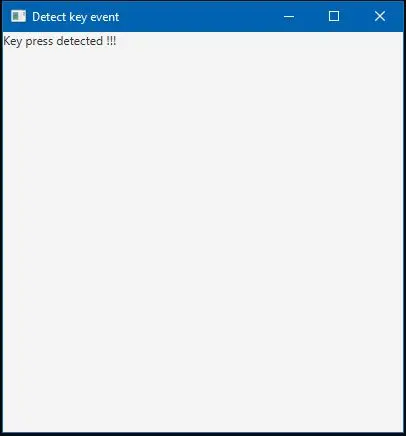
이제 성공적인 컴파일 후 코드를 실행하면 키 이벤트 감지라는 제목의 창이 열리고 키보드에서 키를 누르면 아래와 같은 출력이 표시됩니다.
출력:
IDE가 라이브러리 자동 포함을 지원하지 않는 경우 기억하십시오. 그런 다음 컴파일하기 전에 필요한 라이브러리 파일을 수동으로 포함해야 할 수 있습니다.