
HOWTO · Tkinter
How to Set the Default Text of Tkinter Entry Widget
Learn how to set default text in Tkinter Entry widgets with two effective methods: using the delete and insert methods or leveraging StringVar. This comprehensive guide provides clear examples and detailed explanations to help you enhance user experience in your Python applications. Explore techniques to create intuitive interfaces with Tkinter today.
On this page
When working with graphical user interfaces in Python, Tkinter is a popular choice for developers. One common requirement is to set default text in an Entry widget, which allows users to see placeholder text that can guide their input.There are two effective methods for achieving this in Tkinter: using the combination of the delete and insert methods, and utilizing the StringVar variable.
In this article, we’ll explore both methods in detail, providing clear code examples and explanations to help you implement default text in your Tkinter applications seamlessly.
Method 1: Using Delete and Insert Methods
The first method to set default text in a Tkinter Entry widget involves using the delete and insert methods. This approach is straightforward and allows you to manipulate the text within the widget directly. Here’s how you can implement it:
import tkinter as tk

def set_default_text(entry):
    entry.delete(0, tk.END)
    entry.insert(0, "Default Text")

root = tk.Tk()
entry = tk.Entry(root)
entry.pack()

set_default_text(entry)

root.mainloop()
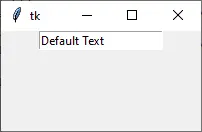
In this example, we first import the Tkinter library and create a simple Tkinter window. The set_default_text function takes an Entry widget as an argument. Inside this function, we use the delete method to clear any existing text in the Entry widget, specifying the range from the start (0) to the end (tk.END). After clearing the text, we then use the insert method to add our default text, Default Text.
This method is particularly useful when you want to ensure that any pre-existing text is removed before setting the default. The user will see the placeholder text immediately upon launching the application, making it clear what they should input.
Output:
Method 2: Using StringVar Variable
The second method to set default text in a Tkinter Entry widget involves using the StringVar variable. This approach is beneficial when you want to dynamically update the text in the Entry widget or link it to other components in your application. Here’s how to use StringVar:
import tkinter as tk

root = tk.Tk()
default_text = tk.StringVar(value="Default Text")
entry = tk.Entry(root, textvariable=default_text)
entry.pack()

root.mainloop()
In this code snippet, we again start by importing the Tkinter library and creating a main window. We then create a StringVar instance called default_text, initializing it with our desired default value, “Enter your text here”. The Entry widget is created with the textvariable parameter set to our StringVar instance. This establishes a link between the Entry widget and the StringVar, meaning any change to the StringVar will automatically reflect in the Entry widget.
Using StringVar provides flexibility because you can easily update the variable from anywhere in your application, and the Entry widget will always display the current value. This method is particularly useful in more complex applications where the default text might need to be changed based on user interactions or other events.
Conclusion
Setting default text in a Tkinter Entry widget can significantly enhance the user experience by providing clear guidance on what is expected as input. Whether you choose to use the delete and insert methods for a straightforward approach or opt for the dynamic capabilities of StringVar, both methods are effective and easy to implement. By understanding these techniques, you can create more intuitive and user-friendly applications in Python using Tkinter.
FAQ
-
What is the purpose of the Entry widget in Tkinter?
The Entry widget is used to create a single-line text input field where users can enter data. -
Can I use placeholder text in Tkinter Entry widgets?
Yes, you can use default text to act as a placeholder, guiding users on what to enter. -
What is StringVar in Tkinter?
StringVar is a special variable class in Tkinter that allows you to manage string values and automatically update related widgets. -
How can I clear the text in a Tkinter Entry widget?
You can use the delete method with the range specified to clear the text. -
Is it possible to set default text dynamically in a Tkinter Entry widget?
Yes, using StringVar allows you to change the default text dynamically based on user interactions or other conditions.
