HOWTO · JavaScript
JavaScript Variable Number of Arguments
JavaScript has the flexibility of dealing with an indefinite number of arguments in a function. This type of function is named after the variadic functions. The arguments object portrays as similar to an array element but it does not support any other properties like an array except the length. This along with the rest parameter effortlessly do their job of handling variable number of arguments.
On this page
There is a primitive way of setting the variable number of arguments via JavaScript’s arguments object. This behaves like an array, but it only has the length property and does not go along with the other built-in properties of an array.
However, the arguments of a function can also be appended to an array on a wide scale.
Other than the arguments convention to specify multiple parameters in a function, we have the rest parameter, the ES6 update. More specifically, observing the syntax, the object accepts the spread operators’ way of defining several arguments.
Besides, you can either set individual arguments alongside the cluster of arguments.
Our example sets will examine how efficiently both methods make our problem easier. One will be with the arguments object, and the other will focus on the rest parameter convention.
Use arguments Object to Set Variable Number of Parameters in JavaScript
Here, we will take 3 parameters in our function take. The general way of using the arguments is to specify them directly as they are named.
But having the facility of the arguments object, we can iterate all the parameters just like array elements. Thus our way of dealing with multiple arguments gets sorted out.
Code Snippet:
function take(a, b, c) {
  for (var i = 0; i < arguments.length; i++) {
    if (i == 1) {
      arguments[i] = 'I am 2';
    }
    console.log(arguments[i]);
  }
}
take(1, 2, 3);
Output:
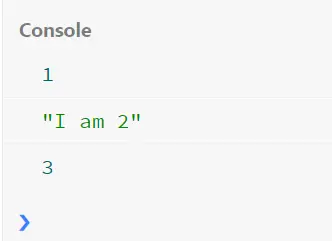
As seen, the arguments object not only works as an instance of the parameters mentioned in the function, but it can also alter its original value. Also, the typeof property of the arguments object allows identifying each of the types of the parameters.
Use Rest Parameter to Set Multiple Arguments in JavaScript
The Rest parameter is the ES6 moderation of dealing with arrow functions. In this regard, we can take parameters that have a self boundary.
More like the below example’s range1 and range2 arguments. And also a group of values that wish to consider a greater cause.
Let’s check the code fence.
function rest(range1, range2, ...add) {
  console.log(range1);
  console.log(range2);
  return add.reduce((pre, cur) => {
    return pre + cur;
  });
}

console.log(rest(1, 4, 1, 2, 3, 4));
Output:

In our instance, we set range1 and range2 as starting and ending boundaries, and the ...add has all the values from range1 to range2 inclusive. This simple task is to represent how the Rest parameter works.