
HOWTO · C
** in C
This tutorial teaches how to use pointer to pointer to store the address of the pointer in C.
On this page
This tutorial teaches how to use the Pointer to Pointer(Double pointer or ** ) to store the address of another pointer variable.
Memory Allocation for Variable in C
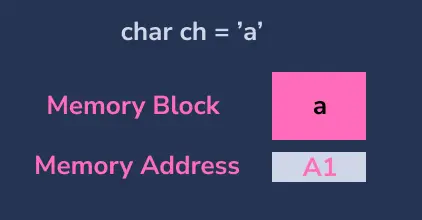
On creating a variable, there will be some specific block of memory allocated to that variable for storing the value. For example, we have created a char variable ch and value a. Internally, one byte of memory will be allocated to the variable ch.
C Pointer
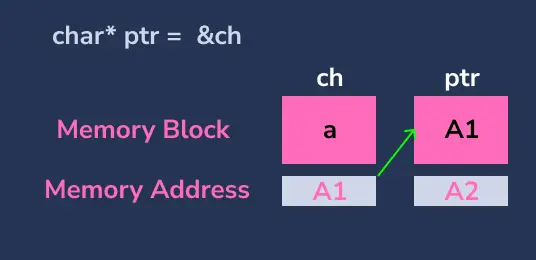
In C programming, a pointer is a variable that stores the address of another variable. To access the value present in that address, we use *.
#include <stdio.h>

int main() {
  char ch = 'a';    // create a variable
  char *ptr = &ch;  // create a pointer to store the address of ch

  printf("Address of ch: %p\n", &ch);  // prints address
  printf("Value of ch: %c\n", ch);     // prints 'a'

  printf("\nValue of ptr: %p\n", ptr);  // prints the address of a
  printf("*ptr(value of ch): %c\n",
         *ptr);  // Prints Content of the value of the ptr
}
Output:
Address of ch: 0x7ffc2aa264ef
Value of ch: a

Value of ptr: 0x7ffc2aa264ef
*ptr(value of ch): a
In the above code,
- Created a
charvariablechand assigned the characteraas a value. - Created a
charpointerptrand stored the address of the variablech. - Printed the address and value of
ch. - Printed the value of the
ptr, the value ofptrwill be the address ofch - Printed the value of
chby using*ptr. The value ofptris the address of the variablech, in that address, the value'a'is present, so it will be printed.
Pointer to Pointer (**) in C
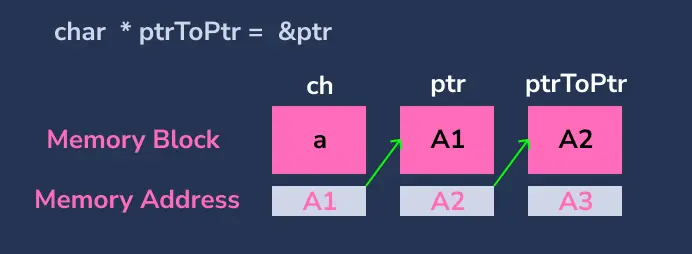
To store the address of a variable, we use a pointer. Similarly, to store the address of a pointer, we need to use ** (pointer to pointer). ** denotes a pointer that stores the address of another pointer.
To print the value present in the pointer to pointer variable, we need to use **.
#include <stdio.h>

int main() {
  char ch = 'a';           // create a variable
  char *ptr = &ch;         // create a pointer to store the address of ch
  char **ptrToPtr = &ptr;  // create a pointer to store the address of ch

  printf("Address of ch: %p\n", &ch);  // prints address of ch
  printf("Value of ch: %c\n", ch);     // prints 'a'

  printf("\nValue of ptr: %p\n", ptr);   // prints the address of ch
  printf("Address of ptr: %p\n", &ptr);  // prints address

  printf("\nValue of ptrToPtr: %p\n", ptrToPtr);  // prints the address of ptr
  printf("*ptrToPtr(Address of ch): %p\n",
         *ptrToPtr);  // prints the address of ch
  printf("**ptrToPtr(Value of ch): %c\n", **ptrToPtr);  // prints ch
}
Output:
Address of ch: 0x7fffb48f95b7
Value of ch: a

Value of ptr: 0x7fffb48f95b7
Address of ptr: 0x7fffb48f95b8

Value of ptrToPtr: 0x7fffb48f95b8
*ptrToPtr(Address of ch): 0x7fffb48f95b7
**ptrToPtr(Value of ch): a
In the above code,
- Created a
charvariablechand assigned the characteraas a value to it. - Created a
charpointerptrand stored the address of the variablech. - Created a
charpointer to pointerptrToPtrand stored the address of the variableptr. - The ptr will have the address of the variable
chas value, and theptrToPtrwill have the address of pointerptras value. - When we dereference the
ptrToPtrlike*ptrToPtrwe get address of variablech - When we dereference the
ptrToPtrlike**ptrToPtrwe get value of variablech
Point to Remember
In order to store the address of ptrToPtr we need to create
char ***ptrToPtrToPtr = &ptrToPtr;
printf("***ptrToPtrToPtr : %c\n", ***ptrToPtrToPtr);  // 'a'