HOWTO · Java
InvocationTargetException in JavaFX
Dieses Tutorial zeigt, wie invocationtargetexception in JavaFX gelöst wird.
Auf dieser Seite
Dieses Tutorial zeigt, wie man die InvocationTargetException in JavaFX löst.
InvocationTargetException in JavaFX behoben
Die Ausnahme InvocationTargetException tritt auf, wenn wir JavaFX verwenden. Die Gründe für diese Ausnahme sind:
- Wenn wir am Anfang des Pfadnamens der FXML-Datei einen Schrägstrich schreiben oder der angegebene Pfad nicht korrekt oder vollständig ist.
- Wenn wir versuchen, das dynamische Root-Verzeichnis zu verwenden, aber das Root-Verzeichnis nicht im FXML-Loader festgelegt haben.
- Wenn wir ein JavaFX-Modul vermissen.
Lassen Sie uns ein Beispiel ausprobieren, das die InvocationTargetException in JavaFX auslöst.
package delftstack;

import java.io.File;
import javafx.application.Application;
import javafx.fxml.FXMLLoader;
import javafx.scene.Parent;
import javafx.scene.Scene;
import javafx.stage.Stage;

public class Example extends Application {
  @Override
  public void start(Stage DemoStage) throws Exception {
    System.out.println("Start()");
    Parent DemoRoot = FXMLLoader.load(getClass().getResource("delftstack.fxml"));
    DemoStage.setTitle("Demo");
    Scene DemoScene = new Scene(DemoRoot, 200, 150);
    DemoStage.setScene(DemoScene);
    DemoStage.show();
  }
}
Die Datei delftstack.fxml ist:
<?xml version="1.0" encoding="UTF-8"?>

<?import javafx.scene.control.ScrollPane?>
<?import javafx.scene.control.TableColumn?>
<?import javafx.scene.control.TableView?>
<?import javafx.scene.layout.AnchorPane?>


<AnchorPane maxHeight="-Infinity" maxWidth="-Infinity" minHeight="-Infinity" minWidth="-Infinity" prefHeight="400.0" prefWidth="600.0" xmlns="http://javafx.com/javafx/8.0.65" xmlns:fx="http://javafx.com/fxml/1">
   <children>
      <ScrollPane layoutX="178.0" layoutY="68.0" prefHeight="400.0" prefWidth="600.0" AnchorPane.bottomAnchor="0.0" AnchorPane.leftAnchor="0.0" AnchorPane.rightAnchor="0.0" AnchorPane.topAnchor="0.0">
         <content>
            <TableView prefHeight="350.0" prefWidth="590.0">
              <columns>
                  <TableColumn prefWidth="130.0" text="First Name" />
                <TableColumn prefWidth="130.0" text="Last Name" />
                <TableColumn prefWidth="330.0" text="ID" />
              </columns>
            </TableView>
         </content>
      </ScrollPane>
   </children>
</AnchorPane>
Der obige Code löst die InvocationTargetException aus, weil er die Datei delftstack.fxml nicht finden konnte. Siehe Ausgabe:
Start()
Exception in Application start method
Exception in thread "main" java.lang.reflect.InvocationTargetException
	at java.base/jdk.internal.reflect.NativeMethodAccessorImpl.invoke0(Native Method)
	at java.base/jdk.internal.reflect.NativeMethodAccessorImpl.invoke(NativeMethodAccessorImpl.java:77)
	at java.base/jdk.internal.reflect.DelegatingMethodAccessorImpl.invoke(DelegatingMethodAccessorImpl.java:43)
	at java.base/java.lang.reflect.Method.invoke(Method.java:568)
	at java.base/sun.launcher.LauncherHelper$FXHelper.main(LauncherHelper.java:1071)
Caused by: java.lang.RuntimeException: Exception in Application start method
	at javafx.graphics@18.0.1/com.sun.javafx.application.LauncherImpl.launchApplication1(LauncherImpl.java:901)
	at javafx.graphics@18.0.1/com.sun.javafx.application.LauncherImpl.lambda$launchApplication$2(LauncherImpl.java:196)
	at java.base/java.lang.Thread.run(Thread.java:833)
Caused by: java.lang.NullPointerException: Location is required.
	at javafx.fxml@18.0.1/javafx.fxml.FXMLLoader.loadImpl(FXMLLoader.java:3324)
	at javafx.fxml@18.0.1/javafx.fxml.FXMLLoader.loadImpl(FXMLLoader.java:3287)
	at javafx.fxml@18.0.1/javafx.fxml.FXMLLoader.loadImpl(FXMLLoader.java:3255)
	at javafx.fxml@18.0.1/javafx.fxml.FXMLLoader.loadImpl(FXMLLoader.java:3227)
	at javafx.fxml@18.0.1/javafx.fxml.FXMLLoader.loadImpl(FXMLLoader.java:3203)
	at javafx.fxml@18.0.1/javafx.fxml.FXMLLoader.load(FXMLLoader.java:3196)
	at delftstack.Example.start(Example.java:15)
	at javafx.graphics@18.0.1/com.sun.javafx.application.LauncherImpl.lambda$launchApplication1$9(LauncherImpl.java:847)
	at javafx.graphics@18.0.1/com.sun.javafx.application.PlatformImpl.lambda$runAndWait$12(PlatformImpl.java:484)
	at javafx.graphics@18.0.1/com.sun.javafx.application.PlatformImpl.lambda$runLater$10(PlatformImpl.java:457)
	at java.base/java.security.AccessController.doPrivileged(AccessController.java:399)
	at javafx.graphics@18.0.1/com.sun.javafx.application.PlatformImpl.lambda$runLater$11(PlatformImpl.java:456)
	at javafx.graphics@18.0.1/com.sun.glass.ui.InvokeLaterDispatcher$Future.run(InvokeLaterDispatcher.java:96)
	at javafx.graphics@18.0.1/com.sun.glass.ui.win.WinApplication._runLoop(Native Method)
	at javafx.graphics@18.0.1/com.sun.glass.ui.win.WinApplication.lambda$runLoop$3(WinApplication.java:184)
	... 1 more
Wenn wir nun versuchen, es zu lösen, indem wir den absoluten Pfad für die Datei delftstack.fxml angeben, kann dies das Problem lösen, aber bei einigen Systemen kann es immer noch dasselbe Problem verursachen. Die beste Lösung für diesen Fehler ist unten angegeben:
- Kopieren Sie die Datei
delftstack.fxmlin das gleiche Verzeichnis der Klasse. Wenn sich die Klassendatei beispielsweise im Paketdelftstackbefindet, sollte die FXML-Datei in den Ordnerproject/src/delftstackkopiert werden. - Aktualisieren Sie das Projekt in der IDE. Klicken Sie beispielsweise in Eclipse mit der rechten Maustaste auf den Projektnamen und wählen Sie Aktualisieren aus.
- Führen Sie dasselbe Programm aus, und der Fehler wird behoben.
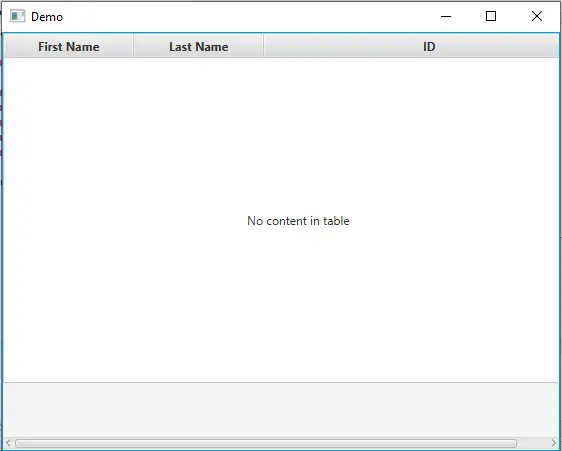
Die Ausgabe nach Befolgen der obigen Lösung ist: