Python os.system() Method
-
Syntax of Python
os.system()Method -
Example 1: Use the
os.system()Method to Get Current Date of Computer -
Example 2: Use the
os.system()Method to Create a New Notepad Text File -
Example 3: Use the
os.system()Method and Its Alternative to Display Text -
Example 4: Use the
os.system()Method to Clear the Screen
Python os.system() method is an efficient way of executing a string command in a subshell. The os.system() is implemented by calling the standard C function system() and has the same limitations.
Syntax of Python os.system() Method
os.system(command)
Parameters
command |
It is a string telling which command to execute. |
Return
The return type of this method depends on the OS. For example, on a Unix system, the return value is the exit status of the completed process.
On Windows OS, the return value is the value returned by the system command shell.
Example 1: Use the os.system() Method to Get Current Date of Computer
import os

command = "date"

os.system(command)
Output:
UNIX:
Fri 19 Aug 2022 11:48:48 AM UTC

Windows OS:
The current date is: Fri 08/19/2022
While using this method, if the input command generates any output, it is directly sent to the interpreter as a standard output stream.
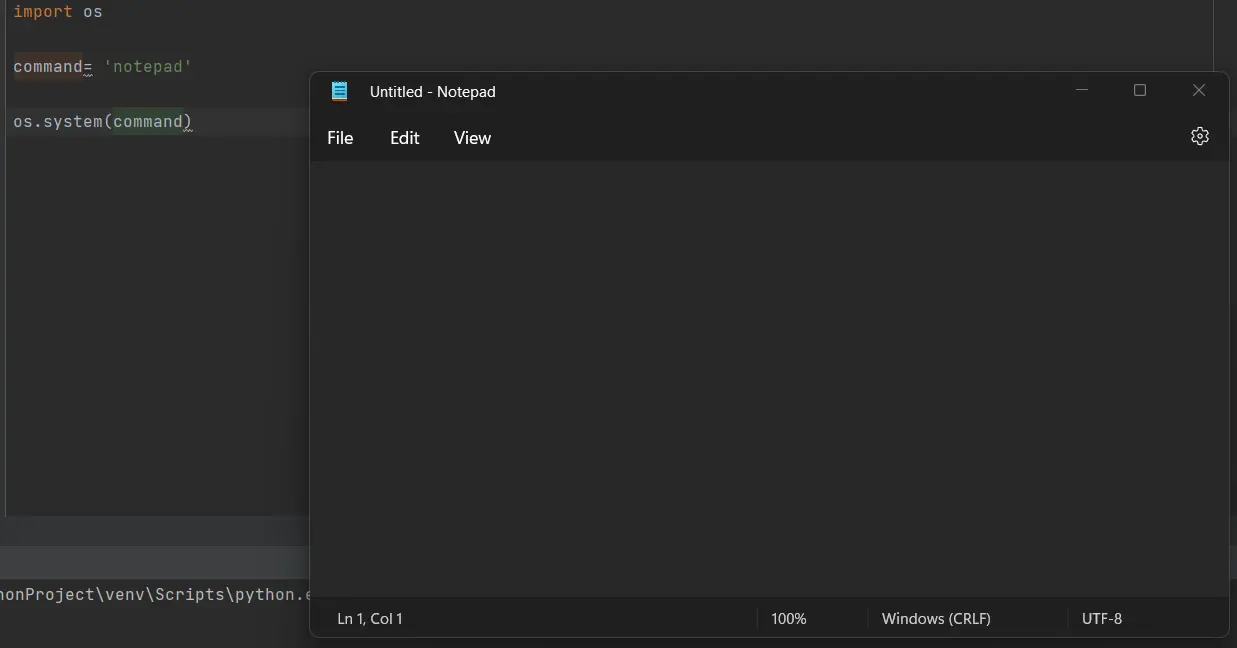
Example 2: Use the os.system() Method to Create a New Notepad Text File
import os

command = "notepad"

os.system(command)
Output:
On any Unix system, we can use the waitstatus_to_exitcode() to convert the exit status into an exit code (0).
Example 3: Use the os.system() Method and Its Alternative to Display Text
import os

os.system("echo Hello, World!")

string = "Hello, World!"

print(string)
Output:
Hello, World!
Hello, World!
We use the echo command to print the output on our stdout stream.
Example 4: Use the os.system() Method to Clear the Screen
import os

# for use on UNIX
os.system("clear")

# for use on Windows OS
os.system("cls")
Output:
UNIX:
Windows OS:0
Using the os.system() method instead of the standard OS compiler will result in slower process execution.

Musfirah is a student of computer science from the best university in Pakistan. She has a knack for programming and everything related. She is a tech geek who loves to help people as much as possible.
LinkedIn