HOWTO · JavaFX
JavaFX TextArea 换行文本
本教程演示了如何使用 JavaFX 在 TextArea 中换行。
本页内容
文本区域用于输入大文本。本教程演示了如何使用 JavaFX 在 TextArea 中换行。
JavaFX TextArea 换行文本
文本区域用于获取大文本作为输入。有时我们需要编辑一些大文本,不想再写整个文本;为此,我们可以将文本区域中的先前文本换行并编辑该部分。
setWrapText(true) 方法将文本包装在 TextArea 或任何其他元素中。按照分步过程将文本换行在文本区域中。
-
创建一个扩展
Application的类。 -
用内容创建一个
TextArea。 -
将文本区域的方法
setWrapText()设置为true。 -
设置
TextArea的大小。 -
创建
场景并将其显示在舞台上。 -
最终输出将是包裹在
TextArea中的文本。
让我们尝试根据上述步骤实现一个示例。
package delftstack;

import javafx.application.Application;
import javafx.scene.Group;
import javafx.scene.Scene;
import javafx.scene.control.TextArea;
import javafx.scene.paint.Color;
import javafx.stage.Stage;
public class TextArea_Wrap extends Application {
  public void start(Stage TextArea_Stage) {
    String Content = "DelftStack is a resource for everyone interested in programming, "
        + "embedded software, and electronics. It covers the programming languages "
        + "like Python, C/C++, C#, and so on in this website's first development stage. "
        + "Open-source hardware also falls in the website's scope, like Arduino, "
        + "Raspberry Pi, and BeagleBone. DelftStack aims to provide tutorials, "
        + "how-to's, and cheat sheets to different levels of developers and hobbyists..";
    // Create a Label
    TextArea Text_Area = new TextArea(Content);
    // wrap the textArea
    Text_Area.setWrapText(true);
    // Set the maximum width of the textArea
    Text_Area.setMaxWidth(300);
    // Set the position of the textArea
    Text_Area.setTranslateX(30);
    Text_Area.setTranslateY(30);
    Group TextArea_Root = new Group();
    TextArea_Root.getChildren().add(Text_Area);
    // Set the stage
    Scene TextArea_Scene = new Scene(TextArea_Root, 595, 150, Color.BEIGE);
    TextArea_Stage.setTitle("Label Example");
    TextArea_Stage.setScene(TextArea_Scene);
    TextArea_Stage.show();
  }
  public static void main(String args[]) {
    launch(args);
  }
}
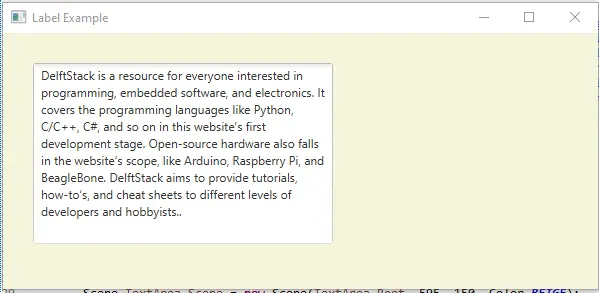
上面的代码将创建一个文本区域,其中包含文本。见输出: