HOWTO · Matplotlib
Matplotlib 燭臺圖
在與我們的演示中,我們介紹了燭臺圖或繪圖,並瞭解如何在 python 中的 mplfinance 模組的幫助下建立開盤高低收盤燭臺圖。
本頁內容
在本演示中,我們將介紹燭臺圖或繪圖,並瞭解如何使用 Python Matplotlib 中的 mplfinance 模組建立 OHLC(開盤價、最高價、最低價、收盤價)燭臺圖。
使用 Matplotlib 中的 mplfinance 庫建立燭臺圖
Matplotlib 金融 API 使繪製股價變得容易。它需要安裝在我們機器上的 pandas 和 mplfinance 模組。
mplfinance 模組可以非常輕鬆地完成各種操作,例如 OHLC 圖表、燭臺圖甚至是點數圖,所有這些都在一條線上。
舉個例子,首先要做的是獲取一些資料。我們從雅虎財經下載了 2019 年至 2020 年的亞馬遜股價。
要下載,請轉到雅虎財經,搜尋亞馬遜,然後轉到歷史資料選項卡,以便在此處下載。我們使用的是亞馬遜的股價,但你可以使用任何你喜歡的資料股價。
如果你的機器上沒有安裝 mplfinance 模組,你必須安裝它。
pip install mplfinance
匯入以下所需模組。
# %matplotlib inline
import pandas as pd
import mplfinance as mplf
下面這一行將在不使用 show() 方法的情況下內聯顯示我們的繪圖或圖表,但是如果我們使用不同的 IDLE,例如 pycharm,我們不需要編寫這一行,因為它會產生錯誤。
%matplotlib inline
讓我們建立一個名為 file 的變數,並將其作為我們下載的 CSV 檔案的名稱。確保你位於正確的檔案路徑位置,否則你必須將路徑放在這裡並使用 os Python 包。
file = "AMZN.csv"
然後我們將建立一個資料框並讀取 CSV 檔案。
data = pd.read_csv(file)
下面稱為資料框。它是 252 行乘 7 列,我們在這裡有這些列,可以看到它是自動索引的。
data
如果你將程式碼寫入不同的 IDLE,則上述行將不起作用。你需要列印它以檢視你的資料。
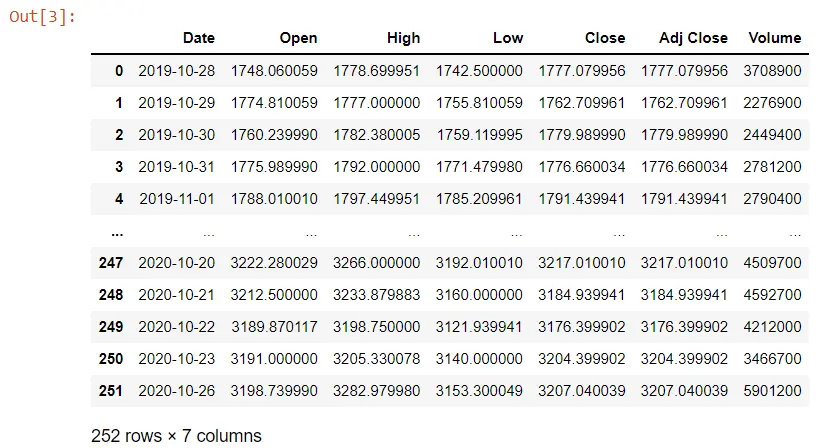
有時當我們從 yahoo 下載資料時,列的名稱前面有空格。這可能很煩人,所以你必須改變它。
我們將把 Date 列轉換為 datetime,因為物件是一個字串。我們需要使用 pandas to_datetime() 方法將其轉換為 datetime。
我們可以使用 info() 方法檢視 Date 列的摘要及其資料型別。
data.Date = pd.to_datetime(data.Date)
data.info()
當我們執行它時,我們現在將看到我們有一個 datetime 資料型別,而不是之前我們有一個物件。
<class 'pandas.core.frame.DataFrame'>
RangeIndex: 252 entries, 0 to 251
Data columns (total 7 columns):
 #   Column     Non-Null Count  Dtype
---  ------     --------------  -----
 0   Date       252 non-null    datetime64[ns]
 1   Open       252 non-null    float64
 2   High       252 non-null    float64
 3   Low        252 non-null    float64
 4   Close      252 non-null    float64
 5   Adj Close  252 non-null    float64
 6   Volume     252 non-null    int64
dtypes: datetime64[ns](1), float64(5), int64(1)
memory usage: 13.9 KB
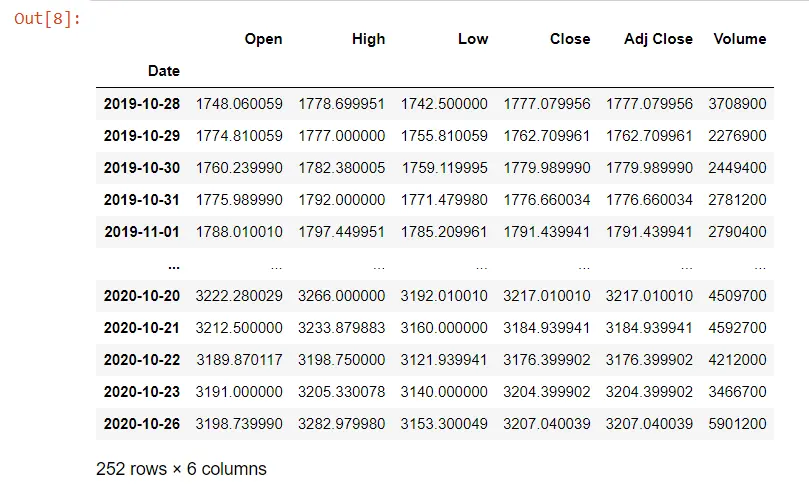
如果我們想操縱這些資料來顯示我們的圖表,我們需要訪問日期列,因為我們將顯示與日期相對應的股價。我們需要使索引成為我們資料框的 Date 列,並且該索引將自動新增填充。
data = data.set_index("Date")
data
Date 列現在是我們的索引。
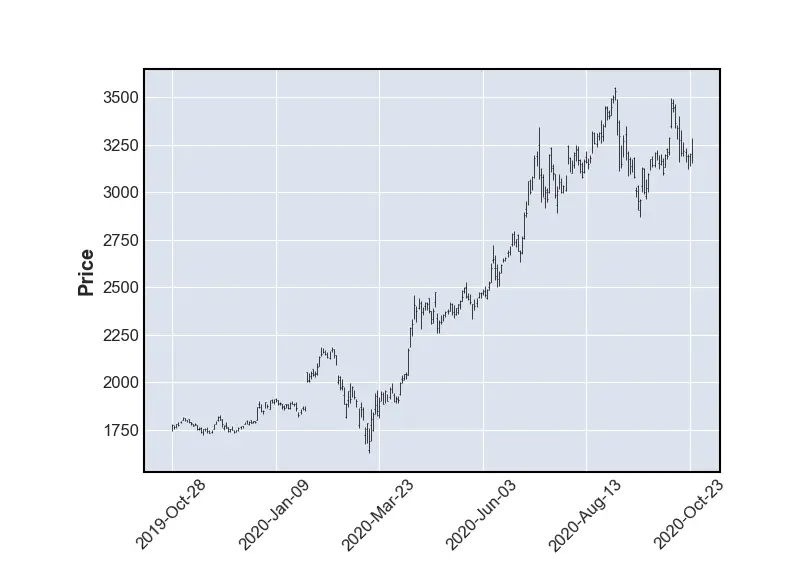
我們將在以下示例中使用財務 API。我們有我們的資料和型別 mplf,這是我們對 mplfinance 模組的引用。
我們從這個模組呼叫 plot() 方法。
# %matplotlib inline # remove this line when use do not use jupyter notebook
import pandas as pd
import mplfinance as mplf

file = "AMZN.csv"
data = pd.read_csv(file)
data.Date = pd.to_datetime(data.Date)
data.info()
data = data.set_index("Date")
mplf.plot(data)
# use this when you are not using jupyter notebook
mplf.show()
輸出:
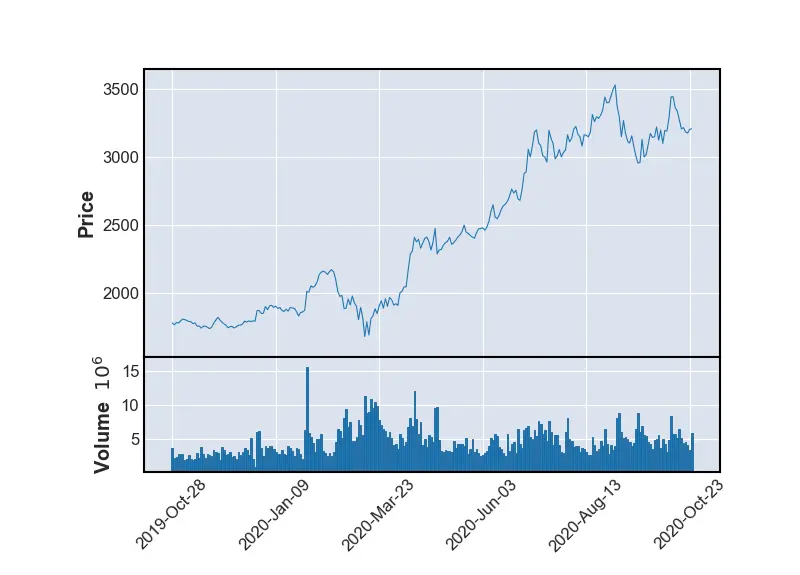
如果我們想顯示體積,我們將製作一個線圖,因為在這個比例上更容易看到並且體積為 True。
# %matplotlib inline # remove this line when we use jupyter notebook
import pandas as pd
import mplfinance as mplf

file = "AMZN.csv"
data = pd.read_csv(file)
data.Date = pd.to_datetime(data.Date)
data.info()
data = data.set_index("Date")
mplf.plot(data, type="line", volume=True)
# use this when you are not using jupyter notebook
mplf.show()
我們有一個與 OHLC 圖不同的線圖。我們也有卷,所以我們可以看到它在這裡為我們做了一些事情。
它已經標記了軸並旋轉了這些標籤。
輸出:
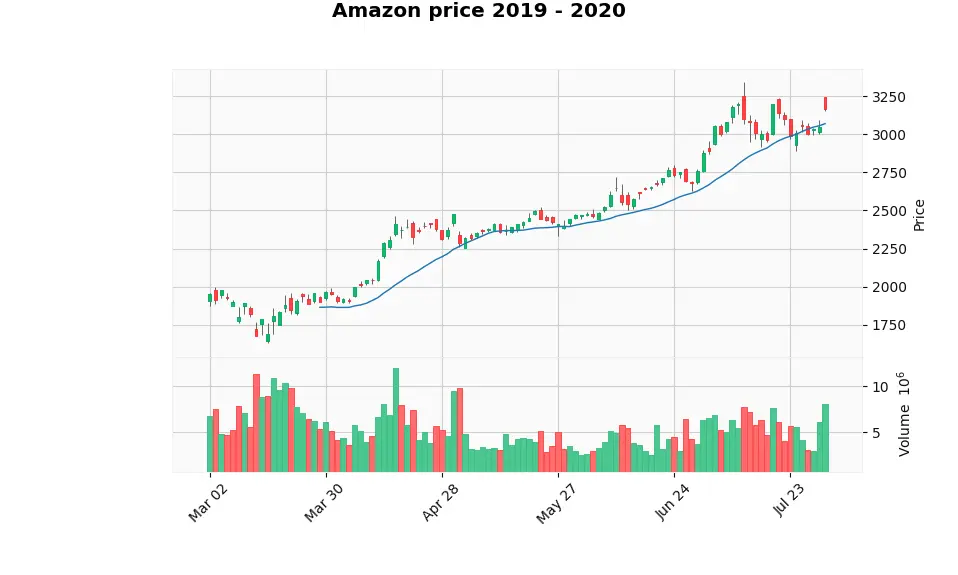
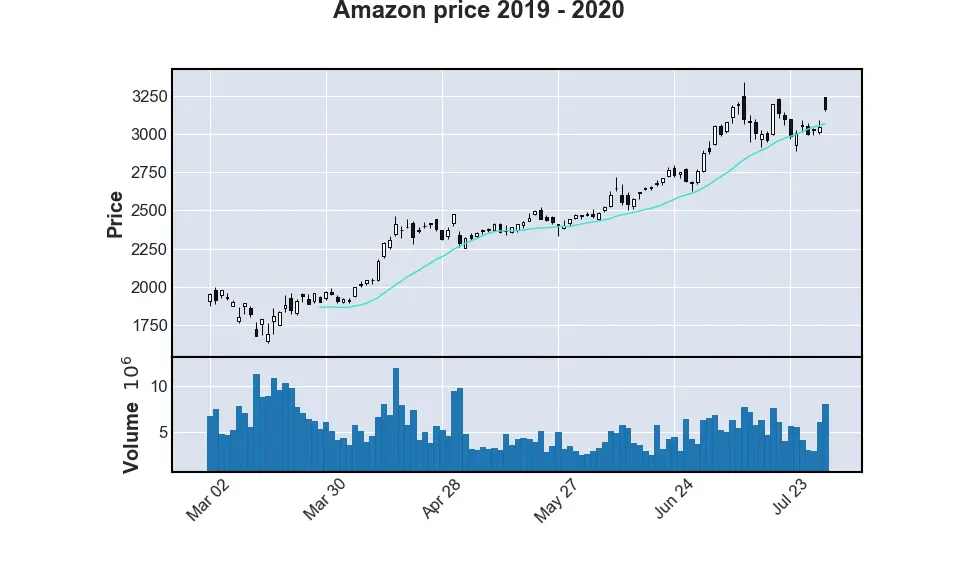
讓我們在 pandas 中使用時間序列尋找幾個月。我們使用 mav 引數將 5 月至 7 月的資料放入移動平均線,然後我們將型別指定為名為 candlestick 的蠟燭,我們將保持交易量。
# %matplotlib inline # remove this line when wuse do not use jupyter notebook
import pandas as pd
import mplfinance as mplf

file = "AMZN.csv"
data = pd.read_csv(file)
data.Date = pd.to_datetime(data.Date)
data.info()
data = data.set_index("Date")

mplf.plot(
    data.loc["2020-03":"2020-07"],
    figratio=(20, 12),
    title="Amazon price 2019 - 2020",
    type="candle",
    mav=(20),
    volume=True,
)
# use this when you are not using jupyter notebook
mplf.show()
如果我們執行程式碼,我們會得到一個燭臺,一個 OHLC 圖表,其交易量僅用於移動平均線。
輸出:
我們可以使用 style 引數來更改繪圖外觀的樣式,將 "yahoo" 設定為此方法的值。
# %matplotlib inline # remove this line when wuse do not use jupyter notebook
import pandas as pd
import mplfinance as mplf

file = "AMZN.csv"
data = pd.read_csv(file)
data.Date = pd.to_datetime(data.Date)
data.info()
data = data.set_index("Date")

mplf.plot(
    data.loc["2020-03":"2020-07"],
    figratio=(20, 12),
    title="Amazon price 2019 - 2020",
    type="candle",
    mav=(20),
    volume=True,
    style="yahoo",
)
# use this when you are not using jupyter notebook
mplf.show()
輸出: