HOWTO · Angular
Angular 로드 시
이 튜토리얼은 Angular에서 로드 시 함수를 호출하는 방법을 보여줍니다.
이 페이지의 내용
Angular에서 페이지가 로드될 때 함수를 소개합니다.
Angular에서 로드 시
페이지나 구성 요소가 로드될 때 함수를 실행하려면 init에서 해당 함수를 호출합니다.
예를 들어 시작하겠습니다. 먼저 뷰를 생성하겠습니다.
# angular
<body>
  <div ng-app="newapp" ng-controller="newcontroller" data-ng-init="init()">
    <h2>Page Loaded</h2>
  </div>
</body>
위 코드에서 ng-app, ng-controller, initialized component 및 data-ng-init를 정의했습니다.
이제 페이지가 로드될 때 콘솔에 출력을 표시하는 함수를 작성해 보겠습니다.
# angular
var app = angular.module("newapp", []);
app.controller("newcontroller", function($scope){
  $scope.init = function(){
    console.log("Page Loaded")
  }
})
출력:
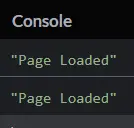
우리가 제공한 예제는 페이지 로드 시 함수를 호출하는 것이 얼마나 쉬운지를 보여줍니다. 위의 예를 사용하면 모든 함수를 쉽게 호출할 수 있습니다.