HOWTO · PowerShell
PowerShell 中的字符串数组
本教程演示如何在 PowerShell 中创建字符串数组。
本页内容
本教程演示了如何在 PowerShell 中创建一个字符串数组。
PowerShell 字符串数组
在 PowerShell 中声明字符串数组有不同的方法。本教程演示不同的方法来声明字符串数组以及如何访问字符串数组。
方法 1:使用内置方法声明字符串数组
第一种方法是通过内置的 PowerShell 方法声明字符串数组,我们可以在一行中声明字符串数组。请查看以下命令:
$DemoArray = @("This is Delftstack1", "This is Delftstack2", "This is Delftstack3", "This is Delftstack4")
echo $DemoArray
上面的代码将创建一个字符串数组并打印出来。请查看输出:
This is Delftstack1
This is Delftstack2
This is Delftstack3
This is Delftstack4
方法 2:使用 System.Collections.Arraylist 声明字符串数组
System.Collections.Arraylist 是一个用于创建数组和数组列表的 PowerShell 类。要使用此类,首先我们需要创建该类的对象。
请查看以下命令:
New-Object -TypeName System.Collections.Arraylist
$DemoArray = [System.Collections.Arraylist]@("This is Delftstack1", "This is Delftstack2", "This is Delftstack3", "This is Delftstack4")
echo $DemoArray
上面的代码将使用 PowerShell 的 System.Collections.Arraylist 类创建一个字符串的 ArrayList。请查看输出:
This is Delftstack1
This is Delftstack2
This is Delftstack3
This is Delftstack4
获取字符串数组的长度
由于我们已在变量 $DemoArray 中声明了字符串数组,因此我们必须使用 Length 方法与该变量一起获取这个长度。请查看命令:
$DemoArray.Length
确保您在内置方法上运行此 Length 方法。请查看输出:
19
19
19
19
在 System.Collections.Arraylist 字符串数组上使用此 Length 方法将显示每个字符串的长度。请查看示例:
New-Object -TypeName System.Collections.Arraylist
$DemoArray = [System.Collections.Arraylist]@("This is Delftstack1", "This is Delftstack2", "This is Delftstack3", "This is Delftstack4")
$DemoArray.Length
上面的代码将输出数组中每个字符串的长度。请查看输出:
19
19
19
19
获取字符串数组的类型
我们可以使用 PowerShell 的 GetType() 方法获取数组类型。让我们尝试获取上述两种方法的字符串数组类型。
方法 1:
$DemoArray = @("This is Delftstack1", "This is Delftstack2", "This is Delftstack3", "This is Delftstack4")
$DemoArray.GetType()
上面的代码将使用第一种方法获取字符串数组的类型。请查看输出:
IsPublic IsSerial Name                                     BaseType
-------- -------- ----                                     --------
True     True     Object[]                                 System.Array
方法 2:
$DemoArray = [System.Collections.Arraylist]@("This is Delftstack1", "This is Delftstack2", "This is Delftstack3", "This is Delftstack4")
$DemoArray.GetType()
上面的代码将使用 System.Collections.Arraylist 方法获取字符串数组的类型。请查看输出:
IsPublic IsSerial Name                                     BaseType
-------- -------- ----                                     --------
True     True     ArrayList                                System.Object
数据类型的名称存储在 Name 列中,因此对于第一种方法,数据类型是 Object,对于第二种方法,数据类型是 ArrayList。BaseType 列显示系统中的数据类型。
对于数组,它始终是 System.Array,对于字符串或 ArrayList,它将是 System.Object。
向字符串数组添加字符串
使用 += 连接操作符可以向字符串数组添加或附加更多字符串。例如,如果我们想向数组添加几个字符串,则使用以下命令:
$DemoArray += @("This is Delftstack5", "This is Delftstack6", "This is Delftstack7", "This is Delftstack8")
让我们尝试一个示例,将更多字符串添加到数组中,检查长度并打印数组。请查看示例:
$DemoArray = @("This is Delftstack1", "This is Delftstack2", "This is Delftstack3", "This is Delftstack4")
echo $DemoArray
$DemoArray += @("This is Delftstack5", "This is Delftstack6", "This is Delftstack7", "This is Delftstack8")
$DemoArray.Length
echo $DemoArray
上面的代码将创建一个字符串数组并打印,然后向其中添加四个字符串,检查数组的长度,最后打印数组。请查看输出:
This is Delftstack1
This is Delftstack2
This is Delftstack3
This is Delftstack4
8
This is Delftstack1
This is Delftstack2
This is Delftstack3
This is Delftstack4
This is Delftstack5
This is Delftstack6
This is Delftstack7
This is Delftstack8
在字符串数组中查找字符串
在 PowerShell 中查找字符串数组中的字符串是很简单的。我们必须使用 Contains() 方法,其中参数是我们想要查找的字符串。
如果找到了该字符串,方法将返回 true,否则返回 false。让我们尝试一个示例,使用我们的数组:
$DemoArray = @("This is Delftstack1", "This is Delftstack2", "This is Delftstack3", "This is Delftstack4")
$DemoArray.Contains("This is Delftstack1")
$DemoArray.Contains("This is Delftstack5")
该方法将在 contains() 方法中查找给定的字符串,如果找到字符串将返回 true,如果找不到将返回 false。请查看输出:
True
False
更改字符串数组中字符串的大小写
我们还可以更改字符串数组中字符串的大小写。为此,我们使用 toLower() 和 toUpper() 方法,分别将大小写转换为小写和大写。
让我们尝试一个示例:
$DemoArray = @("This is Delftstack1", "This is Delftstack2", "This is Delftstack3", "This is Delftstack4")
$DemoArray = $DemoArray.toLower()
echo $DemoArray
$DemoArray = $DemoArray.toUpper()
echo $DemoArray
上述命令将把数组字符串转换为小写和大写。请查看输出:
this is delftstack1
this is delftstack2
this is delftstack3
this is delftstack4
THIS IS DELFTSTACK1
THIS IS DELFTSTACK2
THIS IS DELFTSTACK3
THIS IS DELFTSTACK4
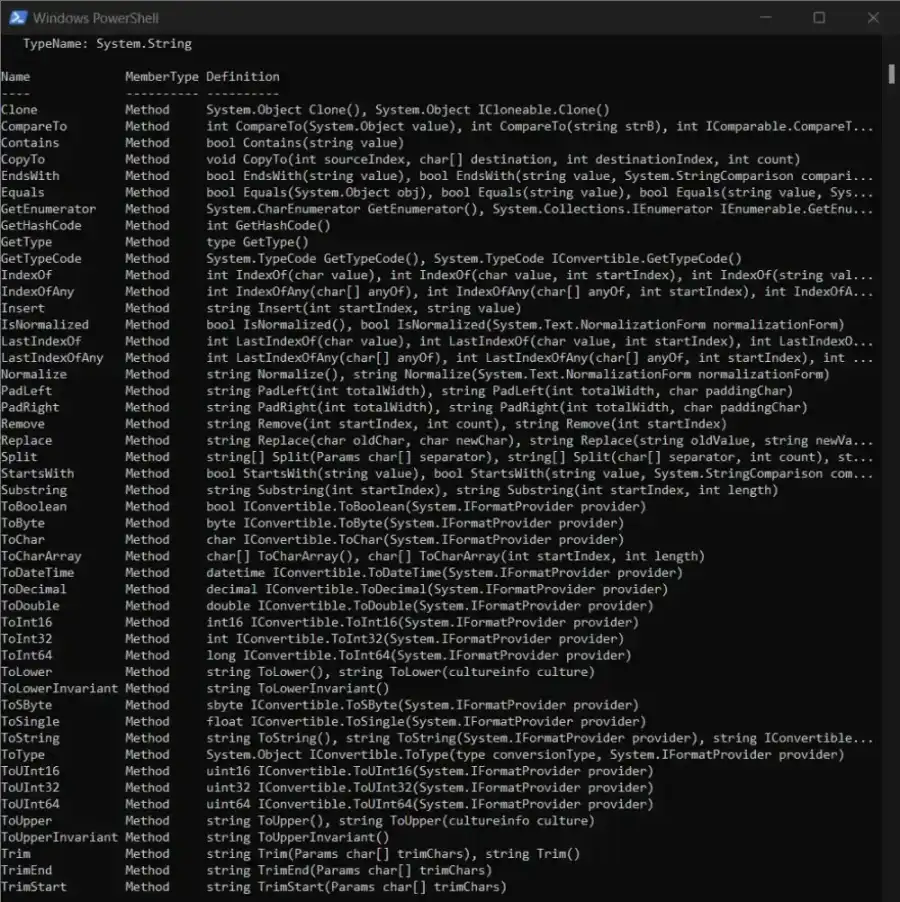
获取字符串数组的所有现有方法
我们可以使用 Get-Member 和 -MemberType 方法获取可用于字符串数组的所有方法。要获取字符串数组可用的所有方法,请运行以下命令:
$DemoArray | Get-Member -MemberType Method
上述代码将获取数组 $DemoArray 中可用的所有方法。请查看输出: