HOWTO · PowerShell
PowerShell 中的字串陣列
本教程演示了如何在 PowerShell 中創建字串數組。
本頁內容
本教學將演示如何在 PowerShell 中創建字符串數組。
PowerShell 字符串數組
在 PowerShell 中有不同的方法來聲明字符串數組。本教學演示了不同的方法來聲明字符串數組以及如何訪問字符串數組。
方法 1:使用內置方法聲明字符串數組
第一種方法是通過內置的 PowerShell 方法在一行中聲明字符串數組。請參見命令:
$DemoArray = @("This is Delftstack1", "This is Delftstack2", "This is Delftstack3", "This is Delftstack4")
echo $DemoArray
上面的代碼將創建一個字符串數組,然後打印它。請參見輸出:
This is Delftstack1
This is Delftstack2
This is Delftstack3
This is Delftstack4
方法 2:使用 System.Collections.Arraylist 聲明字符串數組
System.Collections.Arraylist 是一個用於創建數組和數組列表的 PowerShell 類。要使用此類,我們首先需要創建此類的對象。
請參見命令:
New-Object -TypeName System.Collections.Arraylist
$DemoArray = [System.Collections.Arraylist]@("This is Delftstack1", "This is Delftstack2", "This is Delftstack3", "This is Delftstack4")
echo $DemoArray
上面的代碼將使用 PowerShell 的 System.Collections.Arraylist 類創建一個字符串的 ArrayList。請參見輸出:
This is Delftstack1
This is Delftstack2
This is Delftstack3
This is Delftstack4
獲取字符串數組的長度
如我們在變量 $DemoArray 中聲明了字符串數組,我們必須使用 Length 方法來獲取該長度。請參見命令:
$DemoArray.Length
確保您在內置方法上運行此 Length 方法。請參見輸出:
19
19
19
19
在 System.Collections.Arraylist 字符串數組上使用此 Length 方法將顯示每個字符串的長度。請參見範例:
New-Object -TypeName System.Collections.Arraylist
$DemoArray = [System.Collections.Arraylist]@("This is Delftstack1", "This is Delftstack2", "This is Delftstack3", "This is Delftstack4")
$DemoArray.Length
上面的代碼將輸出數組中每個字符串的長度。請參見輸出:
19
19
19
19
獲取字符串數組的類型
我們可以使用 PowerShell 的 GetType() 方法獲取數組類型。讓我們嘗試獲取上述兩種方法的字符串數組類型。
方法 1:
$DemoArray = @("This is Delftstack1", "This is Delftstack2", "This is Delftstack3", "This is Delftstack4")
$DemoArray.GetType()
上面的代碼將使用第一種方法獲取字符串數組的類型。請參見輸出:
IsPublic IsSerial Name                                     BaseType
-------- -------- ----                                     --------
True     True     Object[]                                 System.Array
方法 2:
$DemoArray = [System.Collections.Arraylist]@("This is Delftstack1", "This is Delftstack2", "This is Delftstack3", "This is Delftstack4")
$DemoArray.GetType()
上面的代碼將使用 System.Collections.Arraylist 方法獲取字符串數組的類型。請參見輸出:
IsPublic IsSerial Name                                     BaseType
-------- -------- ----                                     --------
True     True     ArrayList                                System.Object
數據類型的名稱存儲在 Name 列中,因此對於第一種方法,數據類型為 Object,而對於第二種方法,數據類型為 ArrayList。BaseType 列顯示系統中的數據類型。
對於數組,它始終是 System.Array,而對於字符串或 ArrayList,則將是 System.Object。
向字符串數組添加字符串
使用 += 連接運算符可以向字符串數組添加或附加更多字符串。例如,如果我們想向數組添加幾個字符串,則可以使用以下命令:
$DemoArray += @("This is Delftstack5", "This is Delftstack6", "This is Delftstack7", "This is Delftstack8")
讓我們嘗試一個示例,將更多字符串添加到數組中,檢查長度並打印數組。請參見示例:
$DemoArray = @("This is Delftstack1", "This is Delftstack2", "This is Delftstack3", "This is Delftstack4")
echo $DemoArray
$DemoArray += @("This is Delftstack5", "This is Delftstack6", "This is Delftstack7", "This is Delftstack8")
$DemoArray.Length
echo $DemoArray
上面的代碼將創建一個字符串數組並打印,再添加四個字符串,檢查數組的長度,並最終打印該數組。請參見輸出:
This is Delftstack1
This is Delftstack2
This is Delftstack3
This is Delftstack4
8
This is Delftstack1
This is Delftstack2
This is Delftstack3
This is Delftstack4
This is Delftstack5
This is Delftstack6
This is Delftstack7
This is Delftstack8
在字符串數組中查找字符串
在 PowerShell 中找到字符串數組中的字符串很簡單。我們必須使用 Contains() 方法,其參數將是我們想要查找的字符串。
如果找到該字符串,則該方法將返回 true;否則,它將返回 false。讓我們嘗試一個示例,使用我們的數組:
$DemoArray = @("This is Delftstack1", "This is Delftstack2", "This is Delftstack3", "This is Delftstack4")
$DemoArray.Contains("This is Delftstack1")
$DemoArray.Contains("This is Delftstack5")
該方法將查找 contains() 方法中的給定字符串,如果找到該字符串則返回 true,如果找不到則返回 false。請參見輸出:
True
False
更改字符串數組中字符串的大小寫
我們還可以更改字符串數組中字符串的大小寫。為此,我們使用 toLower() 和 toUpper() 方法,它們分別將大小寫轉換為小寫和大寫。
讓我們嘗試一個示例:
$DemoArray = @("This is Delftstack1", "This is Delftstack2", "This is Delftstack3", "This is Delftstack4")
$DemoArray = $DemoArray.toLower()
echo $DemoArray
$DemoArray = $DemoArray.toUpper()
echo $DemoArray
上面的命令將把數組字符串轉換為小寫和大寫。請參見輸出:
this is delftstack1
this is delftstack2
this is delftstack3
this is delftstack4
THIS IS DELFTSTACK1
THIS IS DELFTSTACK2
THIS IS DELFTSTACK3
THIS IS DELFTSTACK4
獲取字符串數組的所有現有方法
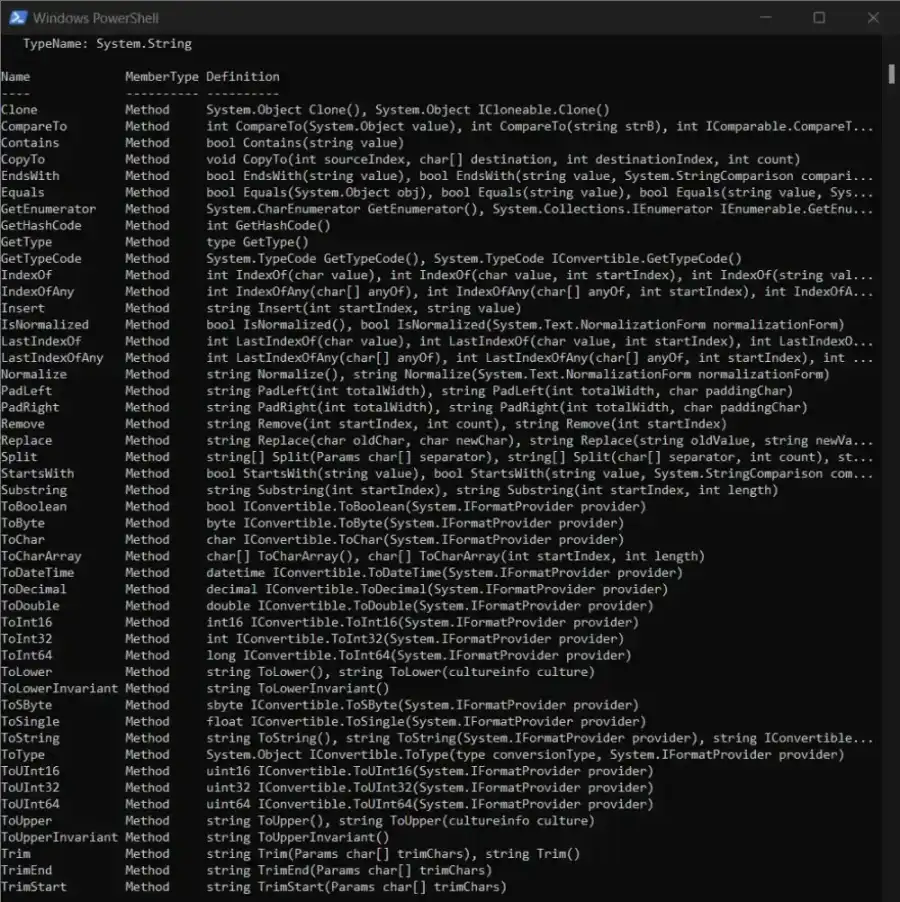
我們可以使用 Get-Member 和 -MemberType 方法來獲取字符串數組可用的所有方法。要獲取字符串數組可用的所有方法,請運行以下命令:
$DemoArray | Get-Member -MemberType Method
上面的代碼將獲取 $DemoArray 的所有可用方法。請參見輸出: