HOWTO · JavaScript
在 JavaScript 中获取元素的高度和宽度
在 JavaScript 中使用 offsetWidth、clientWidth 和 scrollWidth 测量元素,并选择与你的布局任务相匹配的数值。
本页内容
在 JavaScript 中测量 HTML 元素时,可根据需要选择不同属性:offsetWidth 和 offsetHeight 用于获取边框盒的布局尺寸,clientWidth 和 clientHeight 用于获取内部可见区域的尺寸,scrollWidth 和 scrollHeight 用于获取包含溢出内容的尺寸。这些只读属性返回像素值;应使用哪一组,取决于你要测量元素的哪一部分。
使用 CSS 盒模型获取元素的高度和宽度
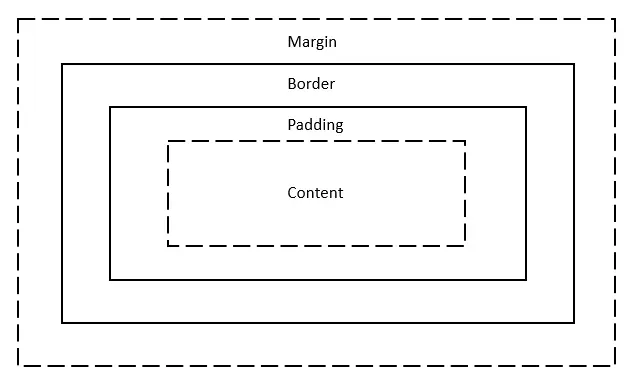
CSS 盒模型描述了元素内容周围的各层。从内到外依次是内容、内边距、边框和外边距。内边距在边框内增加空间;外边距则在边框外增加空间。下文介绍的三组尺寸都不包含外边距,因此外边距不会改变这些值。
在 JavaScript 中使用 offsetWidth 和 offsetHeight 获取元素的高度和宽度
offsetWidth 和 offsetHeight 返回元素渲染后的边框盒尺寸,单位为 CSS 像素。它们包含内容、内边距、边框,以及占用布局空间的滚动条。对于下方内容区宽度为 100 像素、内边距为 1 像素、每侧边框为 5 像素的示例,如果没有滚动条占用空间,这两个值都是 112 像素。没有渲染盒的元素(例如设置了 display: none 的元素)会返回 0。
这两个属性描述的是布局尺寸,返回整数值。CSS 变换可以改变元素在视觉上的大小,却不会改变它的 offsetWidth 或 offsetHeight。如果需要获取显示出来的矩形尺寸(包括变换效果或小数像素),请改用 getBoundingClientRect();它的 width 和 height 表示相对于视口的矩形尺寸。
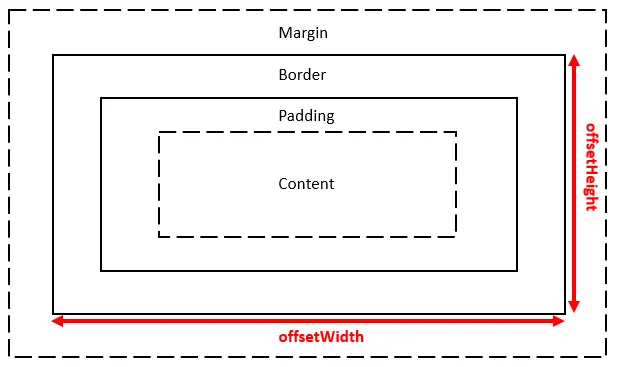
下面用数值演示边框盒尺寸的计算;示例输出中显示的标签仍为英文:
const box = { contentWidth: 100, padding: 1, border: 5 };
const offsetWidth = box.contentWidth + 2 * box.padding + 2 * box.border;
console.log(`offsetWidth = ${offsetWidth}`);
offsetWidth = 112
在 JavaScript 中使用 clientWidth 和 clientHeight 获取元素的高度和宽度
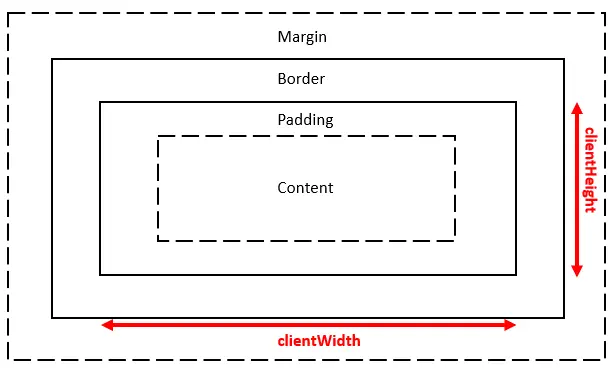
clientWidth 和 clientHeight 测量元素的内部区域,即内容加内边距。它们不包含边框或滚动条。对于内容宽度为 100 像素、每侧内边距为 1 像素的示例,这两个值都是 102 像素。当你需要测量内部可见尺寸,而不是外侧边框盒尺寸时,可以读取这两个属性。
在 JavaScript 中使用 scrollWidth 和 scrollHeight 获取元素的高度和宽度
scrollWidth 和 scrollHeight 测量内容区域加内边距的尺寸,其中也包括超出可见区域的内容。当所有内容都能完整显示时,它们可能与客户端尺寸相同;内容溢出时,值则会更大。这些值可用于判断容器是否需要滚动。
下面的浏览器页面会显示同一个固定尺寸容器的三组尺寸。其子元素在宽度和高度上都大于容器,因此容器的滚动尺寸会包含溢出部分。浏览器布局和滚动条行为会影响具体数值,因此这个静态示例不保证特定的运行时输出。
<!doctype html>
<html lang="en">
<head>
  <meta charset="utf-8">
  <title>Compare element dimensions</title>
  <style>
    #container { box-sizing: content-box; width: 200px; height: 200px; padding: 10px; border: 2px solid green; overflow: auto; }
    #items { width: 400px; height: 400px; background: skyblue; }
  </style>
</head>
<body>
  <div id="container"><div id="items">Content extends beyond the container.</div></div>
  <pre id="results"></pre>
  <script>
    const item = document.querySelector('#container');
    document.querySelector('#results').textContent = [
      `offset: ${item.offsetWidth} × ${item.offsetHeight}`,
      `client: ${item.clientWidth} × ${item.clientHeight}`,
      `scroll: ${item.scrollWidth} × ${item.scrollHeight}`
    ].join('\n');
  </script>
</body>
</html>