HOWTO · JavaScript
在 JavaScript 中獲取元素的高度和寬度
在 JavaScript 中使用 offsetWidth、clientWidth 和 scrollWidth 測量元素,並選擇與你的版面工作相符的數值。
本頁內容
在 JavaScript 中測量 HTML 元素時,可依需求選擇屬性:使用 offsetWidth 和 offsetHeight 取得元素的邊框盒版面尺寸;使用 clientWidth 和 clientHeight 取得內部可見區域;使用 scrollWidth 和 scrollHeight 取得包含溢出內容的尺寸。這些唯讀屬性會回傳像素值;應使用哪一組,取決於你要測量元素的哪個部分。
使用 CSS 盒模型取得元素的高度和寬度
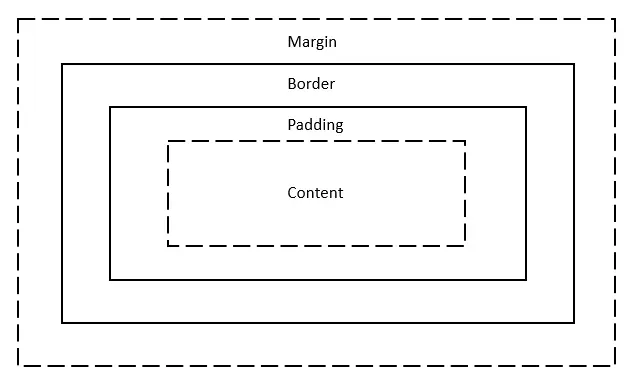
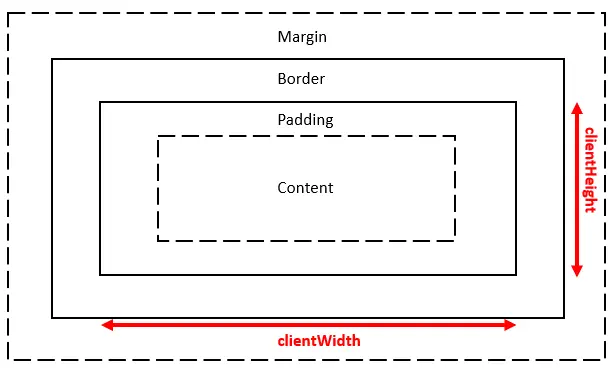
CSS 盒模型描述元素內容周圍的各個層次,由內而外依序為內容、內距、邊框和外距。內距是在邊框內側增加空間;外距則是在邊框外側增加空間。下方三組尺寸都不包含外距,因此外距不會改變這些值。
在 JavaScript 中使用 offsetWidth 和 offsetHeight 取得元素的高度與寬度
offsetWidth 和 offsetHeight 會回報元素已繪製的邊框盒尺寸,單位為 CSS 像素。它們包含內容、內距、邊框,以及會佔用版面空間的捲軸。以下範例的內容盒為 100 像素、內距為 1 像素,且每側邊框為 5 像素;若沒有捲軸佔用空間,兩個值都會是 112 像素。沒有已繪製盒子的元素,例如套用 display: none 樣式的元素,會回傳 0。
這些屬性描述版面尺寸,並回傳整數值。CSS 轉換可以改變元素的視覺大小,但不會改變它的 offsetWidth 或 offsetHeight。若要取得顯示的矩形尺寸,包含轉換效果或小數像素,請改用 getBoundingClientRect();其 width 和 height 表示相對於視埠的矩形尺寸。
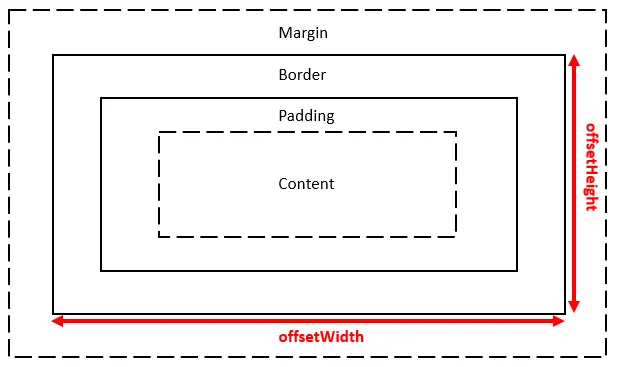
以下用數值示範邊框盒的計算方式。範例輸出為 112 像素;輸出區塊中的標籤維持英文:
const box = { contentWidth: 100, padding: 1, border: 5 };
const offsetWidth = box.contentWidth + 2 * box.padding + 2 * box.border;
console.log(`offsetWidth = ${offsetWidth}`);
offsetWidth = 112
在 JavaScript 中使用 clientWidth 和 clientHeight 取得元素的高度與寬度
clientWidth 和 clientHeight 測量元素的內部區域,也就是內容加上內距。它們不包含邊框或任何捲軸。內容為 100 像素、每側內距為 1 像素時,這兩個值都是 102 像素。若需要的是內部可見尺寸,而非外側邊框盒尺寸,請使用這些屬性。
在 JavaScript 中使用 scrollWidth 和 scrollHeight 取得元素的高度與寬度
scrollWidth 和 scrollHeight 測量內容區域加上內距,也會計入超出可見區域的內容。若所有內容都容得下,它們可能與用戶端尺寸相同;內容溢出時,這些值則會更大。你可以用這些值判斷容器是否需要捲動。
以下瀏覽器頁面會顯示同一個固定尺寸容器的三組尺寸。容器的子元素在寬度和高度上都比容器大,因此容器的捲動尺寸會包含溢出的部分。瀏覽器版面配置與捲軸行為會影響實際數值,因此這個靜態範例不宣稱特定執行環境會產生固定輸出。
<!doctype html>
<html lang="en">
<head>
  <meta charset="utf-8">
  <title>Compare element dimensions</title>
  <style>
    #container { box-sizing: content-box; width: 200px; height: 200px; padding: 10px; border: 2px solid green; overflow: auto; }
    #items { width: 400px; height: 400px; background: skyblue; }
  </style>
</head>
<body>
  <div id="container"><div id="items">Content extends beyond the container.</div></div>
  <pre id="results"></pre>
  <script>
    const item = document.querySelector('#container');
    document.querySelector('#results').textContent = [
      `offset: ${item.offsetWidth} × ${item.offsetHeight}`,
      `client: ${item.clientWidth} × ${item.clientHeight}`,
      `scroll: ${item.scrollWidth} × ${item.scrollHeight}`
    ].join('\n');
  </script>
</body>
</html>