HOWTO · Tkinter
如何更改 Tkinter 按鈕的大小
本教程介紹如何設定和更改 Tkinter 按鈕控制元件的大小。
本頁內容
Tkinter 按鈕 Button 控制元件的 height 和 width 選項指定初始化期間建立的按鈕的大小。初始化之後,我們仍然可以使用 configure 方法來配置 height 和 width 選項,以程式設計方式更改 Tkinter 按鈕 Button 控制元件的大小。
指定 height 和 width 選項以設定按鈕大小
tk.Button(self, text="", height=20, width=20)
以文字單位為單位,將 height 和 width 設定為 20。在預設的系統字型中,水平文字單位等於字元 0 的寬度,垂直文字單位等於 0 的高度。
注意
Tkinter 使用文字單位而不是英寸或畫素來測量寬度和高度的原因是,該文字單位可確保 Tkinter 在不同平臺上的一致行為。
完整的工作程式碼
import tkinter as tk
import tkinter.font as tkFont

app = tk.Tk()
app.geometry("400x200")


buttonExample1 = tk.Button(app, text="Button 1", width=10, height=10)
buttonExample2 = tk.Button(app, text="Button 2", width=10, height=10)

buttonExample1.pack(side=tk.LEFT)
buttonExample2.pack(side=tk.RIGHT)

app.mainloop()
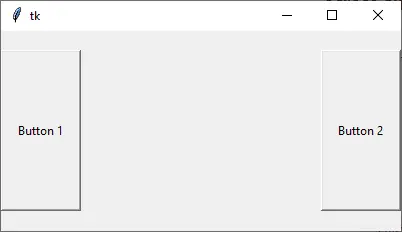
如上所示,按鈕的高度和寬度在畫素中是不同的,儘管其 height 和 width 都設定為 10。
以畫素為單位設定 Tkinter 按鈕 Button 的寬度和高度
如果需要以畫素 pixel 為單位指定 Tkinter 按鈕控制元件的寬度和/或高度,則可以向按鈕中新增虛擬的不可見的 1x1 畫素影象。然後,將以畫素為單位測量寬度和高度。
tk.Button(app, text="Button 1", image=pixelVirtual, width=100, height=100, compound="c")
如果不可見的影象和文字應該在按鈕的中央,我們還需要將 compound 選項設定為 c 或等效的 tk.CENTER。如果未配置 compound,則 text 將不會顯示在按鈕中。
import tkinter as tk
import tkinter.font as tkFont

app = tk.Tk()
app.geometry("300x100")
fontStyle = tkFont.Font(family="Lucida Grande", size=20)

labelExample = tk.Label(app, text="20", font=fontStyle)

pixelVirtual = tk.PhotoImage(width=1, height=1)

buttonExample1 = tk.Button(
    app, text="Increase", image=pixelVirtual, width=100, height=100, compound="c"
)
buttonExample2 = tk.Button(
    app, text="Decrease", image=pixelVirtual, width=100, height=100, compound="c"
)

buttonExample1.pack(side=tk.LEFT)
buttonExample2.pack(side=tk.RIGHT)
app.mainloop()
初始化後更改 Tkinter 按鈕 Button 大小

在建立按鈕控制元件之後,configure 方法可以設定 width 和/或 height 選項來更改按鈕的大小。
buttonExample1.configure(height=100, width=100)
它將 buttonExample1 的高度和寬度設定為 100。
初始化後更改按鈕 Button 大小的完整工作示例
import tkinter as tk
import tkinter.font as tkFont

app = tk.Tk()
app.geometry("600x500")


def decreaseSize():
    buttonExample1.configure(height=100, width=100)


def increaseSize():
    buttonExample2.configure(height=400, width=400)


pixelVirtual = tk.PhotoImage(width=1, height=1)

buttonExample1 = tk.Button(
    app,
    text="Decrease Size",
    image=pixelVirtual,
    width=200,
    height=200,
    compound="c",
    command=decreaseSize,
)
buttonExample2 = tk.Button(
    app,
    text="Increase Size",
    image=pixelVirtual,
    width=200,
    height=200,
    compound=tk.CENTER,
    command=increaseSize,
)

buttonExample1.pack(side=tk.LEFT)
buttonExample2.pack(side=tk.RIGHT)
app.mainloop()