HOWTO · Pandas
使用 Python 將 Pandas DataFrame 儲存為 HTML
本教程演示如何將 Pandas DataFrame 轉換為 Python 中的 HTML 表格。
本頁內容
有時我們將 DataFrame 渲染為 HTML 表格以在網頁中表示它。如果我們想在 HTML 中顯示同一個表格,我們不需要在 HTML 中編寫它的程式碼來重新制作那個表格。
我們可以使用內建的方法或在 python 中手動編寫程式碼來將 Pandas DataFrame 轉換為 HTML 表格,這將在本文中討論。
使用 to_html() 方法將 Pandas DataFrame 儲存為 HTML 檔案
在下面的程式碼中,我們有學生的資料。我們使用 pandas 庫中提供的方法 to_html() 將 Pandas DataFrame 轉換為 HTML。
我們將使用我們的 DataFrame 物件呼叫此方法,並傳遞表示表格的新 HTML 檔案的名稱。如果我們只傳遞 HTML 檔案的名稱,它將在當前目錄中建立。
我們還可以提供路徑以及 HTML 檔案的名稱,以將其儲存在其他位置。此方法會將整個 DataFrame 轉換為 <table> 元素,並且列將包裹在 <thead> 元素中。
DataFrame 的每一行都將被包裹在 HTML 的 <tr> 元素中。此方法將返回 DataFrame 的 HTML 格式。
示例程式碼:
# Python 3.x
import pandas as pd

df = pd.read_csv("Student.csv")
display(df)
df.to_html("Student.html")
輸出:
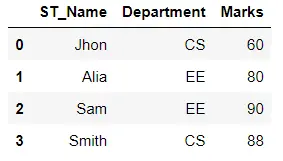
輸出將在 Student.html 檔案中。
HTML - 程式碼:
<table border="1" class="dataframe">
  <thead>
    <tr style="text-align: right;">
      <th></th>
      <th>ST_Name</th>
      <th>Department</th>
      <th>Marks</th>
    </tr>
  </thead>
  <tbody>
    <tr>
      <th>0</th>
      <td>Jhon</td>
      <td>CS</td>
      <td>60</td>
    </tr>
    <tr>
      <th>1</th>
      <td>Alia</td>
      <td>EE</td>
      <td>80</td>
    </tr>
    <tr>
      <th>2</th>
      <td>Sam</td>
      <td>EE</td>
      <td>90</td>
    </tr>
    <tr>
      <th>3</th>
      <td>Smith</td>
      <td>CS</td>
      <td>88</td>
    </tr>
  </tbody>
</table>
手動將 Pandas DataFrame 轉換為 HTML 表
將 Pandas DataFrame 儲存為 HTML 的另一種方法是從頭開始編寫程式碼以進行手動轉換。
首先,我們在下面的程式碼中以 w+ 模式開啟了一個檔案 student.html。如果檔案不存在,此模式將建立一個檔案。
在這個檔案中,我們的 HTML 程式碼將被儲存。在這裡,我們將整個表包裹在 <table> 中,然後我們遍歷 DataFrame 的列並將它們包裹在 <th> 中。
最後,我們對行進行了迭代並將它們包裝在 <tr> 中。
示例程式碼:
# Python 3.x
import pandas as pd

df = pd.read_csv("Student.csv")
display(df)
with open(r"student.html", "w+") as f:
    f.write("<table>")
    for header in df.columns.values:
        f.write("<th>" + str(header) + "</th>")
    for i in range(len(df)):
        f.write("<tr>")
        for col in df.columns:
            value = df.iloc[i][col]
            f.write("<td>" + str(value) + "</td>")
        f.write("</tr>")
    f.write("</table>")
輸出:
HTML - 程式碼:
<table><th>ST_Name</th><th>Department</th><th>Marks</th><tr><td>Jhon</td><td>CS</td><td>60</td></tr><tr><td>Alia</td><td>EE</td><td>80</td></tr><tr><td>Sam</td><td>EE</td><td>90</td></tr><tr><td>Smith</td><td>CS</td><td>88</td></tr></table>