HOWTO · PowerShell
如何在 PowerShell 中使用 CmdletBinding 特性
cmdlet 是一種輕量級的腳本,在 PowerShell 環境中執行單一功能。cmdlet 可以用任何 .Net 語言編寫。
本頁內容
cmdlet 是一個輕量級腳本,在 PowerShell 環境中執行單一功能。cmdlets 可以用任何 .Net 語言編寫。
通常,cmdlet 以動詞-名詞對的形式表示,以執行命令。該命令是對底層操作系統的命令,要求其執行最終用戶所需的特定服務。
PowerShell 環境包含超過 200 個基本 cmdlets,例如 New-Item、Move-Item、Set-Location 和 Get-Location。這些 cmdlet 共享一組普通的功能,這些功能在簡單的 PowerShell 函數中不可用。
- 支援常用參數,如
-WhatIf、ErrorAction、Verbose等。 - 提示確認
- 支援必需參數
PowerShell 中的 CmdletBinding 屬性
通過繼承上述基本 cmdlet 特性,可以將簡單的 PowerShell 函數寫成進階函數。CmdletBinding 屬性使您能夠訪問這些基本的 cmdlet 特性。
以下顯示 CmdletBinding 屬性的語法及所有可能的參數。
{
    [CmdletBinding(ConfirmImpact = <String>,
        DefaultParameterSetName = <String>,
        HelpURI = <URI>,
        SupportsPaging = <Boolean>,
        SupportsShouldProcess = <Boolean>,
        PositionalBinding = <Boolean>)]

    Param ($myparam)
    Begin {}
    Process {}
    End {}
}
假設我們有一個名為 Helloworld-To-UpperCase 的簡單 PowerShell 函數。
Function Helloworld-To-UpperCase {
    "helloworld".ToUpper();
}
這個函數沒有任何參數。因此,這稱為簡單的 PowerShell 函數。
但是,我們可以使用 CmdletBinding 屬性將此函數轉換為進階函數,以訪問基本的 cmdlet 特性和參數,如下所示。
Function Helloworld-To-UpperCase {
    [CmdletBinding()]Param()
    "helloworld".ToUpper();
}
Helloworld-To-UpperCase 函數已轉換為進階函數,繼承所有基本的 cmdlet 特性。此函數可使用基本的 cmdlet 參數。
如果您在 PowerShell 視窗中調用此函數並帶有 -,它應該列出所有來自 cmdlet 的常用參數。
helloworld-to-uppercase -
輸出:
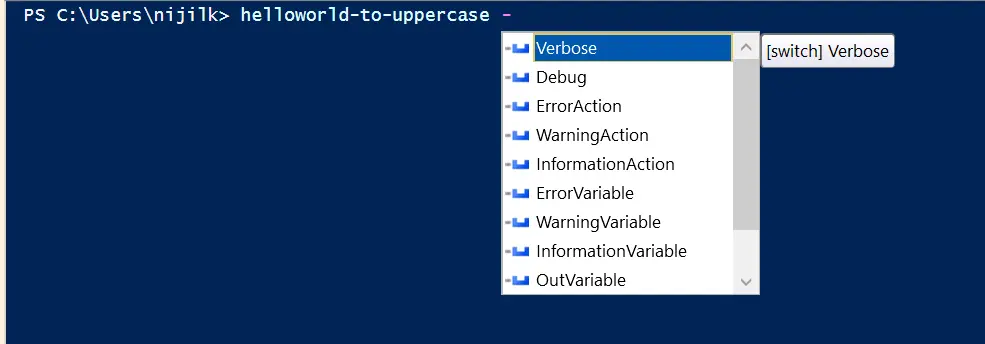
常用的 cmdlet 參數和特性可以在我們的進階函數中使用,以擴展功能。
使用 CmdletBinding 屬性與 Verbose 參數
-verbose 是一個有價值的常用參數,可以在執行進階函數時顯示消息。
Function Helloworld-To-UpperCase {
    [CmdletBinding()]Param()

    Write-Verbose "This is the common parameter usage -Version within our Helloworld-To-UpperCase function"

    "helloworld".ToUpper();
}
當我們使用 -verbose 參數調用上述函數時,它將把所有的 Write-Verbose 字串打印到 PowerShell 視窗。
HelloWorld-To-UpperCase -Verbose
輸出:

使用 CmdletBinding 屬性與 $PSCmdlet 對象和 SupportsShouldProcess
由於我們使用了 CmdletBinding 屬性,我們的進階函數可以輕鬆訪問 $PSCmdlet 對象。該對象包含多個方法,例如 ShouldContinue、ShouldProcess、ToString、WriteDebug 等。
使用 CmdletBinding 屬性與 ShouldContinue 方法
該方法允許用戶處理確認請求。與此同時,必須將 SupportsShouldProcess 參數設置為 $True。
ShouldContinue 方法有多個重載方法,我們將使用帶有兩個參數的方法。
Function Helloworld-To-UpperCase {
    [CmdletBinding(SupportsShouldProcess = $True)]Param()

    Write-Verbose "This is the common parameter usage -Version within our Helloworld-To-UpperCase function"

    if ($PSCmdlet.ShouldContinue("Are you sure on making the helloworld all caps?", "Making uppercase with ToUpper")) {
        "helloworld".ToUpper();
    }
    Else {
        "helloworld kept in lowercase."
    }
}
我們可以使用 -Confirm 參數調用此函數,並將顯示確認框,如下所示。
HelloWorld-To-UpperCase -Confirm
輸出:
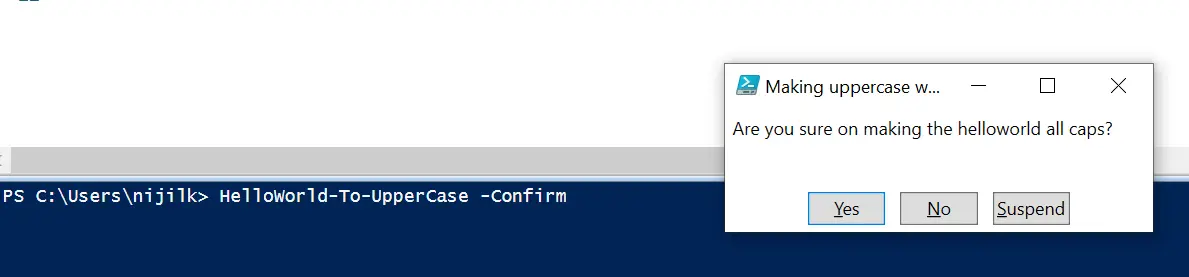
如果用戶點擊 Yes,它應該在 if 塊中執行該方法,並用大寫字母打印 helloworld 字串。

如果不是,它應該顯示 helloworld 保持小寫 消息。

使用 CmdletBinding 屬性與 Parameter 屬性控制函數參數
讓我們讓我們的進階函數接受一個字符串類型的參數。
Function Helloworld-To-UpperCase {
    [CmdletBinding(SupportsShouldProcess = $True)]
    Param([string]$word)

    Write-Verbose "This is the common parameter usage -Version within our Helloworld-To-UpperCase function"

    if ($PSCmdlet.ShouldContinue("Are you sure on making the helloworld all caps?", "Making uppercase with ToUpper")) {
        $word.ToUpper();
    }
    Else {
        "helloworld kept in lowercase."
    }
}
我們已經將 Helloworld-To-UpperCase 函數更改為接受一個名為 $word 的字符串類型參數。當該函數被調用時,我們需要提供一個字符串作為參數。
提供的文本將轉換為大寫。如果用戶沒有提供任何文本參數,則函數將會輸出空值。
我們可以通過將 $word 參數設置為必需並給予參數位置 0 來控制這一點。
Function Helloworld-To-UpperCase {
    [CmdletBinding(SupportsShouldProcess = $True)]
    Param(
        [Parameter(
            Mandatory = $True, Position = 0
        ) ]
        [string]$word
    )

    #Verbose
    Write-Verbose "This is the common parameter usage -Version within our Helloworld-To-UpperCase function"

    #If/Else block for request processing
    if ($PSCmdlet.ShouldContinue("Are you sure on making the helloworld all caps?", "Making uppercase with ToUpper")) {
        $word.ToUpper();
    }
    Else {
        "helloworld kept in lowercase."
    }
}
我們已經添加了一些標誌來控制 $word 參數的行為。由於它是必需的,因此在函數執行時需要提供字符串值。
HelloWorld-To-UpperCase -Confirm "stringtouppercase"
如果我們不提供文本參數,PowerShell 將不斷請求該參數。

您可以使用多個標誌來控制函數中的參數,如以下 Parameter 屬性語法所示。
Param
(
    [Parameter(
        Mandatory = <Boolean>,
        Position = <Integer>,
        ParameterSetName = <String>,
        ValueFromPipeline = <Boolean>,
        ValueFromPipelineByPropertyName = <Boolean>,
        ValueFromRemainingArguments = <Boolean>,
        HelpMessage = <String>,
    )]
    [string[]]
    $Parameter1
)