
HOWTO · PHP
使用 PHP 生成影象
本教程演示如何使用 PHP 中的 GD 庫生成影象。
本頁內容
PHP 有一個用於影象處理操作的內建庫 GD。該庫還可以生成不同格式的影象。
GD 庫預設不啟用;你需要從 php.ini 啟用它。
在 PHP 中使用 GD 庫生成 JPEG 影象
首先,檢查 GD 庫是否啟用;可以從 phpinfo() 或 php.ini 檢查。一旦從 php.ini 啟用,我們就可以開始建立影象了。
<?php
// Create a blank image and add some content
$new_image = imagecreatetruecolor(400, 400);
$bg_color = imagecolorallocate($new_image,  125, 125, 125);

// Set the background color
imagefill($new_image, 0, 0, $bg_color);
$text = imagecolorallocate($new_image, 225, 225, 225);
imagestring($new_image, 25, 50, 200,  'Welcome to Delftstack Tutorial.', $text);
imagestring($new_image, 15, 50, 240,  'This is JPEG image generation', $text);

// Save the image as jpeg
imagejpeg($new_image, 'delftstack.jpeg');

// Free the memory
imagedestroy($new_image);
?>
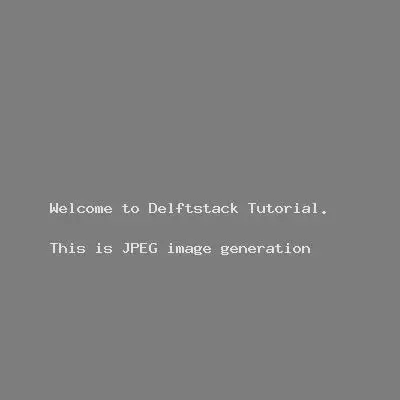
上面的程式碼生成一個 400x400 的 jpeg 影象,給定的內容為字串,背景顏色為灰色。
輸出:
在 PHP 中使用 GD 庫生成 PNG 影象
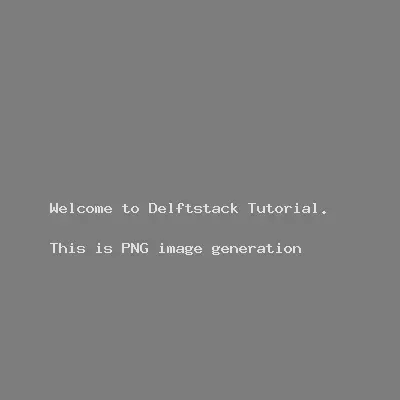
生成 png 影象的過程幾乎相同,只是將影象儲存為 png。
<?php
// Create a blank image and add some content
$new_image = imagecreatetruecolor(400, 400);
$bg_color = imagecolorallocate($new_image,  125, 125, 125);

// Set the background color
imagefill($new_image, 0, 0, $bg_color);
$text = imagecolorallocate($new_image, 225, 225, 225);
imagestring($new_image, 25, 50, 200,  'Welcome to Delftstack Tutorial.', $text);
imagestring($new_image, 15, 50, 240,  'This is PNG image generation', $text);

// Save the image as png
imagepng($new_image, 'delftstack.png');
// Free the memory
imagedestroy($new_image);
?>
輸出:
在 PHP 中使用 GD 庫繪製影象
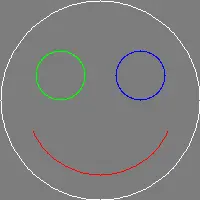
GD 庫幾乎沒有內建函式來繪製特定圖形,包括 imagearc()、imagefilledpolygon()、imagechar() 和 imageellipse()。
繪製弧線:
<?php
$new_image = imagecreatetruecolor(200, 200);
$color_white = imagecolorallocate($new_image, 255, 255, 255);
$color_red   = imagecolorallocate($new_image, 255,   0,   0);
$color_green = imagecolorallocate($new_image,   0, 255,   0);
$color_blue  = imagecolorallocate($new_image,   0,   0, 255);
$bg_color = imagecolorallocate($new_image,  125, 125, 125);
imagefill($new_image, 0, 0, $bg_color);
// drawing a smiling face
//head
imagearc($new_image, 100, 100, 200, 200,  0, 360, $color_white);
// smile
imagearc($new_image, 100, 100, 150, 150, 25, 155, $color_red);
// eyes
imagearc($new_image,  60,  75,  50,  50,  0, 360, $color_green);
imagearc($new_image, 140,  75,  50,  50,  0, 360, $color_blue);

//save image
imagepng($new_image,'arcimage.png');

// free memory
imagedestroy($new_image);

?>
輸出:
讓我們畫一個多邊形:
<?php
// value points for polygon
$polygon_values = array(
            30,  80,
            50,  240,
            29,  80,
            240, 80,
            58,  60,
            100,  100
            ); // The random (x,y) points

$new_image = imagecreatetruecolor(250, 250);
$bg_color   = imagecolorallocate($new_image,  125, 125, 125);
$color_blue = imagecolorallocate($new_image, 0, 0, 255);

// Fill the background color
imagefilledrectangle($new_image, 0, 0, 249, 249, $bg_color);

// draw the polygon
imagefilledpolygon($new_image, $polygon_values, 6, $color_blue);

//save image
imagepng($new_image, 'polygon.png');
imagedestroy($new_image);
?>
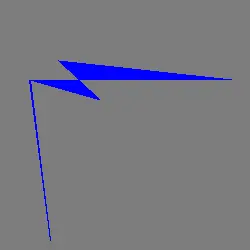
上面的程式碼將生成一個具有給定隨機值的多邊形。
輸出:
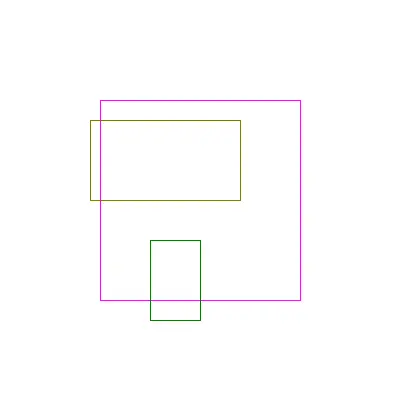
讓我們嘗試繪製矩形。
<?php
$new_image = imagecreatetruecolor(400, 400);
$bg_color = imagecolorallocate($new_image,  255, 255, 255);
// Set the background color
imagefill($new_image, 0, 0, $bg_color);
// colors of rectangles
$color_magenta = imagecolorallocate($new_image, 255,0,255);
$color_olive = imagecolorallocate($new_image, 128,128,0);
$color_green = imagecolorallocate($new_image, 0,128,0);

//three rectangles with different size and color
imagerectangle($new_image, 100, 100, 300, 300, $color_magenta);
imagerectangle($new_image, 90, 120, 240, 200, $color_olive );
imagerectangle($new_image, 200, 240, 150, 320, $color_green);

//save image
imagepng($new_image, 'rectangles.png');
imagedestroy($new_image);
?>
上面的程式碼將在一張影象中生成三個矩形。
輸出:
GD 庫有更多的功能來繪製不同的影象。這些函式可以很容易地與給定的引數一起使用。
