HOWTO · Seaborn
Python의 Seaborn 플롯에서 범례 제거
이 튜토리얼은 Python의 seaborn 플롯에서 범례를 제거하는 방법을 보여줍니다
이 페이지의 내용
이 튜토리얼에서는 Python의 seaborn 플롯에서 범례를 제거하는 방법을 배웁니다.
legend매개 변수를 사용하여 Python의 Seaborn 플롯에서 범례 제거
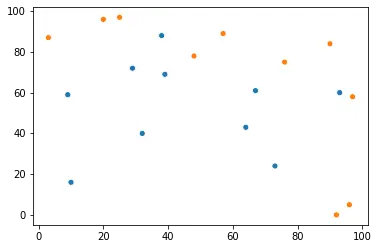
seaborn의 대부분의 플롯 함수는legend매개 변수를 허용합니다. False로 설정하고 최종 플롯에서 범례를 숨길 수 있습니다.
예를 들면
import random
import seaborn as sns
import matplotlib.pyplot as plt

s_x = random.sample(range(0, 100), 20)
s_y = random.sample(range(0, 100), 20)
cat = [i for i in range(2)] * 10

sns.scatterplot(y=s_y, x=s_x, hue=cat, legend=False)
legend()함수를 사용하여 Python의 Seaborn 플롯에서 범례 제거
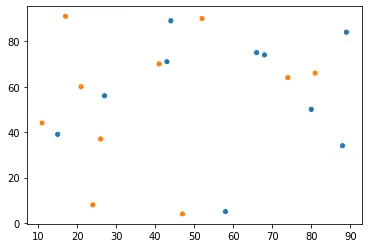
matplotlib.pyplot.legend()함수를 사용하여 seaborn 플롯에 사용자 정의 범례를 추가 할 수 있습니다. seaborn 모듈이 matplotlib 모듈 위에 빌드 되었기 때문에이 함수를 사용할 수 있습니다. 플롯에 빈 범례를 추가하고 프레임을 제거 할 수 있습니다. 이렇게하면 최종 그림에서 범례를 숨 깁니다.
다음 코드 스 니펫이이를 구현합니다.
import random
import seaborn as sns
import matplotlib.pyplot as plt

s_x = random.sample(range(0, 100), 20)
s_y = random.sample(range(0, 100), 20)
cat = [i for i in range(2)] * 10

sns.scatterplot(y=s_y, x=s_x, hue=cat)

plt.legend([], [], frameon=False)
서브 플롯이 포함 된 그림을 다루고 각 서브 플롯에서 범례를 제거하려면 axes 객체를 반복하고 위의 함수를 사용하여 모든 축에 빈 범례를 추가 할 수 있습니다.
remove()함수를 사용하여 Python의 Seaborn 플롯에서 범례 제거
이 메서드는 seaborn 모듈의 PairGrid 클래스와 같은 다른 클래스에 속하는 객체와 함께 작동합니다. _legend()함수를 사용하여 범례를 호출하고remove()메소드를 사용하여 제거 할 수 있습니다.
아래 코드를 참조하십시오.
import random
import seaborn as sns
import matplotlib.pyplot as plt
import pandas as pd

s_x = random.sample(range(0, 100), 20)
s_y = random.sample(range(0, 100), 20)
cat = [i for i in range(2)] * 10

df = pd.DataFrame({"s_x": s_x, "s_y": s_y, "cat": cat})
g = sns.pairplot(data=df, x_vars="s_x", y_vars="s_y", hue="cat")
g._legend.remove()
pairplot()함수는 PairGrid 클래스의 객체를 반환합니다. 이 방법은 seaborn 모듈의FacetGrid객체에도 적용됩니다.