HOWTO · PowerShell
PowerShell에서 CmdletBinding 특성을 사용하는 방법
cmdlet은 PowerShell 환경 내에서 단일 기능을 수행하는 경량 스크립트입니다. cmdlet은 모든 .Net 언어로 작성될 수 있습니다.
cmdlet은 PowerShell 환경 내에서 단일 기능을 수행하는 경량 스크립트입니다. cmdlet은 어떤 .Net 언어로도 작성될 수 있습니다.
보통 cmdlet은 명령을 실행하기 위해 동사-명사 쌍으로 표현됩니다. 명령은 최종 사용자가 특정 서비스를 수행하기 위해 기본 운영 체제에 내리는 명령입니다.
PowerShell 환경에는 New-Item, Move-Item, Set-Location, Get-Location과 같은 200개 이상의 기본 cmdlet이 포함되어 있습니다. cmdlet은 단순 PowerShell 함수에서는 사용할 수 없는 공통 기능 집합을 공유합니다.
-WhatIf,ErrorAction,Verbose등과 같은 공통 매개변수 지원- 확인을 위한 프롬프트
- 필수 매개변수 지원
PowerShell의 CmdletBinding 속성
간단한 PowerShell 함수는 위에서 논의한 기본 cmdlet 기능을 상속하여 고급 함수로 작성할 수 있습니다. CmdletBinding 속성은 이러한 기본 cmdlet 기능에 접근할 수 있게 해줍니다.
다음은 가능한 모든 인수를 가진 CmdletBinding 속성 문법을 보여줍니다.
{
    [CmdletBinding(ConfirmImpact = <String>,
        DefaultParameterSetName = <String>,
        HelpURI = <URI>,
        SupportsPaging = <Boolean>,
        SupportsShouldProcess = <Boolean>,
        PositionalBinding = <Boolean>)]

    Param ($myparam)
    Begin {}
    Process {}
    End {}
}
간단한 PowerShell 함수인 Helloworld-To-UpperCase가 있다고 가정해 봅시다.
Function Helloworld-To-UpperCase {
    "helloworld".ToUpper();
}
이 함수에는 매개변수가 첨부되어 있지 않습니다. 그래서 이는 간단한 PowerShell 함수라고 합니다.
하지만 CmdletBinding 속성을 사용하여 이 함수를 고급 함수로 변환하고 기본 cmdlet 기능 및 매개변수에 접근할 수 있습니다. 다음과 같이 실행됩니다.
Function Helloworld-To-UpperCase {
    [CmdletBinding()]Param()
    "helloworld".ToUpper();
}
Helloworld-To-UpperCase 함수는 모든 기본 cmdlet 기능을 상속받는 고급 함수로 변환되었습니다. 기본 cmdlet 매개변수가 이 함수에서 사용할 수 있습니다.
PowerShell 창에서 -로 이 함수를 호출하면 cmdlet에서 오는 모든 공통 매개변수를 나열해야 합니다.
helloworld-to-uppercase -
출력:
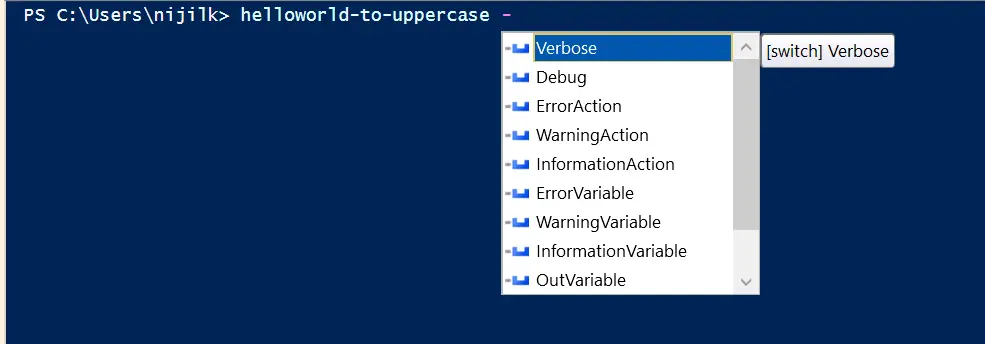
공통 cmdlet 매개변수와 기능은 우리의 고급 함수 내에서 기능을 확장하는 데 사용될 수 있습니다.
Verbose 매개변수와 함께 CmdletBinding 속성 사용
-verbose는 고급 함수가 실행될 때 메시지를 표시할 수 있는 귀중한 공통 매개변수 중 하나입니다.
Function Helloworld-To-UpperCase {
    [CmdletBinding()]Param()

    Write-Verbose "This is the common parameter usage -Version within our Helloworld-To-UpperCase function"

    "helloworld".ToUpper();
}
위의 함수를 -verbose 매개변수와 함께 호출하면 모든 Write-Verbose 문자열이 PowerShell 창에 출력됩니다.
HelloWorld-To-UpperCase -Verbose
출력:

$PSCmdlet 객체 및 SupportsShouldProcess와 함께 CmdletBinding 속성 사용
CmdletBinding 속성을 사용했기 때문에, 우리의 고급 함수는 $PSCmdlet 객체에 hassle 없이 접근할 수 있습니다. 이 객체에는 ShouldContinue, ShouldProcess, ToString, WriteDebug 등의 여러 메소드가 포함되어 있습니다.
ShouldContinue 메서드와 함께 CmdletBinding 속성 사용
이 메서드는 사용자가 확인 요청을 처리할 수 있게 해줍니다. 이와 동시에 SupportsShouldProcess 인수를 $True로 설정하는 것이 필수입니다.
ShouldContinue 메서드는 여러 오버로드된 메서드를 가지고 있으며, 우리는 두 개의 매개변수가 있는 것을 사용할 것입니다.
Function Helloworld-To-UpperCase {
    [CmdletBinding(SupportsShouldProcess = $True)]Param()

    Write-Verbose "This is the common parameter usage -Version within our Helloworld-To-UpperCase function"

    if ($PSCmdlet.ShouldContinue("Are you sure on making the helloworld all caps?", "Making uppercase with ToUpper")) {
        "helloworld".ToUpper();
    }
    Else {
        "helloworld kept in lowercase."
    }
}
-Confirm 매개변수와 함께 함수를 호출하면 다음과 같이 확인 상자가 표시됩니다.
HelloWorld-To-UpperCase -Confirm
출력:
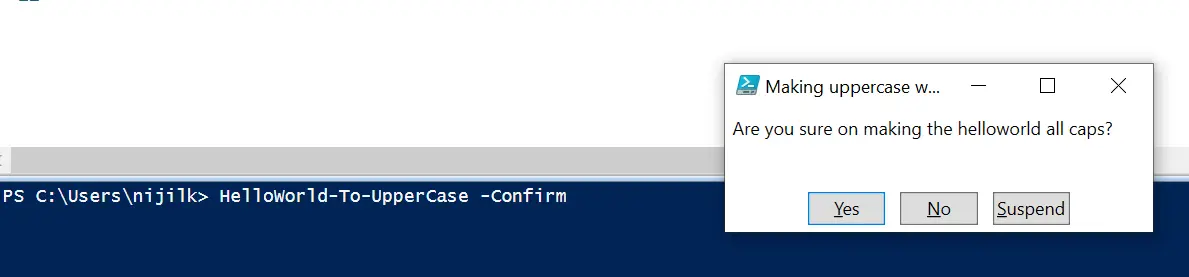
사용자가 Yes를 클릭하면 if 블록 내의 메소드를 구현하고 대문자로 된 helloworld 문자열을 출력해야 합니다.

그렇지 않으면 helloworld kept in lowercase 메시지를 보여야 합니다.

함수 매개변수를 제어하기 위해 Parameter 속성으로 CmdletBinding 속성 사용
고급 함수가 하나의 문자열 매개변수를 받도록 만들어 봅시다.
Function Helloworld-To-UpperCase {
    [CmdletBinding(SupportsShouldProcess = $True)]
    Param([string]$word)

    Write-Verbose "This is the common parameter usage -Version within our Helloworld-To-UpperCase function"

    if ($PSCmdlet.ShouldContinue("Are you sure on making the helloworld all caps?", "Making uppercase with ToUpper")) {
        $word.ToUpper();
    }
    Else {
        "helloworld kept in lowercase."
    }
}
Helloworld-To-UpperCase 함수를 하나의 문자열 형식 매개변수인 $word를 받도록 변경했습니다. 함수가 호출될 때, 문자열을 인수로 제공해야 합니다.
제공된 텍스트는 대문자로 변환됩니다. 사용자가 텍스트 인수를 제공하지 않으면 함수는 빈 출력을 제공합니다.
이를 $word 매개변수를 필수로 만들고 매개변수 위치를 0으로 지정하여 제어할 수 있습니다.
Function Helloworld-To-UpperCase {
    [CmdletBinding(SupportsShouldProcess = $True)]
    Param(
        [Parameter(
            Mandatory = $True, Position = 0
        ) ]
        [string]$word
    )

    #Verbose
    Write-Verbose "This is the common parameter usage -Version within our Helloworld-To-UpperCase function"

    #If/Else block for request processing
    if ($PSCmdlet.ShouldContinue("Are you sure on making the helloworld all caps?", "Making uppercase with ToUpper")) {
        $word.ToUpper();
    }
    Else {
        "helloworld kept in lowercase."
    }
}
$word 매개변수의 동작을 제어하기 위해 몇 가지 플래그를 추가했습니다. 필수이기 때문에 함수가 실행될 때 문자열 값을 제공해야 합니다.
HelloWorld-To-UpperCase -Confirm "stringtouppercase"
PowerShell은 텍스트 인수를 제공하지 않으면 계속해서 이를 요청합니다.

다음의 Parameter 속성 문법에서 볼 수 있듯이 여러 플래그를 사용하여 함수의 매개변수를 제어할 수 있습니다.
Param
(
    [Parameter(
        Mandatory = <Boolean>,
        Position = <Integer>,
        ParameterSetName = <String>,
        ValueFromPipeline = <Boolean>,
        ValueFromPipelineByPropertyName = <Boolean>,
        ValueFromRemainingArguments = <Boolean>,
        HelpMessage = <String>,
    )]
    [string[]]
    $Parameter1
)