HOWTO · Java
Método setCellValueFactory en JavaFX
Este tutorial discutirá el uso del método setCellValueFactory en JavaFX.
En esta página
TableView es una parte muy importante de cualquier interfaz de usuario; ayuda a visualizar datos para los usuarios. Cuando trabajamos con la tabla, usamos el método más común, setCellValueFactory(), para crear una celda en la tabla.
En este artículo, discutiremos este método y veremos un ejemplo con una explicación.
Use el método setCellValueFactory en JavaFX
En nuestro ejemplo a continuación, hemos creado una tabla simple con algunos datos. El código de nuestro ejemplo tendrá el siguiente aspecto.
// Importing all necessary packages

import javafx.application.Application;
import javafx.beans.property.*;
import javafx.collections.*;
import javafx.event.*;
import javafx.geometry.Insets;
import javafx.scene.*;
import javafx.scene.control.*;
import javafx.scene.control.cell.PropertyValueFactory;
import javafx.scene.layout.VBox;
import javafx.scene.text.Font;
import javafx.stage.Stage;

public class FXtable extends Application {
  private TableView table = new TableView(); // Creating a table with a static class "Person"
  private final ObservableList data =
      FXCollections.observableArrayList(); // Creating an observable list

  private void initData() { // Method that set data to table
    data.setAll(
        // All table datas
        new Person("Alen", "Smith", "alen.smith@example.com"),
        new Person("Stefen", "Johnson", "stefen@example.com"),
        new Person("Uri", "Gagrin", "uri@example.com"),
        new Person("Alex", "Jones", "alex@example.com"),
        new Person("Hexa", "Brown", "hexa@example.com"));
  }

  public void start(Stage stage) {
    initData(); // Set initial data to table

    stage.setTitle("JavaFx Table View"); // Set the title of the table
    stage.setWidth(450); // Set the width
    stage.setHeight(500); // Set the height

    Label label = new Label("Simple Address Table"); // Create a label
    label.setFont(new Font("Arial", 20)); // Set the font and font size

    TableColumn FirstNameCol = new TableColumn("First Name"); // Create a column named "First Name"
    FirstNameCol.setMinWidth(100); // Set the minimum column width to 100
    FirstNameCol.setCellValueFactory(
        new PropertyValueFactory("firstName")); // Populate all the column data for "First Name"

    TableColumn LastNameCol = new TableColumn("Last Name"); // Create a column named "Last Name"
    LastNameCol.setMinWidth(100); // Set the minimum column width to 100
    LastNameCol.setCellValueFactory(
        new PropertyValueFactory("lastName")); // Populate all the column data for "Last Name"

    TableColumn EmailColl = new TableColumn("Email"); // Create a column named "Email"
    EmailColl.setMinWidth(200); // Set the minimum column width to 200
    EmailColl.setCellValueFactory(
        new PropertyValueFactory("email")); // Populate all the column data for "Last Name"

    table.setItems(data);
    table.getColumns().addAll(FirstNameCol, LastNameCol, EmailColl); // Add columns to table
    table.setPrefHeight(300); // Set table height

    final VBox vbox = new VBox(10); // Create a VBox
    vbox.setPadding(new Insets(10, 0, 0, 10)); // Add padding
    vbox.getChildren().addAll(label, table); // Organize the VBox with label and table

    stage.setScene(new Scene(new Group(vbox))); // Add the VBox to scene
    stage.show(); // Visualize the scene
  }

  public static class Person { // Class for creating the person table
    private StringProperty FirstName;
    private StringProperty LastName;
    private StringProperty email;

    private Person(String FName, String LName, String email) {
      this.FirstName = new SimpleStringProperty(FName);
      this.LastName = new SimpleStringProperty(LName);
      this.email = new SimpleStringProperty(email);
    }

    public String getFirstName() { // Method to get First Name
      return FirstName.get();
    }
    public void setFirstName(String FName) { // Method to set First Name
      FirstName.set(FName);
    }
    public StringProperty FirstNameProperty() { // Method to add First Name property
      return FirstName;
    }
    public String getLastName() { // Method to get Last Name
      return LastName.get();
    }
    public void setLastName(String LName) { // Method to set Last Name
      LastName.set(LName);
    }
    public StringProperty lastNameProperty() { // Method to add Last Name property
      return LastName;
    }

    public String getEmail() { // Method to get Email
      return email.get();
    }
    public void setEmail(String inMail) { // Method to set Email
      email.set(inMail);
    }
    public StringProperty emailProperty() { // Method to add Email property
      return email;
    }
  }

  public static void main(String[] args) {
    launch(args);
  } // Launch the application.
}
Ya comentamos en el código el propósito de cada línea. Ahora, solo discutiremos sobre la función setCellValueFactory() aquí.
A través de las líneas FirstNameCol.setCellValueFactory(new PropertyValueFactory("firstName"));, LastNameCol.setCellValueFactory(new PropertyValueFactory("lastName"));, y EmailColl.setCellValueFactory(new PropertyValueFactory("email"));, usamos el método setCellValueFactory() para crear celdas en nuestra tabla.
Aquí, creamos tres columnas llamadas firstName, lastName y email. Este método especifica cómo llenar las celdas de una tabla dentro de una sola columna de tabla.
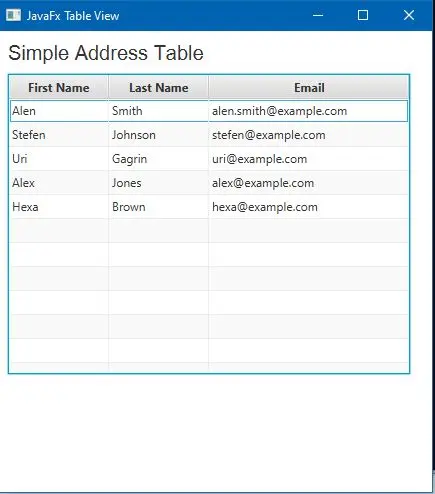
Proporciona la instancia TableColumn.CellDataFeatures y devuelve la instancia ObservableValue. Después de compilar el código de ejemplo anterior y ejecutarlo en su entorno, obtendrá el siguiente resultado.
Producción:
Recuerde, si su IDE no admite la inclusión automática de bibliotecas y paquetes, es posible que deba incluir manualmente estas bibliotecas y paquetes necesarios antes de compilar.