
TUTORIAL · PyQt5
PyQt5 教程 - 按鈕
本教程介紹了 PyQt5 按鈕控制元件 QPushButton。
本頁內容
按鈕控制元件 QPushButton 是 PyQt5 中的命令按鈕。使用者單擊它命令 PC 執行某些特定操作,如確認、取消或儲存等。
PyQt5 按鈕 - QPushButton
import sys
from PyQt5 import QtWidgets


def basicWindow():
    app = QtWidgets.QApplication(sys.argv)
    windowExample = QtWidgets.QWidget()

    buttonA = QtWidgets.QPushButton(windowExample)
    labelA = QtWidgets.QLabel(windowExample)

    buttonA.setText("Click!")
    labelA.setText("Show Label")

    windowExample.setWindowTitle("Push Button Example")

    buttonA.move(100, 50)
    labelA.move(110, 100)

    windowExample.setGeometry(100, 100, 300, 200)
    windowExample.show()
    sys.exit(app.exec_())


basicWindow()
這裡,
buttonA = QtWidgets.QPushButton(windowExample)
buttonA 是來自 QtWidgets 的 QPushButton,它會被新增到視窗 windowExample 中,與前面章節中介紹的按鈕相同。
buttonA.setText("Click!")
它將 buttonA 的文字設定為 Click!。
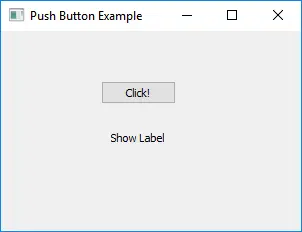
實際上,按鈕現在不會做任何事情。
PyQt5 QLabel 按鈕控制元件集樣式
QLabel 可以使用 setStyleSheet 方法設定 PyQt5 控制元件的樣式,例如背景色、字型系列和字型大小。它的工作方式類似於 CSS 中的樣式表。
buttonA.setStyleSheet(
    "background-color: red;font-size:18px;font-family:Times New Roman;"
)
它設定 buttonA 了以下樣式,
| 樣式 | 值 |
|---|---|
background-color |
red |
font-size |
18px |
font-family |
Times New Roman |
在 PyQt5 中設定樣式很方便,因為它類似於 CSS。
import sys
from PyQt5 import QtWidgets


def basicWindow():
    app = QtWidgets.QApplication(sys.argv)
    windowExample = QtWidgets.QWidget()

    buttonA = QtWidgets.QPushButton(windowExample)
    labelA = QtWidgets.QLabel(windowExample)

    buttonA.setStyleSheet(
        "background-color: red;font-size:18px;font-family:Times New Roman;"
    )

    buttonA.setText("Click!")
    labelA.setText("Show Label")

    windowExample.setWindowTitle("Push Button Example")

    buttonA.move(100, 50)
    labelA.move(110, 100)

    windowExample.setGeometry(100, 100, 300, 200)
    windowExample.show()
    sys.exit(app.exec_())


basicWindow()
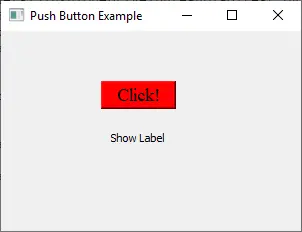
PyQt5 QLabel 按鈕點選事件
按鈕單擊事件通過 QLabel.clicked.connect(func) 方法連線到具體的函式。
import sys
from PyQt5 import QtWidgets


class Test(QtWidgets.QMainWindow):
    def __init__(self):
        QtWidgets.QMainWindow.__init__(self)

        self.buttonA = QtWidgets.QPushButton("Click!", self)
        self.buttonA.clicked.connect(self.clickCallback)
        self.buttonA.move(100, 50)

        self.labelA = QtWidgets.QLabel(self)
        self.labelA.move(110, 100)

        self.setGeometry(100, 100, 300, 200)

    def clickCallback(self):
        self.labelA.setText("Button is clicked")


if __name__ == "__main__":
    app = QtWidgets.QApplication(sys.argv)
    test = Test()
    test.show()
    sys.exit(app.exec_())
當 QPushButton buttonA 被點選時,它觸發 clickCallback 函式來設定標籤文字是 Button is clicked。
