在 Python 中创建词云
Preet Sanghavi
2024年2月15日
Python
Python WordCloud

本教程将介绍一种使用 wordcloud 包在 Python 中创建词云的方法。
在 Python 中安装 wordcloud 包
首先,我们必须在 Python 中安装 wordcloud 包,包括 Matplotlib 包。
pip install wordcloud
上面的命令将安装 wordcloud 和 Matplotlib 包,我们将使用它们来创建词云。
现在,让我们导入创建词云所需的库,即 WordCloud、STOPWORDS 和 matplotlib.pyplot。
在 Python 中导入相关库
from wordcloud import WordCloud, STOPWORDS
import matplotlib.pyplot as plt
上面的代码将导入所有需要的库。
现在让我们创建一组停用词来帮助我们避免在示例字符串的词云中添加停用词。
stopwords = set(STOPWORDS)
让我们取一个示例字符串,从中我们将创建一个包含字符串中最常见单词的词云。
text_str = (
    "peep gate do it but peep heal gate also not  heal do it but gate peep peep peep"
)
用 Python 生成词云
我们将在函数中使用这个字符串来创建词云。现在让我们创建一个函数 present_wordcloud(),我们使用带有所有合适参数的 Worcloud() 函数来创建词云。
def present_wordcloud(stri, title=None):
    wordcloud = WordCloud(
        background_color="white",
        stopwords=stopwords,
        max_words=300,
        max_font_size=50,
        scale=3,
        random_state=1,
    ).generate(str(stri))
在上面的代码中,我们将合适的参数传递给我们的函数,并将我们的字符串传递给 generate() 函数以生成词云。现在,我们将通过在我们的 present_wordcloud() 函数中添加以下代码,使用 Matplotlib 库显示我们的词云。
def present_wordcloud(stri, title=None):
    wordcloud = WordCloud(
        background_color="white",
        stopwords=stopwords,
        max_words=200,
        max_font_size=40,
        scale=3,
        random_state=1,
    ).generate(str(stri))

    fig = plt.figure(1, figsize=(9, 9))
    plt.axis("off")
    if title:
        fig.suptitle(title, fontsize=18)
        fig.subplots_adjust(top=2.4)

    plt.imshow(wordcloud)
    plt.show()
如上所示,我们通过将图形大小、副标题和字体大小添加到 plt 屏幕来显示我们的词云。plt.imshow() 函数将在屏幕上显示词云。
现在运行 present_wordcloud() 函数,通过运行以下代码查看为我们的示例字符串生成的词云。
if __name__ == "__main__":

    present_wordcloud(text_str)
通过运行我们的 main 函数,我们得到以下输出。
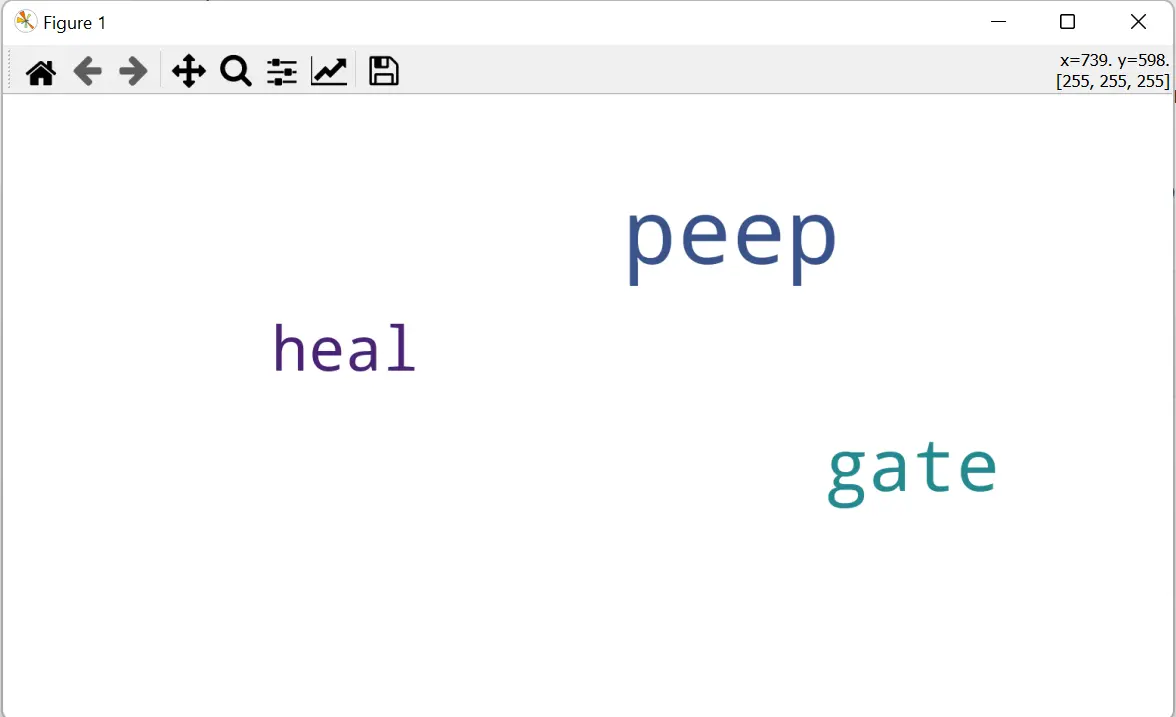
我们从示例字符串中得到了一个词云,其中 peep 是我们句子中最常见的词。
这样我们就成功地在 Python 中创建了一个词云。
Enjoying our tutorials? Subscribe to DelftStack on YouTube to support us in creating more high-quality video guides. Subscribe
作者: Preet Sanghavi