HOWTO · JavaScript
在 JavaScript 中呼叫 API
本文演示瞭如何呼叫 API 以在 JavaScript 中傳送 GET 和 POST 請求。
本頁內容
API 代表應用程式程式設計介面,這意味著它是用於開發和整合不同軟體應用程式的協議和定義的集合。
API 是一種在各種介面之間以及從伺服器實時傳送和獲取資訊或向伺服器傳送資料的方法。
在 JavaScript 中使用 Getuser() 函式呼叫和獲取 API 的響應
我們將使用公共 API 並將 URL 儲存在 api_url 變數中。你可以參考更多公共 API 此處。
<html lang="en">
	<head>
 		<meta charset="UTF-8" />
 		<meta name="viewport" content="width=device-width, initial-scale=1.0" />
 	</head>
 	<body>
 		<div class="content">
 			<div class="details">
 				<h2>Random User's Details</h2>
 				<table>
 					<tr>
 						<td>Full Name</td>
 						<td><span id="fullname"></span></td>
 					</tr>
 					<tr>
 						<td>Age</td>
 						<td><span id="age"></span></td>
 					</tr>
 					<tr>
 						<td>Gender</td>
 						<td><span id="gender"></span></td>
 					</tr>
 					<tr>
 						<td>Location</td>
 						<td><span id="location"></span></td>
 					</tr>
 					<tr>
 						<td>Country</td>
 						<td><span id="country"></span></td>
 					</tr>
 				</table>
 			</div>
 		</div>
 	</body>
</html>
.content {
 	text-align: center;
 	padding: 30px;
 	margin: 0px auto;
}
.details {
 	margin-left: auto;
 	margin-right: auto;
}
table,
td {
 	border-collapse: collapse;
 	margin-left: auto;
 	margin-right: auto;
 	text-align: center;
 	padding: 10px;
 	border: 1px solid black;
}
const api_url = 'https://randomuser.me/api/';
async function getUser() {
  // making a call to API
  const response = await fetch(api_url);

  // converting it to JSON format
  const data = await response.json();

  // getting data/information from JSON
  const user = data.results[0];
  let {first, last} = user.name;
  let {gender, email, phone} = user;
  let age = user.dob.age;
  let {city, state, country} = user.location;
  let fullName = first + ' ' + last;

  // getting access to the span container
  document.querySelector('#fullname').textContent = fullName;
  document.querySelector('#age').textContent = age;
  document.querySelector('#gender').textContent = gender;
  document.querySelector('#location').textContent = city + ', ' + state;
  document.querySelector('#country').textContent = country;
}
// Calling the getUser() function
getUser();
要檢查輸出,我們可以在 Google Chrome 和 Edge 中按 Ctrl+Shift+J 或右鍵單擊開啟控制檯視窗-> 檢查 -> 控制檯。
輸出:
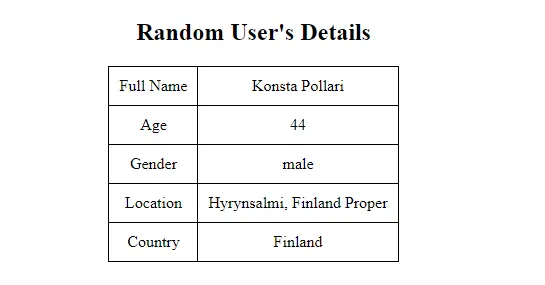
注意
你可能會獲得不同使用者的詳細資訊,因為每次執行程式碼時,我們都會獲得一個隨機使用者。
我們可以使用 async 和 await 確保即使在頁面完全載入後資訊仍然可見。
Async 和 await 用於非同步程式設計。Async 總是確保返回 Promise,因為它總是返回值。
而且,如果沒有,那麼 JavaScript 會立即將其包裝在一個 Promise 中,並使用它的值來解決。我們使用 await 函式來等待 Promise。
這只能在 async 塊中使用。await 函式使 async 塊等待直到 Promise 返回結果。
fetch() 方法將 URL 作為引數並通過網路非同步獲取所需的資源。
在 JavaScript 中建立另一個 API 以傳送 POST 請求
const api_url = 'https://httpbin.org/post';
async function getUser() {
  const response = await fetch(api_url, {
    method: 'POST',
    headers: {'Accept': 'application/json', 'Content-Type': 'application/json'},
    body: JSON.stringify({
      fullname: 'Thomas John',
      age: 33,
      gender: 'male',
      location: 'Miam',
      country: 'USA'
    })
  });
  const data = await response.json();
  console.log(data);
}
// Calling the function
getUser();
此方法返回的結果稱為 response。我們使用 response.json() 將此響應解析為 JSON。
我們從 JSON 中檢索資料/資訊,並使用解構賦值將其儲存在不同的變數中。之後,我們可以訪問 <span> 容器並修改它們的 textContent。
輸出(JSON):
{
  args: { ... },
  data: "{\"fullname\":\"Thomas John\",\"age\":33,\"gender\":\"male\",\"location\":\"Miam\",\"country\":\"USA\"}",
  files: { ... },
  form: { ... },
  headers: {
    Accept: "application/json",
    Accept-Encoding: "gzip, deflate, br",
    Accept-Language: "en-GB,en-US;q=0.9,en;q=0.8,ur;q=0.7",
    Content-Length: "85",
    Content-Type: "application/json",
    Host: "httpbin.org",
    Origin: "https://fiddle.jshell.net",
    Referer: "https://fiddle.jshell.net/",
    Sec-Ch-Ua: "\" Not A;Brand\";v=\"99\", \"Chromium\";v=\"98\", \"Google Chrome\";v=\"98\"",
    Sec-Ch-Ua-Mobile: "?0",
    Sec-Ch-Ua-Platform: "\"Windows\"",
    Sec-Fetch-Dest: "empty",
    Sec-Fetch-Mode: "cors",
    Sec-Fetch-Site: "cross-site",
    User-Agent: "Mozilla/5.0 (Windows NT 10.0; Win64; x64) AppleWebKit/537.36 (KHTML, like Gecko) Chrome/98.0.4758.82 Safari/537.36",
    X-Amzn-Trace-Id: "Root=1-6207e40f-1146923e2704c7e8542bf54e"
  },
  json: {
    age: 33,
    country: "USA",
    fullname: "Thomas John",
    gender: "male",
    location: "Miam"
  },
  origin: "119.153.33.34",
  url: "https://httpbin.org/post"
}
我們使用 JSON.stringify() 轉換為字串,因為 body 的值只能是字串或物件。